
Intel Z77 Motherboard Review with Ivy Bridge - ASRock, ASUS, Gigabyte, and MSI
MSI Z77A-GD65 - In The Box
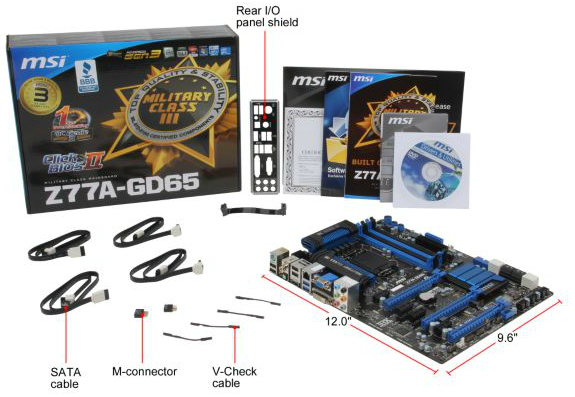
The MSI Z77A-GD65 is currently available for $190, just north of the Gigabyte board. With this in mind, we also get a few more extras in the box than the Gigabyte:
IO Shield
Driver CD
User Manual
Certification of Military Class testing (FWIW)
Four SATA cables
Flexi-SLI bridge
M-Connectors (to help front panel connections)
V-Check cables (to help with voltage read points)
Voltage Readings
Using OCCT we monitor the voltage change of the motherboard under load. This represents the direct correlation between the Load Line Calibration and how the processor/motherboard deals with voltage requests while under load. This is not to be confused with the quality of power delivery, but more an indication of how aggressive the default LLC settings are on a motherboard.

Similarly to the ASUS board in this review, the MSI has minor variations in the CPU voltage. Worthy of note though is the lower VCore used by the MSI board compared to the other boards in this review while at load, suggesting more aggressive LLC settings.
Overclocking
Note: Ivy Bridge does not overclock like Sandy Bridge. For a detailed report on the effect of voltage on Ivy Bridge (and thus temperatures and power draw), please read Undervolting and Overclocking on Ivy Bridge.
Overclocking options on the MSI Z77A-GD65 are relatively straightforward. With the OC Genie button on board, give it a press and it lights up, causing the next boot to initialize a series of predefined settings for an overclock. Manual overclocks can be done by the Click BIOS software in the operating system, or by adjusting the BIOS directly.
Automatic Overclocking: After pressing the OC Genie button, it essentially seemed to enable the Enhanced Turbo option in the BIOS. The system booted without issue, and I was greeted with a 39x multiplier under all loads, showing 1.080 volts and 65ºC with PovRay. This is a rather disappointing automatic overclock. This is also indicative of issues relating to one button overclocks - the manufacturer is supplying a series of presets that has to work on every processor out of the factory. It is perhaps time that MSI introduces their own stress-testing overclock into the mix to get a better result.
Manual Overclock: Given the previous overclocking results achieved, with the MSI board we jumped straight in with 1.2 volts, with PLL Overvoltage enabled just for good measure. At this voltage, 46x multiplier was the highest multiplier stable, giving 82ºC with PovRay and showing 1.184 volts at load. In order to get the 47x multiplier to work, it required 1.250 volts on the CPU, although this gave 90ºC during PovRay and 1.240 volts at load.
Originally published at https://www.anandtech.com/show/5793/intel-z77-motherboard-review-with-ivy-bridge-asrock-asus-gigabyte-and-msi (Wayback Machine).