
Sony VAIO SE: An IPS Laptop for Under a Grand
Double Your Pleasure with a Sheet Battery
Battery life is good, which isn’t too surprising as Sandy Bridge laptops with switchable graphics have always delivered the goods. The wrinkle here is if you want to get the $150 sheet battery, you can double your battery life. As mentioned earlier, Sony also has some intelligent battery circuitry so that you’ll discharge/charge the sheet battery first, allowing you to put it away (or connect it to the separate charging station) and take the now lighter laptop with you.
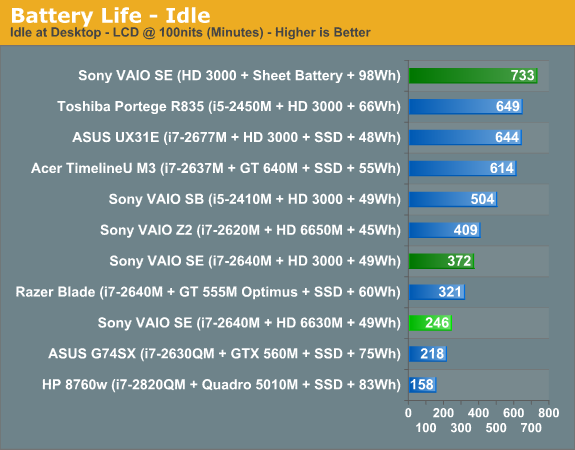
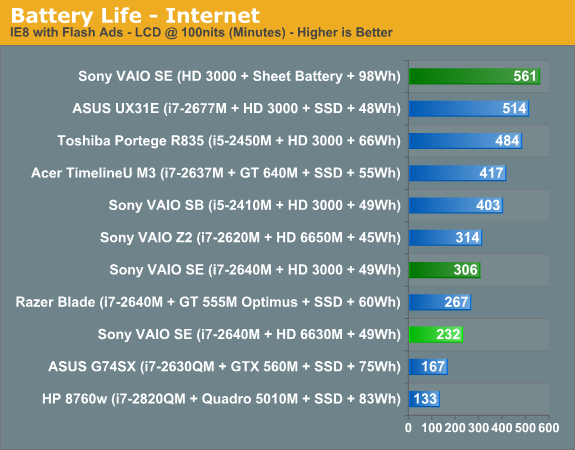
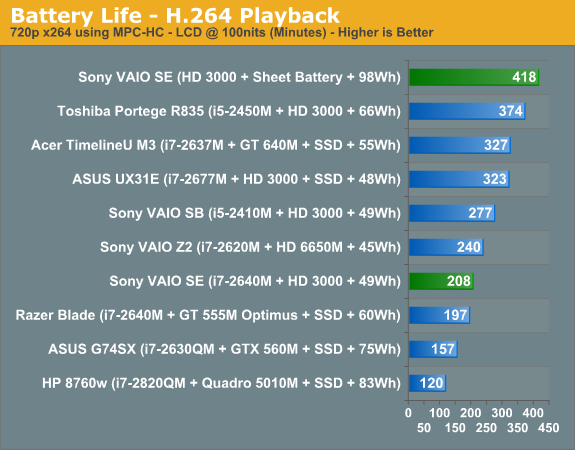
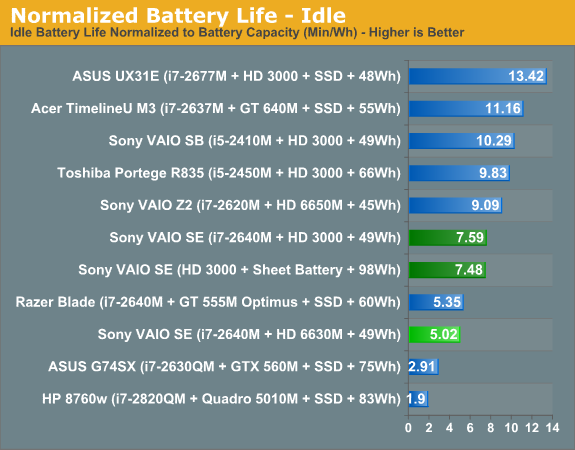
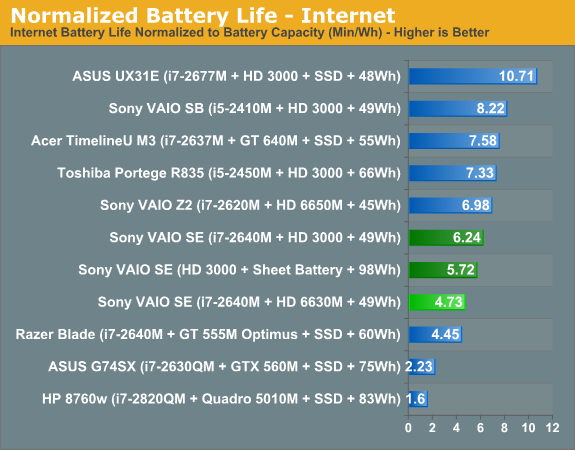
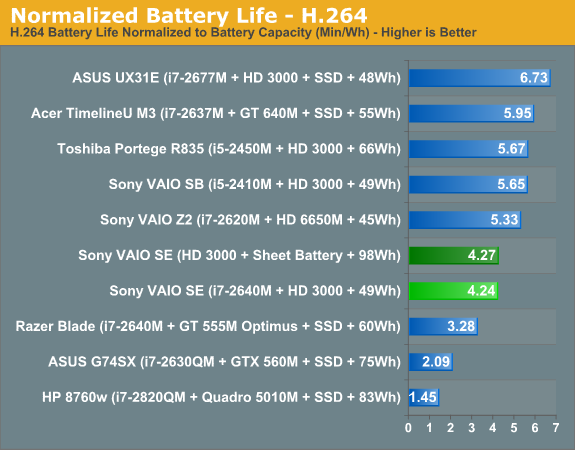
If we take the stock scores, battery life is similar to what we’ve come to expect from Sandy Bridge laptops. The integrated 49Wh battery actually delivers better battery life than some competing laptops with 56Wh batteries, but we’d take the reported battery capacity with a grain of salt as there’s certainly some wiggle room there. Even so, our normalized battery life charts show that Sony knows a thing or two about power optimizations. As for the sheet battery, it does more or less double the battery life—there’s some margin for error in our battery life tests and given the number of battery tests we already had to run we didn’t repeat most tests multiple times.
We also did a quick test of idle and Internet battery life with the discrete GPU enabled, just to see how much extra power that consumes. Based on the 49Wh battery capacity, the VAIO SE idles at around 7.75W and averages 9.41W during the Internet test while running off the IGP. Turn on the HD 6630M and idle power draw (on battery) increases to 11.71W while Internet power draw is 12.42W. Based on that it appears the HD 6630M has an idle power draw that’s around 4W more than the HD 3000, but for “typical” Internet use it only uses 3W more than the IGP.
We also tested dGPU battery life while playing games and still managed two hours of gaming with the main battery, but that was using the Balanced power profile with AMD’s PowerPlay set to Maximum Battery Life. Using those settings, we found that typical gaming performance dropped anywhere from 3% (Battlefield 3) to as much as 40% (Skyrim), with most titles showing a drop in frame rates of around 15-20%. Set PowerPlay to Maximum Performance and you’ll get full performance from the HD 6630M at the cost of battery life; our 122 minute result became 90 minutes with PowerPlay at Max Performance. Double that with the sheet battery, though, and you’re looking at roughly three hours of decent gaming performance while unplugged—something you’re not likely to exceed right now with any “gaming” laptop!
Thermals: Too Hot to Handle?
We mentioned earlier that we have concerns with the way the hinge and LCD pivot down to block the sole exhaust port on the back of the laptop. We never experienced any instability from the design, but one look at thermals under load should help you understand why we think the design is flawed:
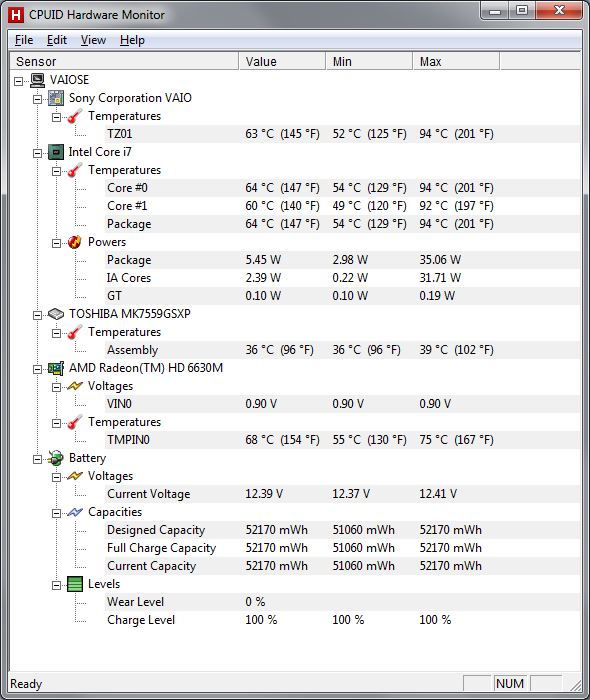
We’ve seen a few laptops run hotter than the VAIO SE under load—notably, the Toshiba Portege R835 ultraportable we just reviewed hits 100C on one of the cores during our stress tests—but 94C is still far more than we’d like. For an i7-2640M, this is the second laptop that might simply be “too thin” (the first being the Razer Blade that hit 95C). We’d really like to see max CPU thermals under 80C, even for thinner laptop designs. Long-term, the concern is that once you start to get some dust inside the fan and radiator, cooling performance will suffer and you’ll start to hit 100C or more. I recently saw this exact issue with a friend’s laptop (with an older Core 2 Duo T9550 CPU), which caused the laptop to get very hot to the touch and eventually shut off (with no warning) after heavy use.
Noise Levels
The high temperatures unfortunately have a secondary companion: noise pollution. At idle and under light loads, the VAIO SE is well behaved: we measured 31.2 dB from around 18” above and in front of the laptop (where your head would typically be if you’re using the laptop), and for many tasks the noise levels never broke 35 dB. All that starts to change when you put a heavy load on the system. For gaming, it really depends on the type of game you’re playing—specifically, how CPU intensive the game happens to be. 3DMark06 for instance never got about 36 dB in the graphics tests, but it tends to be pretty light on the CPU side of the fence. Batman: Arkham City and several other modern titles (Battlefield 3 and Skyrim) are a different story, with fan speeds apparently maxed out and noise levels hitting 46.7 dB—very similar to the Razer Blade, though I’d characterize the noise as being less annoying on the VAIO SE. The real culprit here is the CPU, though, as any heavy CPU load (video encoding, Cinebench, etc.) will peg the fan speed and noise at the same 46.7 dB.
For all the noise the fan generates, it doesn’t feel like it’s moving a lot of air, and this is where the hinge and the blocked exhaust port really makes its mark. It’s about what you’d get from other laptops if you stuck your hand in front of the exhaust and left it there. Provided you’re not planning on doing a lot of CPU intensive tasks, however, the VAIO SE isn’t all that noisy. For office applications and Internet browsing, I never had issues with the fan, and assuming you have a desktop to do your heavy lifting (e.g. video transcoding), gaming is about the only time you’re apt to hit max fan speed for “mainstream” use.
Originally published at https://www.anandtech.com/show/5722/sony-vaio-se-an-ips-laptop-for-under-a-grand (Wayback Machine).