
Dell XPS 13: A Different Kind of Ultrabook
In and Around the Dell XPS 13
While Dell's Inspiron line hasn't seen a whole lot of excitement, their XPS line has thus far been an aggressive attack on the old prevailing notion of Dell as a budget mainstream vendor. The XPS notebooks we've tested have all been well-received, but Dell's entry in the ultrabook market is especially noteworthy: Dell will tell you they're trying to bridge the high-end consumer market with the professional market, but the XPS 13 proves they mean it.
The lid of the XPS 13 is a sheet of machined aluminum and probably one of the least flexible lids I've ever seen; it's the polar opposite of and a sharp contrast to the Sony Vaio Z2, which featured a lid that was ultra-flexible by design to avoid damage. The chintziest-looking thing about it is the glossy black Dell logo. Open it and you'll find very stiff hinges: a welcome find, ensuring there won't be any screen wobble in regular use.
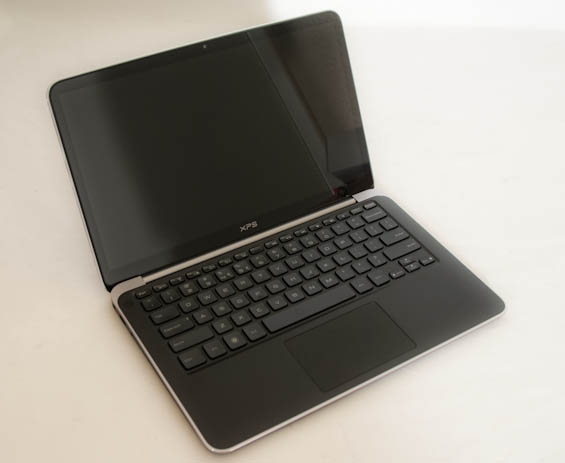
I'm at the point now where I do have some reservations about the single glossy panel that covers the bezel and the screen, though. This is the same style you'll see on all of the Alienware notebooks, and while on the one hand it offers a uniform aesthetic that's pleasing on its own, on the other I've found that a glossy bezel is a fingerprint and dirt magnet. Having this single sheet really just exacerbates that issue. This is going to ultimately be a matter of taste. Where Dell does succeed, though, is having a fairly thin bezel surrounding the screen; much like the XPS 14z features a 14" screen in a 13" chassis, so the XPS 13 features a 13.3" screen in a 12" chassis. If you've ever felt like a bezel was just wasted space, you'll find yourself right at home here: the XPS 13 is very economical in its design, offering a larger screen than we'd normally expect in a notebook with these dimensions.
The silver trim around the keyboard area is one of the less comfortable aspects of the XPS 13's design, though. While it's attractive, it also has an unusually harsh edge that can potentially dig into your wrists depending on how you handle the notebook. The black, soft-touch-coated interior surface is incredibly pleasant to the touch, though, and a welcome deviation from most other ultrabooks. This along with the rounded chiclet keys on the keyboard and the smooth texture of the touchpad prove that Dell seems to have put real thought into how comfortable the XPS 13 would be to use.
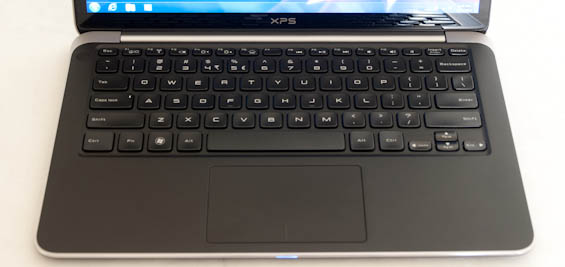
That said, there are reservations. I was able to adapt to the XPS 13's keyboard reasonably quickly, but mushy keyboards with minimal travel will continue to be par for the course for ultrabooks due to the limitations imposed by the form factor. Unified touchpads aping the MacBook's design had their day in the sun for mainstream notebooks (and seem to have thankfully fallen by the wayside), but they persist on ultrabooks, and the one on the XPS 13 is problematic. If you're used to having separate touchpad buttons, you'll find the XPS 13 can have a devil of a time properly detecting when you want to use a button and when you want to just move your fingertip across the pad. This is a pervasive problem with this kind of touchpad design; Apple's systems don't seem to have the issues with it that PCs do. I have an Acer in house that has almost the exact same sensitivity problems.
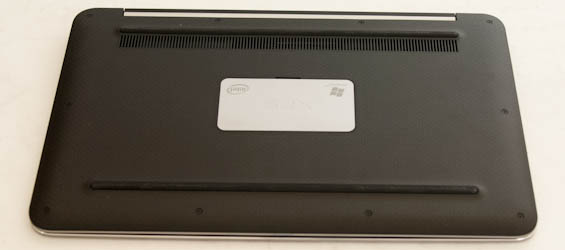
Finally, the base (and much of the frame) of the notebook is carbon fiber, and that carbon fiber does a fantastic job of ensuring the surface never gets too hot to the touch regardless of how hot the internals may be running. It's comfortable and attractive, but the slight bump at the top belies what I think is a problem with how the XPS 13's thermals are engineered. A notebook designed to be this mobile pretty much begs to be used on your lap, but the only ventilation for the XPS 13 is just below that bump: a row of openings hiding the small cooling fan. Other ultrabooks I've seen have ventilated through the side and/or the back, making them more ideal for being used on your lap. Blocking that vent just by using the XPS 13 on your bed can cause CPU core temperatures to reach the mid-to-high 90's.


As a whole I like the design of the XPS 13 a lot. Personally I'm not entirely sold on the ultrabook class, but a discussion with Anand largely confirmed that I'm not really the kind of user these computers were meant for anyhow and if they don't appeal to you specifically, there's a good chance you're not either. That said, of the ultrabooks I've seen I've found the XPS 13's design among the most appealing. Dell's engineers clearly looked at the other ultrabooks on the market and the MacBook Air and asked themselves what could be improved from a design standpoint, and for the most part I think they've been successful. There's still room for improvement in terms of keyboard design and especially with the touchpad, and the cooling system probably needs to be rethought, but the XPS 13 is an excellent starting point.
Originally published at https://www.anandtech.com/show/5660/dell-xps-13-a-different-kind-of-ultrabook (Wayback Machine).