
HP ZR2740w - High Resolution IPS that Doesn't Break the Bank
Color Quality
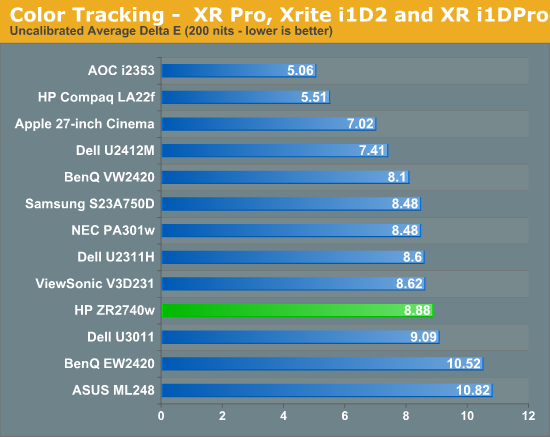
Straight out of the box, the color accuracy of the HP leaves a disappointing taste. The average dE is close to 9, and the grayscale is well up there, almost entirely in the double digits. Due to the lack of an OSD or other controls, there isn’t any other color mode you can select, such as sRGB or 6500K, to try to improve these results without calibration. If you purchase the ZR2740w and cannot calibrate it, this is the performance you can expect with no way to improve upon it at all.

Of course, since many people purchasing this display will be calibrating it, we want to see how well it performs after a calibration. Using ColorEyes Display Pro on a MacBook Air, I set the targets to my usual preferences: 200 nits of light output, a D65 white point, gamma of 2.2, and minimum black level. The calibration was done with an i1Pro spectrometer that is NIST certified to have a maximum error of 1.0 dE and an average error of 0.4. Using these settings, we get a much better result out of the HP.

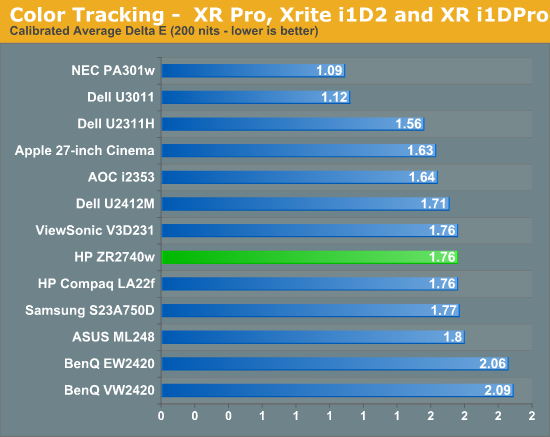
Here we can see that our dE has dropped down to an average of 1.76 which is pretty good. The errors, as usual, are in shades of blue at the edge of the sRGB colorspace, and that grayscale that was horrible is now down to an error of under 1 for almost the entire range. Again I wanted to look at the median color error and see how much this average error is being skewed by the blue results.
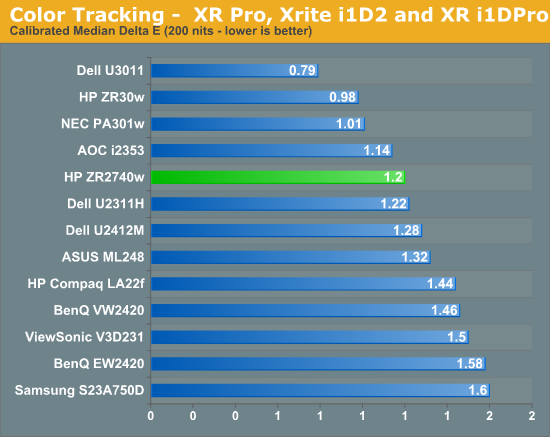
Our median color error is a dE of 1.2, which is quite good. There are a lot of panels that do worse than that, and not many that can do much better at all. The only way to really get an error much better than this is to find a panel that uses the full AdobeRGB colorspace, so those shades of blue will be able to be rendered correctly. As a high resolution 27” monitor is likely to be targeted towards professionals, including those doing print work, the 100 nits results were even more important this time than usual.

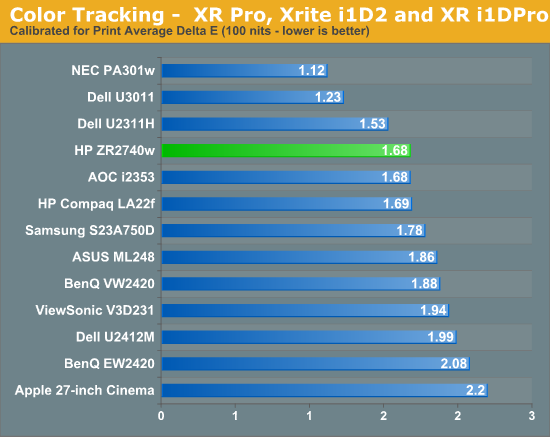
The dE results are very similar to those with 200 nits of light output, down to the grayscale having similar errors across the spectrum. The worst grayscale patch is the dark gray, which is the hardest for the i1Pro to read accurately, but until I have a better calibration program that allows for meter profiling, it’s the best result I’ll be able to get for you. Overall the calibrated results for the HP are good, but with no OSD at all the only way to get even close to these is with a calibration package, since you can’t even copy settings from another display and hope they look OK on your monitor. You could always try copying a color profile from someone else with the same monitor, but even then you're likely to get significant errors as there's plenty of variance between otherwise "identical" panels.
Originally published at https://www.anandtech.com/show/5636/hp-zr2740w-high-resolution-ips-that-doesnt-break-the-bank (Wayback Machine).