
In-Depth with the Windows 8 Consumer Preview
What comes next?
Microsoft released the beta version of Windows 7 to the public in January of 2009. At the time, it was basically feature-complete, but Microsoft made some tweaks and incorporated them into a release candidate build that it released in early May. The OS was then released to manufacturing in July, and public availability followed in October.
Microsoft’s stated goal for Windows 8 is to ship later this year, and using Windows 7’s timeline as a reference we can see that they’re still more or less on track for that. What we don’t really know is whether Windows 8 is as far along in the Consumer Preview as Windows 7 was in its beta—that will be the main factor in determining how quickly the rest of the development process goes by.
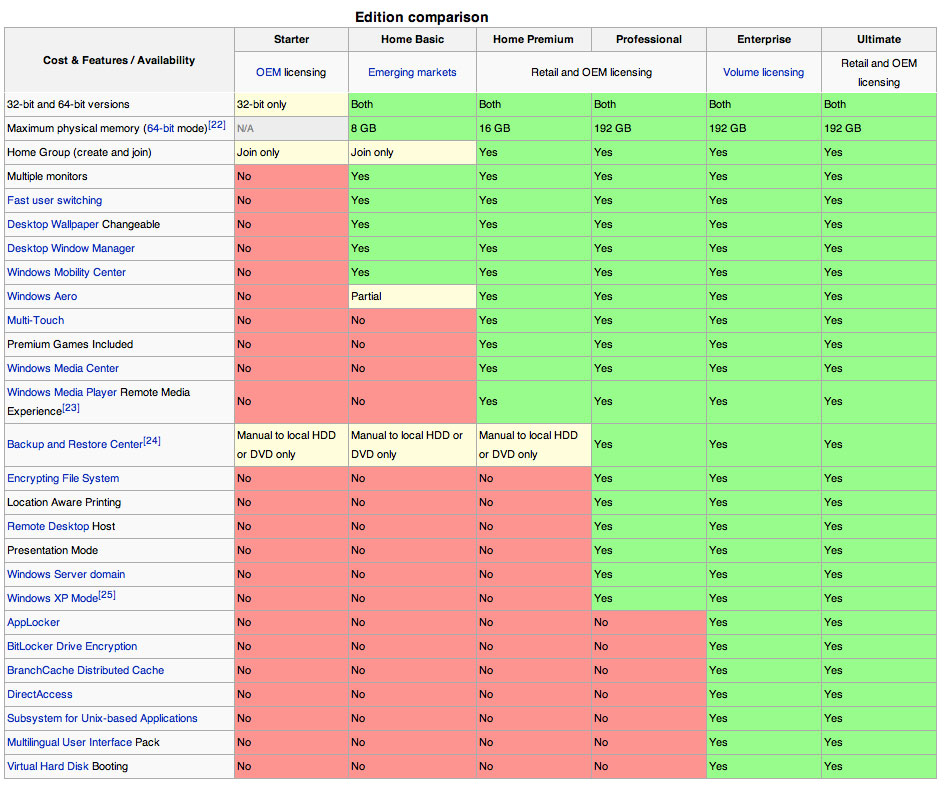
We also know nothing about product editions or cost at this point. Now, we didn’t know these details at this point in Windows 7’s cycle either, but if you’ll recall, the evaluation copy of Windows 7 offered in the beta and release candidate stages was clearly branded as “Windows 7 Ultimate,” suggesting that the multiple product tiers introduced in Vista would stick around to at least some degree. Everything in the Windows 8 Consumer Preview is branded as, well, a Consumer Preview, meaning that Microsoft could really go anywhere with respect to product editions at this point.
In an ideal world, I’d love to see the company sell one edition of Windows that did everything Windows was capable of doing, but in our flawed reality I would settle for the death of the Ultimate edition, which has always had trouble justifying its existence (remember Ultimate Extras? Neither does anyone else). The few extra features it does offer (Bitlocker, primarily) would roll nicely into the Professional edition, and would be a suitable answer to the new version of FileVault introduced in Lion last year.
Unfortunately, I think Microsoft is all-too-likely to maintain the status quo in this case. People who do apples-to-apples comparisons of the OS X and Windows pricing structures are missing the point a bit—Apple has a nice high-margin hardware business that helps to subsidize its software development, which means it can more easily offer upgrades where $29 gets you a new OS that you can use for every computer in your house. Microsoft is a software company, and its bottom line depends on Windows—drastic price cuts would be awesome, but I don't think they're in the cards.
Conclusions
I was a huge advocate of Windows 7 when it came out, both personally and professionally. I immediately upgraded all of my systems just after release, and shortly after I started pushing it on my friends and family (I spent most of Thanksgiving 2009 upgrading systems). I spearheaded a migration from Windows XP to Windows 7 where I worked at the time, a small shop hesitant to change and frightened of the new. I thought it was a great upgrade—it provided a host of much-needed updates with few of Vista’s real or imagined shortcomings—and I thought that any computer that could be upgraded to run Windows 7 should be upgraded to run Windows 7, from the fastest multi-core desktop workstation to the lowliest netbook.
My reaction to Windows 8 is more tempered, assuming that what we see here in the Consumer Preview is more or less representative of the final product. I think it has the potential to be a killer tablet operating system, and for my part I think it’s quite usable on a laptop and desktop, but I have my doubts that more skittish users and businesses are going to be able to see past the newness of Metro.
The other problem Windows 8 is going to have is that, while it offers some nice under-the-hood updates, and while Metro is much more usable with a mouse and keyboard than some pessimists will lead you to believe, it’s not the essential upgrade for PCs that Windows 7 was. Thanks in part to the user-facing and under-the-hood improvements in Windows 7, desktops and laptops don’t need a new operating system like they did three years ago when their only options were the aging XP, the flawed Vista, or the alien landscape of Linux.
If you’re reading this, the chances are good that you’re a technology enthusiast with a decent system, and you’re the ones to whom Windows 8’s under-the-hood enhancements will appeal the most. Give the preview a test drive, evaluate whether you’ll use the new features, and give Metro a fair shake—like it or not, it’s the future of the platform, and it’s well-implemented here. If you’re happy with Windows 7, though, this isn’t the must-have upgrade that its predecessor was, and Microsoft’s long-term support cycle—mainstream support until 2015, extended support until 2020—means that you’ll still get significant software updates (new DirectX and IE versions and a handful of other backported features) for awhile and security updates for even longer. You’ve got time to wait for Windows 9.
We'll continue to cover changes in Windows 8 as it progresses toward its eventual release, at which point I'd like to post an updated version of this article covering new stuff and any features we missed this time around. If there's something missing in this review that you'd like to see covered, you can contact me at andrewc@anandtech.com, or find me on Twitter (I'm @Thomsirveaux).
Originally published at https://www.anandtech.com/show/5630/indepth-with-the-windows-8-consumer-preview (Wayback Machine).