
Capsule Review: Corsair's Vengeance M60 and M90 Mice
- Posted in
- Mouse
- Peripherals
- Corsair
- Input Devices
The Vengeance Mice in Action
Given their reasonably different shapes and designs, the Corsair Vengeance M60 and M90 have noticeably different feels. Both enjoy the same soft touch plastic shell and Corsair's default sensitivity of 2600dpi was surprisingly close to the mark (for me at least), and both use Corsair's Dashboard. Yet the shapes and grips of the mice felt noticeably different, and their functionality proved a little more fraught in practice than it was on the page. Tracking and response were excellent, but when you get into the features are where things fall apart.
In Productivity
For basic browsing and productivity tasks, there's still really no substitute for a wired mouse. Responsiveness of both mice was fantastic and well ahead of even the best wireless mice I've used (including Logitech's classic MX Revolution). Yet the mountain of buttons on the M90 proved to be a hindrance for basic web browsing; on the M60 the back and forward buttons are right where they should be, just the right size, and have a reasonable amount of travel and resistance. The M90, on the other hand, configures those navigation buttons far to the rear of the button cluster. Honestly, to look at the M90, you'd be hard pressed to even figure out which buttons would make the most sense for those.
Over time I also found the soft plastic surfaces of both mice would cause the palm of my hand to get clammier than normal. This is an issue I've had with every Razer mouse I've used, including my old Microsoft Habu (which was developed with Razer); my primary mouse before testing these was a Logitech G500, and the smooth but textured plastic surface felt a lot better and didn't cause me to sweat as much.
In Gaming
The responsiveness carried over to my gaming experiences with both mice, where I had little trouble getting the proper amount of precision. If you're not married to using any of the functionality of either of these mice, they're actually excellent just in terms of the basics.
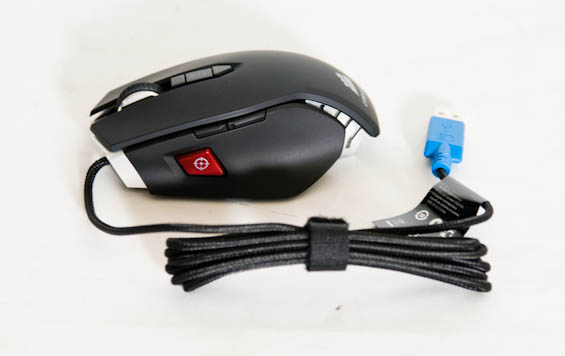
Once again, though, problems creep up when you do start to try and use their features. The "Sniper" button of the M60 (and assignable in the M90) is a useful function in theory, but in practice it feels like something I'd have to get used to. I had friends try out the mice as well and the response was similar: it's a great idea but something you would have to adapt to. That's not unreasonable. There's also the placement of the "Sniper" button. On the M60, for my hands and the way I grip the mouse, it's just too far up the left side. The button needed to be lower to be under where my thumb usually rests. Again, time to adjust is the name of the game, but whether you're willing and able to do so will vary by user.
The M90's button cluster would probably be awesome for die hard MMO gamers, but I found the placement and resistance of the buttons ever so slightly off. Oftentimes it felt like I would have to press the buttons too hard to get them to register, and I never did find a way to configure them exactly how I wanted them, even for basic internet navigation much less gameplay. Where I could actually find myself adapting to the Sniper button on the M60 given enough time, the learning curve for the M90 feels substantially steeper and I'm not sure I'd ever get fully comfortable with the mutlitude of buttons and their locations.
Corsair's Software
If you read my review of the Vengeance keyboards, this is going to be pretty familiar to you. You can configure the functionality of either mouse in software, but you can also program macros and functionality directly into the hardware.
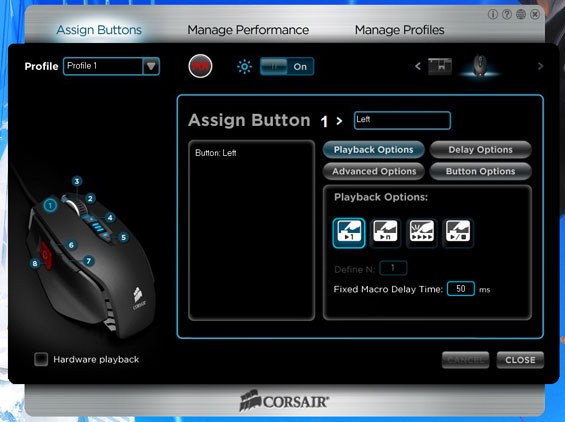
The macro functionality and button assignment configuration is just as unintuitive as the keyboard's software, and once again I find myself lamenting the lack of media controls. I have my G500 configured to control media playback; the on-the-fly sensitivity adjustment buttons are used to skip tracks forward and back, and then the third thumb button is used for play/pause. None of this is possible with Corsair's software. It's a small nuisance and one they can hopefully easily rectify. The unusual and unintuitive nature of the button assignment screen is a little more troublesome, though. In the screen above, you'd expect the box next to "Assign Button 1>" to be the function the button performs. That's actually not true; that box is just a label, it's the long box beneath it that lists what the button does.
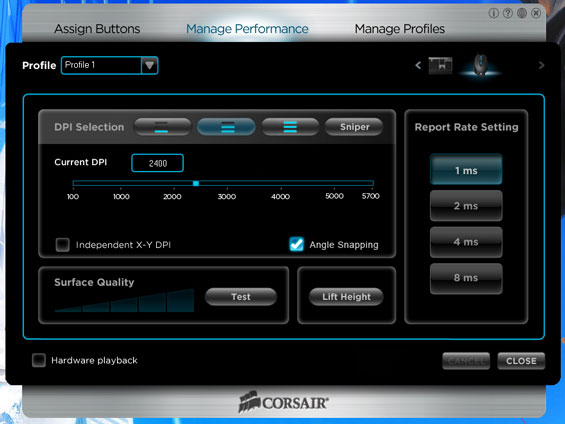
The "Manage Performance" tab is much less of a headache, though, and is actually very useful. I don't have any real complaints here; this is pretty much as simple and easy to understand as they could conceivably make it, and I appreciate them actually listing the DPI numerically instead of just having the slider. Now instead of saying "about...there is comfortable" you can know "about...2400dpi is comfortable."
My biggest complaint about Corsair's peripheral software is that it's not unified. For each mouse and for the Vengeance K90, you actually have to download and run three completely separate installers, with the irony being that eventually they all do tie in together. You can see from the screenshots that on the top right there's a toggle between peripherals, so why isn't there just one download package for all of the Vengeance peripherals? This is one place where Logitech has an edge; SetPoint's interface may be bloated, but you only have to download the one application to manage all your Logitech peripherals and it keeps them fairly separate and orderly.
Originally published at https://www.anandtech.com/show/5564/capsule-review-corsairs-vengeance-m60-and-m90-mice (Wayback Machine).