
Dell U2412M - 16:10 IPS without Breaking the Bank
Dell U2412M Input Lag and Power Use
For testing lag, I am trying a new solution to our previous testing method. I’m trying out SMTT, which is designed specifically for measuring lag in LCD displays. Using DirectX it manages to push over 1,000 frames per second to a display, allowing for millisecond accuracy instead of relying on time demos that often run well below that threshold. Using this method, we can actually determine two different values: The input lag for the LCD to initially respond, and then the total lag from when the new frame is received to when it is completely drawn and at full brightness. This last one is the overall important value, as it is what gamers would be most concerned with. It’s important to have as low an "input lag" as possible so that even if the screen isn’t fully drawn yet (the pixels will be changing over) you will be able to begin to get that feeling of responsiveness.
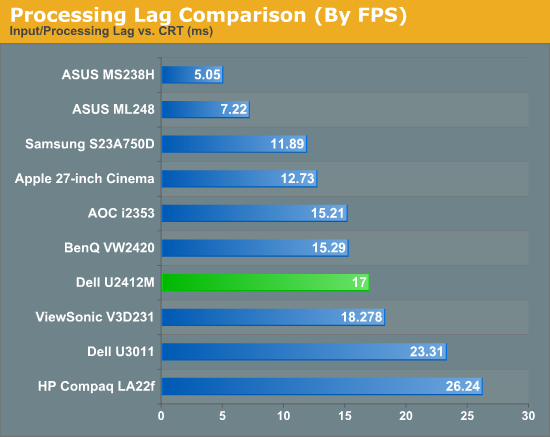
Here we see that the overall lag value measured OK, at 17ms. The input lag, which was also measured, was just under 2ms, which indicates that the Dell responds very quickly, and then it’s just a matter of the pixel response time. One thing to keep in mind here is that the 17ms response time is the total time from input to peak brightness, and then it takes 15ms to fall back to another value. When I actually look at the test subjectively and not objectively, you can certainly see the change in the pixel after 7-8ms of time. So I could report it as 8ms of lag, as that’s about what I think you would experience in a real world situation, but the worst case scenario seems to be 17ms, which is what I’m choosing to report as that’s the objective number.
The CRT still comes in perfect, and that’s what the LCD should aim to do; picking a number that gives a better result, even if it might be more applicable to the real world, feels like cheating. Perhaps we will get a future display technology (like OLED or CrystalLED that I saw at CES this year) that will bring us back to CRT response times, but until that happens I’m going with the objective, worst case measurement. I will report the “real world estimate” along with it, though, so you can use that for your own judgment. Please let me know what you think of this in the comments section.
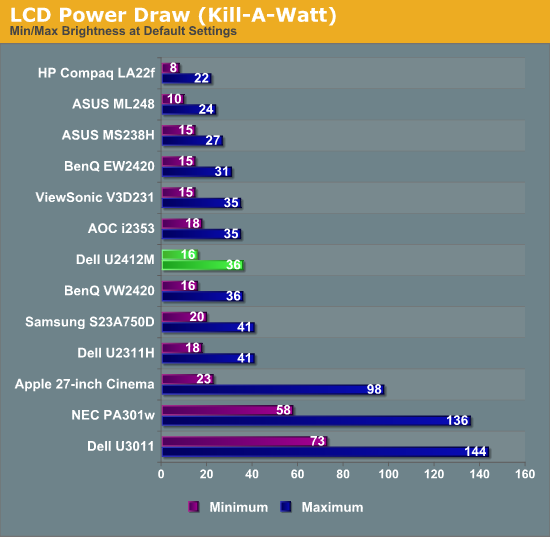
I made the assumption that with a larger panel and the 300 nits of light output that the Dell would not be the most eco friendly panel I had seen. Happily I found this to not be the case. It drew just 36 watts at maximum brightness and only 16W at minimum brightness, less than even the 23” Dell U2311H from last year. I don’t know if it is more efficient LED lights, or a more transparent panel that allows more light through, but Dell did a good job keeping the power use low on the U2412M.
Originally published at https://www.anandtech.com/show/5550/dell-u2412m-16-10-ips-without-breaking-the-bank (Wayback Machine).