
Thoughts on the Mac OS X Mountain Lion Developer Preview
- Posted in
- Mountain Lion
- Mac
- macOS
Messages
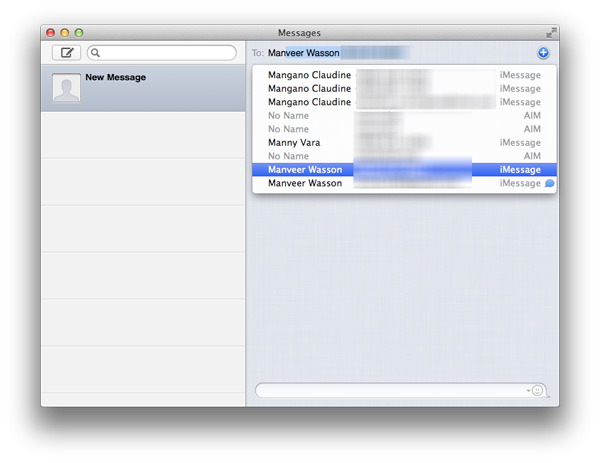
One of the more tangible features of Mountain Lion is Messages, the iChat replacement that's long overdue. The main attraction is the ability to send messages to iMessage users from your Mac. The feature works and is available to Lion users as well through a beta, however the final version will be a Mountain Lion exclusive.
AirPlay Mirroring & QuickSync
Since Arrandale Intel has been offering its own flavor of wireless display technology called Intel WiDi. The premise is simple - take the display buffer, encode it in real time as a video (originally MPEG-2, later H.264), send it over WiFi to a box that can decode the video stream and display it over HDMI to an attached display (e.g. a HDTV). Apple enabled something similar on its iDevice platforms called AirPlay Mirroring. Deploying AirPlay Mirroring on iDevices made sense since all of those platforms ship with hardware encoders on their SoC. With Mountain Lion Apple is bringing the same functionality to Macs. The only requirements are that you have a second generation Apple TV and that it's on the same network as your Mountain Lion Mac.
AirPlay Mirroring isn't functional currently but by the time ML ships it should be. The usage models are plentiful (presentations, quickly tossing videos on the big screen for many users to watch, etc...) and the feature should do a good job of selling Apple TVs to Mac users.
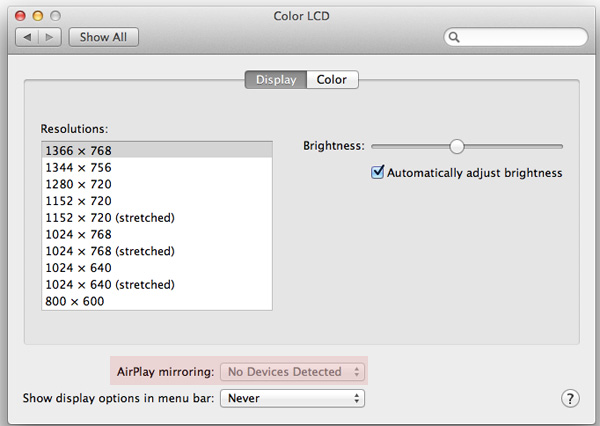
Apple isn't being very specific on what hardware platforms will support AirPlay Mirroring. Sandy Bridge and later Macs shouldn't have a problem and I hope that Apple will leverage Intel's QuickSync technology to keep CPU utilization low. It's possible for earlier Macs to handle the encode workload but there's obviously a performance tradeoff. Apple is usually very sensitive to maintaining user experience over guaranteeing functionality so it'll be interesting to see where it draws the line for AirPlay Mirroring compatibility.
Unfortunately there's no update on QuickSync support elsewhere in Mountain Lion. Thus far all Finder and Quicktime initiated video transcoding is done in software on the x86 cores and doesn't appear to leverage QuickSync at all. Why Apple generally refuses to use one of Sandy Bridge's most valuable features for consumers remains a mystery to me.
Server
I won't dive too far into Mountain Lion Server, since this is just supposed to be a quick first look at a very early version of the product. However, for users of the product (and/or readers of our huge Lion Server review) there's one important change that comes in with 10.8 - Lion introduced a new program, Server.app, which took over some (but not all) of the functionality provided by the legacy Server Admin Tools. The tools are still provided as a separate download to close the functionality gap left by Server.app.
In Mountain Lion Server, more functionality of the Server Admin Tools appears to have been integrated into Server.app - NetBoot, the System Image Utility, DNS, and a few other services can now be managed in Server.app. There are still a few services that appear to be missing (DHCP, NAT, and a few others appear to be absent) - it's too early to say whether these services will be included in Server.app when Mountain Lion is launched, whether the company will offer a new version of the Server Admin Tools, or whether those services will be removed from OS X Server altogether.
Supported Macs
The last thing I wanted to talk about is something we've already touched on, but it bears repeating - Mountain Lion is dropping support for any Mac that is not capable of booting OS X's 64-bit kernel. Lion requires a 64-bit capable Core 2 Duo processor or better, but included the legacy 32-bit kernel to enable support for computers missing one of the other two components required for a 64-bit boot: a 64-bit EFI, and 64-bit graphics drivers. The complete list of supported Macs is below:
• iMac (mid 2007 or later)
• MacBook (13-inch Aluminum, 2008), (13-inch, Early 2009 or later)
• MacBook Pro (13-inch, Mid-2009 or later), (15-inch, 2.4/2.2 GHz), (17-inch, Late 2007 or later)
• MacBook Air (Late 2008 or later)
• Mac Mini (Early 2009 or later)
• Mac Pro (Early 2008 or later)
• Xserve (Early 2009)
Generally speaking, if you don't want to use this Apple Support document to see whether your Mac supports the 64-bit kernel, there are a few rules of thumb you can use: if your Mac uses either the ATI Radeon X1600, Intel's GMA 950 or X3100, and any NVIDIA GeForce card older than the 8000-series, your Mac is likely disqualified from running Mountain Lion. This list includes computers (like the pre-unibody white MacBooks) sold just a little under four years ago, which is no doubt unwelcome news to users of those systems - unfortunately, you'll either have to upgrade your system or stick with Lion if you've got one of the unsupported Macs.
Some have reported that the Mountain Lion Developer Preview will install and run on some of these unsupported Macs without issues, but if you'll recall, early Lion previews could also be made to run on 32-bit Core Duo and Core Solo processors that were dropped from the support list. If the system requirements for the preview are in fact representative of the requirements for the shipping version of Mountain Lion, expect booting on those older machines to be blocked at some point in future previews.
Originally published at https://www.anandtech.com/show/5545/mac-os-x-mountain-lion-developer-preview (Wayback Machine).