
Sony Vaio Z2: Everything is Peripheral
Accessories to a Crime
On paper, the Sony VAIO Z2 is an amazing ultraportable and promises just about everything a mobile professional could possibly want. It's less than three pounds, but get it hooked up to the wall with the docking station and suddenly it's a full featured notebook complete with DVD burner and dedicated graphics performance. Unfortunately, in many ways the Z2 fails to live up to its real potential.


The external design of the Z2 is attractive, as Sony employs a black carbon fiber shell over an aluminum frame for the notebook with glossy plastic used only for the VAIO logo on the lid. You can order it in gold or silver, but the matte black is beautiful enough on its own. There's also a silver accent along the hinge, and the inside and bottom of the notebook retain that sleek black carbon fiber design. This is a uniform, solid-looking notebook, and I have a hard time believing anyone will complain too much about it aesthetically.
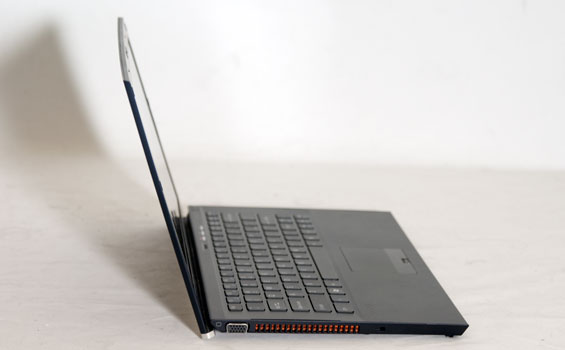
So what's wrong with the shell design? It's utterly impractical. We'll start with the hinge, a design decision so atrocious I can't believe it actually made it to production. If you don't have the battery slice installed, the back of the hinge actually lifts the notebook off of whatever surface it's on, producing an incline for the keyboard. This is exactly the intended functionality, but the problem is that the only feet that provide any traction are the front two, causing the notebook to potentially slide during use. More than that, tilting the screen changes the entire incline of the notebook, making it that much harder to find a sweet spot for both typing and visual comfort. Using the battery slice alleviates this problem, but it's insane that you'd have to buy a $150 accessory just to improve ergonomics that should've been correct from the get go.
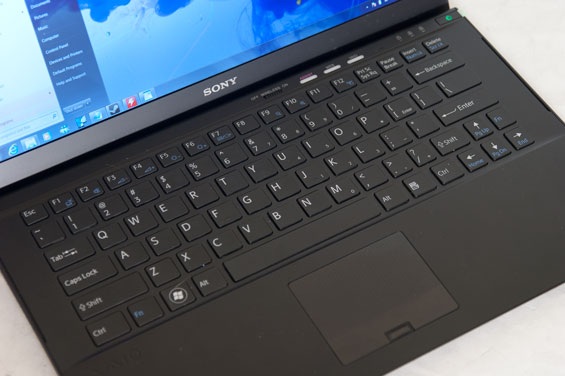
The Z2's problems don't really stop there, either. While keyboards are often a matter of some contention amongst you, the readership, the Z2's keyboard is a poster child for why so many people revile chiclet-style keyboards. Many of you don't have problems adjusting to notebook keyboards since there's so much variation between vendors, but this keyboard may very well put some of you over the edge. I have tiny, spidery fingers, and I couldn't keep from fat-fingering the keyboard. Depth and travel for the keyboard is horrendous, and key action is incredibly mushy.
The touchpad should fare better: it's dedicated as opposed to being a part of the rest of the shell, and has a fingerprint reader tucked away at the bottom. Unfortunately it's also smaller than you might like, and the touchpad and buttons are one piece of plastic instead of having a pair of dedicated mouse buttons. There isn't even a rocker switch, it's all just one piece. Once again, style over practicality.
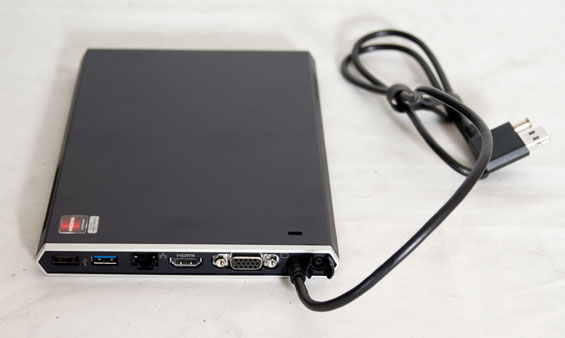
Where the Z2 should redeem itself is the dock. While connectivity of the notebook on its own is quite good, the dock is undoubtedly where the action is. For what it's worth, Sony's Power Media Dock is a fantastic idea: it plugs into the AC adapter port and USB 3.0/dock port (it's not strictly USB 3.0, so don't try to use it with another notebook—it actually uses Intel's Light Peak technology for connectivity), and there's a pass-through for plugging in the AC adapter. Once it's hooked up, the Z2 detects it and asks you if you want the Radeon to power the interior screen or external monitors. This should be the feature that makes the Z2 alongside the stunning 1080p screen. Except there are major drawbacks.
The AMD Radeon HD 6650M inside the dock is limited to a PCI Express 2.1 x4 link instead of x8 or x16, and the performance hit is a noticeable one. Worse still, the only drivers you're going to find for the Radeon are on Sony's site: they don't use the publicly available drivers on AMD's site. You could argue that there's some secret sauce going on here, but the VAIO is using AMD's XGP standard, and either way you have yet another front where the 6650M is being hamstrung. I had to reboot the Z2 the first time I plugged the dock in just to get it to properly accelerate the internal monitor, and after that I still ran into the occasional problem during game testing; DiRT 3, for example, would only run windowed, and would only run on the Intel IGP.
Is the dock still better than nothing at all? Abso-freakin'-lutely. The 6650M is still a major upgrade on the Sandy Bridge IGP, and the added functionality (including the slimline optical drive) is appreciated. Unfortunately you're at Sony's mercy for driver updates, and we all know how reliable notebook manufacturers are at keeping video drivers current. We could also say that as long as you're going external, something a bit more potent than the 6650M would have been welcome; a 6770M would have boosted the clocks another 20%, and making the dock slightly bulkier shouldn't be too much of a problem.
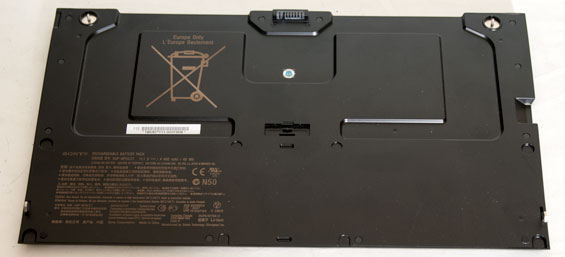
Finally, there's the battery slice. Unlike the slice included with the VAIO S series we reviewed recently, this one actually requires you to screw the battery in to the bottom of the notebook. You rotate the outside edges with your thumbs and tighten the hold at the top. This seems like a sound idea, except the slice doesn't actually feel any more secure than the old latch-style locking system did. It's just a bit of added hassle. Thankfully the slice improves the ergonomics of the Z2 substantially without adding too much to the weight; the Z2 was already under three pounds, and the slice puts it a touch under four. It's an acceptable compromise for what the slice brings to the table.
Originally published at https://www.anandtech.com/show/5530/sony-vaio-z2-everything-is-peripheral (Wayback Machine).