
SilverStone Temjin TJ04-E: Devil in the Details
In and Around the SilverStone Temjin TJ04-E
I recently sold some hardware to a builder who actually bemoaned how common the understated black monolith enclosures were becoming. To an extent you can see where he's coming from, but the sleek brushed aluminum fascia and silver trim of the SilverStone Temjin TJ04-E is pretty tough to complain about.
Where vendors like Fractal Design are increasingly eschewing external drive bays, SilverStone opts for a quartet of 5.25" bays each covered with a black brushed aluminum bay shield that nicely complements the face of the tower. Below them are the power button, power and HDD activity LEDs, and reset button; the power button is probably the stiffest one I've ever seen and requires a little bit of force to power on the machine. It's not a bad thing, just something I noticed during testing. Since the power and reset buttons are going to see fairly infrequent use, SilverStone opted to move the connectivity to the top of the enclosure instead of keeping it chained up with the switches.


The top of the TJ04-E is home to a recessed pair of USB 3.0 ports (using a motherboard header as pretty much all modern cases now do) as well as the audio jacks, and then in the back is a removable cover for the two fan mounts that conceals a removable, easy-to-clean fan filter. When we get to the rear of the case, it's business as usual, although SilverStone is kind enough to include an eighth expansion slot as is becoming de rigeur.
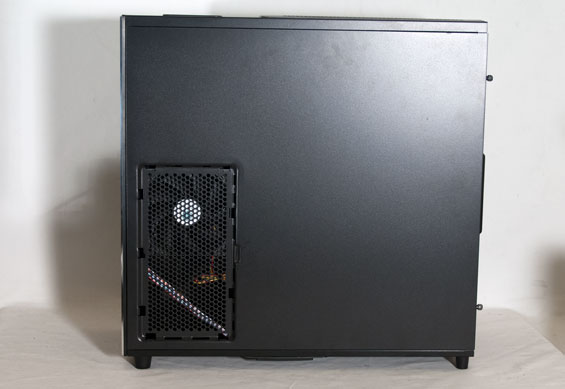
Your first hint that things might be a little different with SilverStone's new enclosure is the lack of ventilation in the left side panel; meanwhile, the right side panel features a 120x240mm vent (which includes the same type of removable cover and fan filter as the top.)
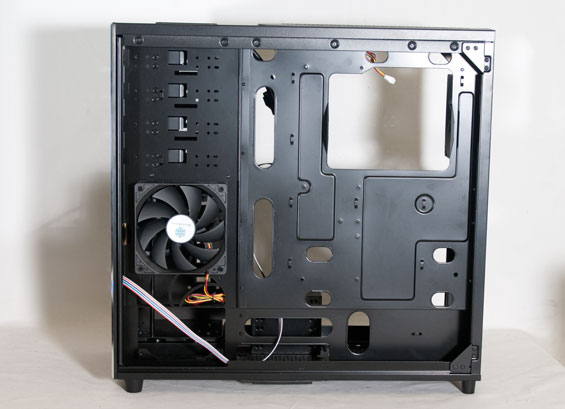
When you do open up the TJ04-E, you'll see why the vents are where they are and why there's no front intake ventilation: the TJ04-E takes in air from the right side and the top instead of the front. Cool outside air essentially runs through and is deflected by hard drives in the drive cage, as well as being pulled in from above to move through the CPU heatsink assembly and out the back of the case.
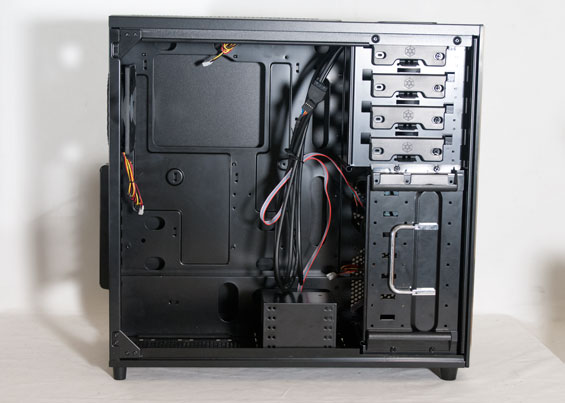
SilverStone uses a toolless design for securing the bay shields, but pretty much everything else inside the TJ04-E requires tools. The drive cage is secured by four screws, and drives are screwed in instead of placed on rails. There's also a smaller secondary cage at the bottom of the enclosure for six 2.5" drives, secured with four small screws. In the midst of all this SilverStone includes a 120mm fan mount, and while they don't include a fan installed, it seems clear to me that they intend for you to use it (at least if you're running multiple hard drives). Finally, there's a healthy amount of space behind the motherboard tray (particularly next to the power supply) for cables to be routed.
There are just enough tweaks in the TJ04-E's design to make one curious about how everything will play out in practice. Even the top fan mounts are actually shifted to the left side of the case to avoid having a 240mm radiator come in contact with memory, chipset, or VRM heatsinks. Yet like virtually all of SilverStone's designs, this isn't expected to be an easy build, so get your power screwdriver ready.
Originally published at https://www.anandtech.com/show/5524/silverstone-temjin-tj04e-devil-in-the-details (Wayback Machine).