
AVADirect Silent Gaming PC: An Exercise in Balance
Build, Heat, and Power Consumption
In discussing this build with AVADirect, I openly expressed my concerns about the use of NZXT's H2 enclosure. We reviewed the H2 enclosure some time ago and found it to be wanting, and during my meetings at CES I found the general sentiment pretty much lined up with our evaluation: it's a good idea, but it's flawed. AVADirect assured me that in their testing, they found the H2 was the best choice and the best deal for their build.
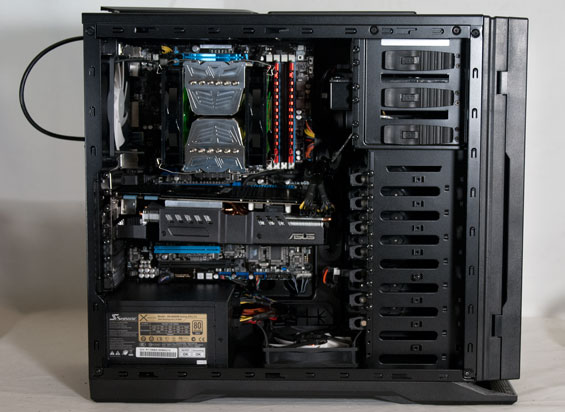
I was skeptical. The H2 feels like a choice motivated by cutting costs rather than performance; were it not for the design flaw (the front intakes are suffocated if the door is closed) it would certainly be close to an ideal boutique enclosure. Sure enough, though, you'll see AVADirect was able to make the H2 work. My guess is that the Prolimatech Megahalems cooler coupled with the bottom intake fan were able to go a long way towards redeeming the enclosure choice.
AVADirect also opted for a triple-slot custom cooler-equipped GeForce GTX 580 from ASUS. The stock cooler on the GTX 580 isn't bad at all (my SilverStone FT02 is able to keep my overclocked 580 from making much of a racket under load), but a better cooler certainly couldn't hurt. The Seasonic power supply and pair of Gelid silent fans on the heatsink help, too, but the Western Digital Green hard disk seemed like an unnecessary cut; I don't feel like the hard drive was going to be a major source of noise for the build.
Jarred was skeptical about a silent (or at least extremely low noise) build being possible with an overclocked i7 and a GTX 580, but I believed and still believe it could be done. Why do I say "still believe"? With all the case fans set on low, idle noise of AVADirect's build remains well below the 40dB "aggravation threshold," and even a GPU load doesn't noticeably affect noise levels. Unfortunately, the instant you stress test the CPU the Gelid fans start really kicking in and AVADirect's system goes to pot with a measured 42dB noise level from about a foot away. [Jarred: Isn't "very quiet" at least less than 30dB?]
And then there's my favorite whipping boy: the overclock. AVADirect should be commended for offering three overclock profiles with what appear to be manually tuned CPU voltages. So what's the problem? Simple: the voltages are set to manual and not offset mode. What this means is that the CPU voltage (and this is true of every overclock profile) never idles, leaving power and heat savings on the table.
At CES I had a conversation with iBuyPower's Ricky Lee, and he took me to task for being a bit harder on boutiques than I probably ought to be. His feedback wasn't unreasonable and I took it to heart, but one area where we disagreed was the importance of a well-tuned overclock. He argued that end users aren't going to notice how precise the overclock is, and as long as the computer functions properly and continues to function properly, it's not a major issue. My position is this: a wasteful overclock has the potential to make its presence known both on your power bill and, frankly, on the room temperature. Computers are extremely wasteful when it comes to power, and a fast machine can spew a lot of heat into a room in a hurry. Not allowing the CPU voltage to idle results in wasted power and increased heat.
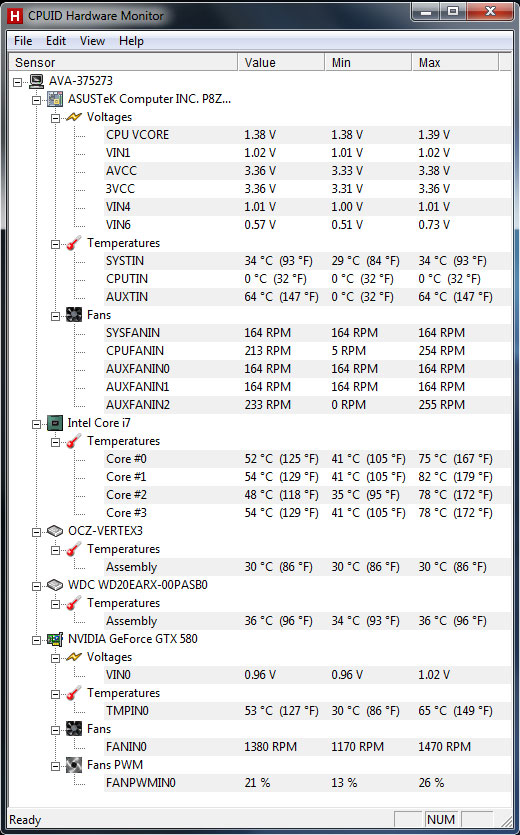
While load temps are reasonable, idle temperatures are actually quite high for a custom desktop. The custom cooler on the GTX 580 is doing its job, but the CPU's cores should be 5-10C lower. How does this play out in power consumption?
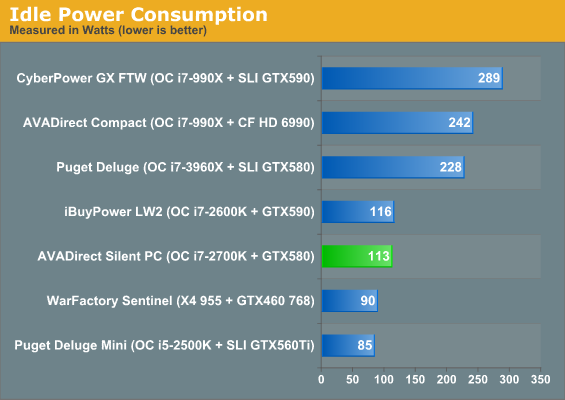
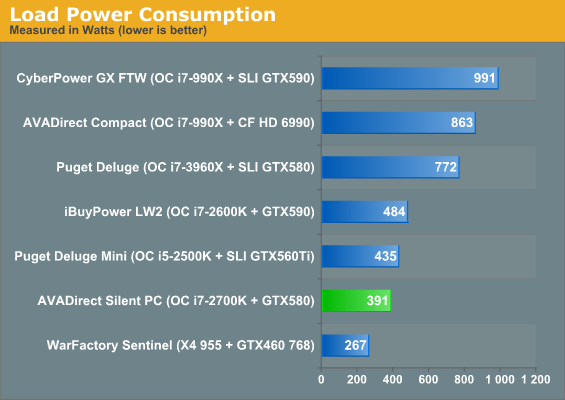
Sandy Bridge is already a pretty frugal architecture, but Puget Systems is able to shave thirty watts off the idle power despite having two idle video cards. Is thirty watts a big deal in the grand scheme of things? Probably not, but it's wasteful all the same.
Originally published at https://www.anandtech.com/show/5452/avadirect-silent-gaming-pc-an-exercise-in-balance (Wayback Machine).