
Samsung S23A750D 3D LCD Display
Samsung S23A750D Lag and Power Usage
Measuring lag on the Samsung was much easier than most panels. Typically when taking shots of an LCD next to a CRT monitor, the FPS numbers on the LCD will be blurry in a shot at least half the time. This is since we’re running at 60Hz and only shooting at 3-4 times that rate, so often we are between frames. With the 120Hz rate of the Samsung, almost all of my images were sharp and clear, which made this bench test much easier than usual.
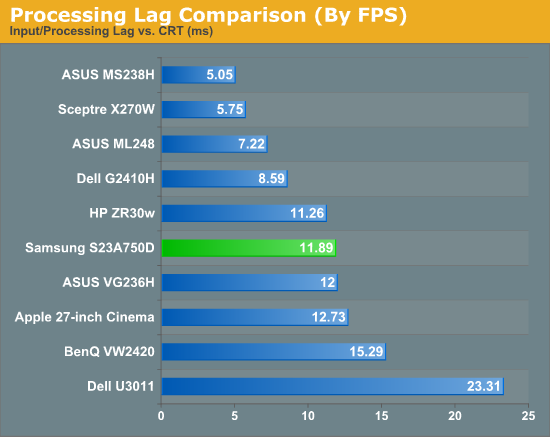
Our overall lag would typically be less than 1 frame, since we usually deal with a 60Hz LCD, but in this case it was just over 1 frame since it is a 120Hz display. This is still a little better than most displays, and the faster refresh means that even if you have a frame of lag, that next frame is coming twice as fast as it would with a typical 60Hz display, so the effect should feel like less. I also tried to increase the response time of the display through the menu but had no change in the lag results.
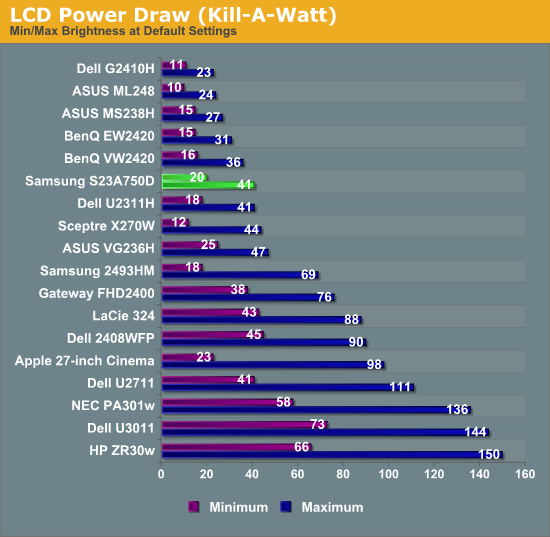
The power use of the Samsung was a bit higher than a normal LCD, though this could easily be due to the 120Hz refresh rate that uses more power. Samsung doesn’t make a 60Hz version so there’s no way to check for certain that it’s the cause of the use. The power use was still very reasonable for the display size.
Originally published at https://www.anandtech.com/show/5231/samsung-s23a750d-3d-lcd-display (Wayback Machine).