
Motorola Droid RAZR Review - A Better Clad Bionic
WiFi, GPS, Audio and Speakerphone
The RAZR uses a TI Wilink 7 series WL1285 combo chip for Bluetooth and WiFi, which is the same situation as the Bionic, unsurprisingly. WiFi is limited to 2.4 GHz and single spatial stream 802.11n, and I saw the RAZR negotiate a 65 Mbps (long guard interval) physical rate with my 20 MHz 802.11n wireless network. I found that range on the RAZR is totally on par with other smartphones I’ve used. Though the visualization at the top seems to be rather conservative with showing bars, if you go view the actual RSSI for WiFi (inside ##4636## and Wireless Information) you’ll see things are just fine. Bluetooth is 4.0 LE + EDR which is the latest bleeding edge.
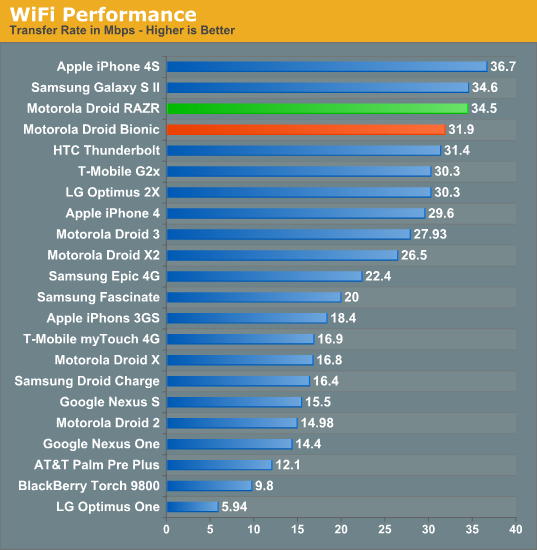
Throughput on WiFi is pretty decent and just a tad faster than the Bionic. It’s possible the subtle software differences between the two account for this difference in throughput.
WiFi Hotspot
I had some issues with the RAZR’s WiFi hotspot that I didn’t encounter with the Bionic. Specifically, when using the hotspot with WPA2 enabled, clients would only be able to attach occasionally for a short period, or not at all. This initially posed lots of frustration when trying to do our WiFi hotspot battery life test, however disabling encryption entirely and running a public AP resulted in no instability.
You still can attach a maximum of 5 clients if you pay the extra fare to Verizon to enable tethering (which the device does check to see is provisioned), and on the whole this works well, just only with security set to open in my experience.
GPS
To the best of my knowledge, the RAZR is using the GPS system onboard MDM6600 and not from the TI Wilink 7 series combo chip. It’s a bit hard to nail down for sure, but I was able to confirm on the Bionic and it seems reasonable that the same applies here.
Like we’re used to seeing from that system, GPS locks are super fast even indoors and don’t pause or stutter at all. I didn’t have any issues with GPS and used the RAZR a few times with Google navigation without any hitch.
Audio + Speakerphone
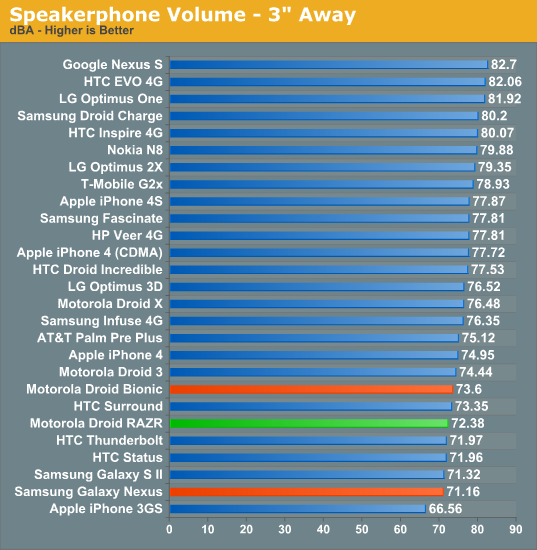
First up in the audio department is speakerphone loudness, which we’ve been measuring for a while now using a USB sound level data logger while placing a test call to the local ASOS. The RAZR is on the quiet side which isn’t incredibly surprising considering the placement and constraints on the size of its acoustic chamber.
The other part of audio is of course call quality, and the RAZR isn’t different at all subjectively from the other Motorola phones on Verizon I’ve reviewed recently. As a reminder all calls go over 1x voice, and by default almost every device uses the EVRC coder, though you can change this to 13k in the programming menu and perceive a slight change in call quality. Noise cancellation features likewise remain the same, again courtesy of the three microphones onboard the RAZR.
The last important audio quality metric is what the device sounds like when playing back music. The Bionic used an ST-E 3.1 CPAC combo power management IC and audio codec, and the RAZR uses an ST-E 3.2 CPCAP. I’m embarrassed to admit it, but I only recently discovered how to change (read: disable) the DSP that Motorola has enabled on the RAZR by default (and ostensibly many other of their devices that have crossed my desk). Because I use Google Music, I rarely venture into the first party Music application, and it’s inside here that the settings lurk for DSP, which are by default enabled.
The background whine that I complained about on the Bionic is reduced but still faintly perceptible with sensitive IEMs on the RAZR. Though it is still present, it’s no longer as fatiguing and irritating as it was on the Bionic. I’m not sure whether that’s more a function of ST-E’s 3.2 (as opposed to 3.1) or something else, but it’s much better.
If you’re interested, I also ran a run of RMAA using an ASUS Xonar Xense sound card and line-in on the RAZR, Nexus S with VoodooSound, and a GSM Galaxy Nexus for comparison. The RAZR with all of the equalizer and DSP settings turned off actually isn’t bad at all, and though I’m not an expert at reading RMAA’s tea leaves, it has good noise figures and frequency response, and though noise takes off at the lower frequencies as our own Chris H. pointed out this less than ideal behavior is only 7% of the spectrum.
Originally published at https://www.anandtech.com/show/5198/motorola-droid-razr-review-a-better-clad-bionic (Wayback Machine).