
Holiday 2011 Midrange System Buyer's Guide
The King of Mainstream Processors
Intel's Core i7-2600K is actually not the king of mainstream processors—that honor is reserved for the more recently released Core i7-2700K. The only differences between the two chips are a 100MHz clockspeed advantage for the 2700K that carries a roughly $50 premium. That is, compared to the 2600K, the 2700K offers around 3% more performance at a cost increase of about 15%. Further, the 2700K does not reliably overclock substantially better than the 2600K. Thus, I consider spending the extra money on a 2700K unwise.
The Core i7-2600K's primary competitor is the Core i5-2500K. Compared the 2500K, the 2600K offers a slight clockspeed increase, and more importantly, Hyper-Threading. The 2600K is about $100 more expensive, so it's important to understand what applications and usage scenarios actually benefit from Hyper-Threading. You can see from Bench how the two CPUs compare. The short story is that if you use a lot of multi-threaded applications (like many photo and video editing titles), do a lot of file compression and decompression, or use specialized professional applications (3D Studio Max or CAD/CAM programs), then the 2600K is a wise investment. The average computer user, most gamers included, are really better off with the 2500K.
Rounding out the build
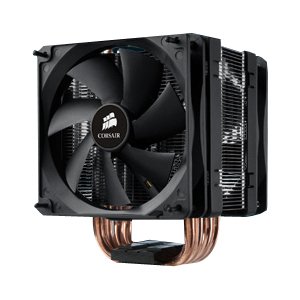
While the Core i7-2600K's stock cooler is sufficient for achieving respectable overclocks, for this build we're pairing the CPU with Corsair's A70. The A70 is a dual-fan heatpipe design that performs very well at an attractive after rebate price (and I've never had any issues with Corsair rebates). That said, there are many other similar CPU coolers that cost about $30, such as Cooler Master's popular Hyper 212 Plus that I've recommended previously.
Like the Biostar Z68 board this guide pairs with the Core i5-2500K, the ASUS P8Z68-V LE is also one of my go-to motherboards, for folks who want a few more bells and whistles than what the Biostar board offers. I've had good to great experiences with this board, especially in terms of its overclocking ability. Thus far these boards have been rock solid stable in the builds I've deployed with them. For a daily workhorse PC, reliability should be a primary consideration in choosing components.
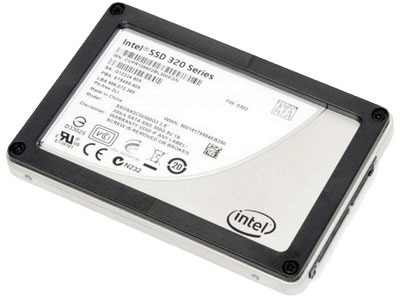
Reliability is why we're going with an Intel 320 Series 120GB SSD for this PC. This SSD is neither particularly inexpensive nor particularly fast (though it will still put any HDD to shame). Instead, Intel's 5 year SSD warranty is the best in the market, and in my experience, Intel's SSDs are very reliable. (Yes, we know the 320 Series had some teething problems, but those appear corrected with the latest firmware.) We've bumped the capacity of the SSD up compared to the previous two builds so that more work-related applications can be installed on it, including disk space hogs like Adobe's CS5.5. While this build also includes the Samsung F3 1TB, it is important to consider whether you need a 7200RPM mainstream HDD or if instead you might be able to use a slower, less expensive "green" drive like Western Digital's WD10EARS.
Because some applications devour RAM, and because RAM is extremely inexpensive right now, we've bumped the DDR3 count from 8GB to 16GB—at the low cost of $60 total. While we're specifically recommending two kits of 8GB (2 x 4GB) G.SKILL Ripjaws X DDR3-1600 because of their current low price, RAM prices fluctuate frequently and wildly, so it's a good idea to comparison shop between different brands for the most attractive combination of price and speed.
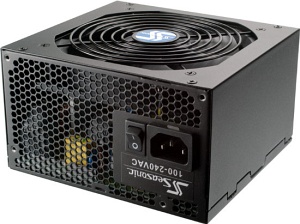
SeaSonic is another component company with a well-deserved reputation for reliability. The S12II 430B is not cheap for a 430W PSU; however, it is very high quality, comes with a 5-year warranty, and is more than enough power for this system. It's also capable of supporting many upgrades, including a powerful discrete GPU if you become interested in GPU-accelerated computing (or gaming) down the road.
Finally, Fractal Design's Define R3 has the honor of housing all of these capable components. The Define R3 was recently reviewed by Dustin, and again I concur with his conclusions. I think this case is as good as it gets at the $100 price point, though there are other cases that perform similarly in terms of objective measures like temperature and noise. I simply find working with Fractal Design's cases in general to be a pleasure and really like their aesthetics.
| Component | Product | Price | Rebate |
| CPU | Intel Core i7-2600K | $320 | |
| CPU cooler | Corsair A70 | $45 | -$15 |
| Motherboard | ASUS P8Z68-V LE | $133 | |
| RAM | 16GB G.SKILL Ripjaws X DDR3 1600 (4 x 4GB, 2 kits) | $60 | |
| SSD | Intel 320 Series 120GB | $200 | |
| HDD | Samsung F3 1TB | $150 | |
| Power supply | SeaSonic S12II 430B | $75 | |
| Case | Fractal Design Define R3 | $100 | |
| Optical drive | LITE-ON iHAS-324-98B | $20 | |
| Operating system | Microsoft Windows 7 Home Premium 64-bit (OEM) | $100 | |
| Total: | $1203 | $1188 |
Summary
This Intel Core i7-2600K system rings up about 20% more expensive than the Core i5-2500K rig on the previous page. You lose the ability to game as this PC has no discrete video card (and the integrated Intel graphics are not gaming-level). Instead, you gain a larger SSD, increased overclocking capability, twice the RAM, and an extra four threads courtesy of Hyper-Threading. To be clear, the i5-2500K is likely a better fit for most computer users than this i7-2600K rig. However, this system can easily be turned into a gaming rig in the future, mitigating one of its drawbacks. And most importantly, certain more intensive applications like many video encoding titles will see more than a 20% improvement in performance for a 20% cost increase. If you can hang off buying a GPU for the time being, as we noted earlier the next generation AMD parts are due "real soon now" so you can grab one of those after the holidays.
We have a few more words of advice and general conclusions on the next page.
Originally published at https://www.anandtech.com/show/5184/holiday-midrange-system-buyers-guide (Wayback Machine).