
ASUS Eee Pad Transformer Prime & NVIDIA Tegra 3 Review
The Three Power Profiles
There are three power profiles ASUS and NVIDIA have defined on the Prime: Normal, Balanced and Power Saver. Normal allows the CPU to run at up to 1.4GHz with only a single core active, and 1.3GHz otherwise. Balanced is the default setting and it drops maximum CPU clock to 1.2GHz and favors lower clock/voltage targets on the curve compared to Normal mode. Power Saver caps CPU frequency at 1GHz with 1 - 2 cores active, 760MHz with 3 cores active and 620MHz with 4 cores active. It's unclear what the impact is on GPU clocks/performance.
Regardless of power profile, video playback capabilities are untouched - all profiles are able to play 1080p High Profile H.264 content at up to 40Mbps.
The performance impact of these various profiles varies depending on what you're doing. I ran a mixture of CPU and GPU bound tests in all profiles to measure their impact. The results are below:

I reformatted the SunSpider and BrowserMark scores to keep the magnitude of the numbers in line with the rest in the chart, and to make higher numbers = better performance across the board. For the most part you can see that the difference between Normal and Balanced is pretty small. Numerically it works out to be a 5 - 15% gap depending on the benchmark. The latter end of the range is big enough where the performance conscious will want to stay in Normal mode, but it's possible to do without it.
It's interesting to note that the impact on GPU performance isn't that major across the board. It looks like NVIDIA is primarily modulating CPU speed here. The impact on JavaScript rendering performance is huge when you enable the Power Saving mode. In this state the Prime performs like a Tegra 2 based Gingerbread phone.
Power Profiles & Super IPS+ Toggles
Unlike (far too) many of its competitors, ASUS limits its customizations to those that are almost purely functional. ASUS is clearly aware of the fine line between useful improvements and clutter.

The most obvious customization is in the Quick Settings tool:
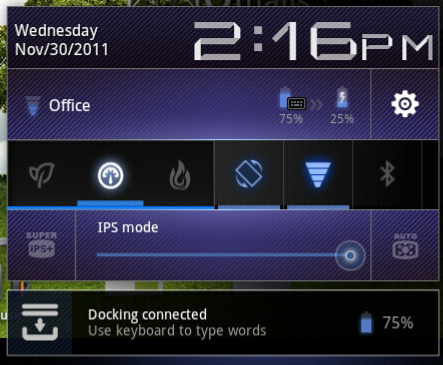
ASUS' implementation is far busier but it's all extremely useful. You get one tap access to Super IPS+ mode, as well as one tap switching between Power Saving, Balanced and Normal power profiles. I'm pleased to report that toggling any of these modes is pretty much instant, there's hardly any lag between when you tap a button and its impact takes effect. Response time is a particularly important as it directly impacts how frequently the tool is used. In this case I have no issues switching between power profiles because it's pretty much effortless.
Originally published at https://www.anandtech.com/show/5163/asus-eee-pad-transformer-prime-nvidia-tegra-3-review (Wayback Machine).