
ASUS Eee Pad Transformer Prime & NVIDIA Tegra 3 Review
Tegra 3 GPU: Making Honeycomb Buttery Smooth
The bigger impact on the overall experience is the Tegra 3's GPU. If you remember back to our initial analysis of Tegra 3 you'll know that the GPU is not only clocked higher but it also has more execution resources at its disposal. To further improve performance, per "core" efficiency is up thanks to some larger internal data structures and tweaks. The end result is much better gaming performance as well as a much smoother UI.
Tasks like bringing up the apps launcher or even swiping between home screens are finally far above 30 fps. While Tegra 2 didn't have the fill rate to deal with some of the more complex overlays in Honeycomb, Tegra 3 does. The move to Tegra 3 makes the Honeycomb experience so much better. This is what it should've been like from the start.
Gaming performance is also significantly better as you can see from our standard collection of Android GPU benchmarks:
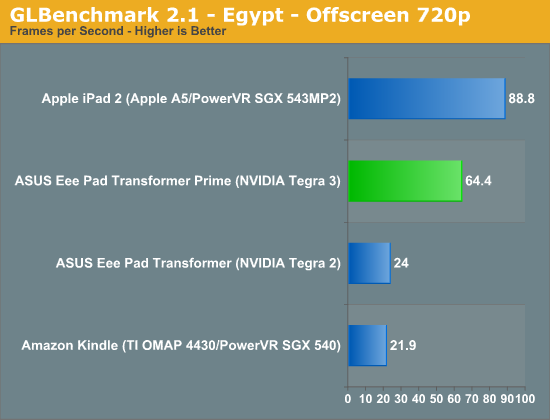
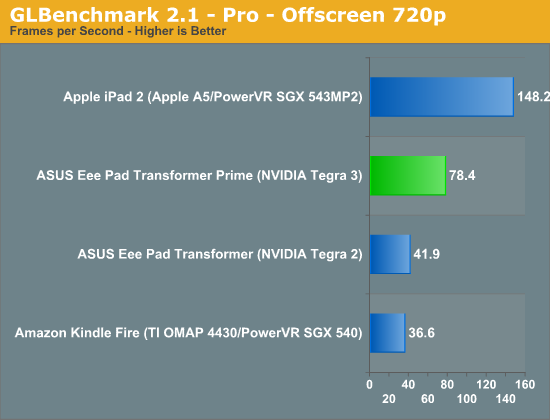
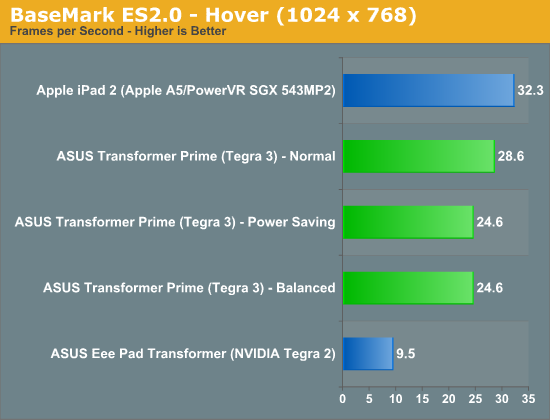
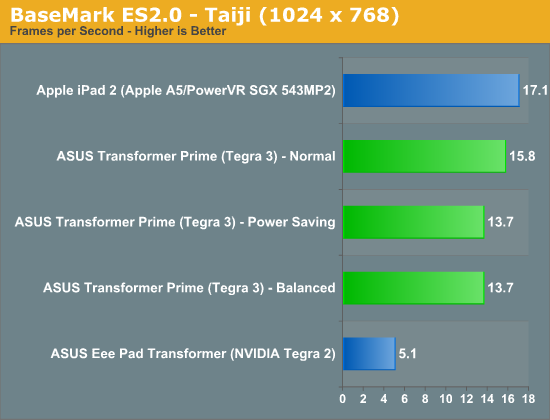
Performance is still not quite up to par with the iPad 2, but if we look at GLBenchmark's Egypt test Tegra 3 doesn't do too bad. The gap grows in more texture bound tests but in a heavier shader environment Tegra 3 isn't too shabby. While it's clear that Tegra 2 wasn't enough to deal with the 1280 x 752 resolution of Honeycomb tablets, Tegra 3 seems well matched.
Note that the BaseMark ES2.0 tests run at FP16 on Tegra 2 and 3 vs. FP24 on the PowerVR SGX 543MP2.
Originally published at https://www.anandtech.com/show/5163/asus-eee-pad-transformer-prime-nvidia-tegra-3-review (Wayback Machine).