
NZXT Phantom 410: The Boutique Favorite Goes On a Diet
- Posted in
- Cases/Cooling/PSUs
- mid-tower
- NZXT
In and Around the NZXT Phantom 410
Historically our readers haven't been very big fans of particularly garish enclosure designs; the stuff from Fractal Design and Antec (among others) have generally been more your speed. I largely tend to be in the same boat, but for some odd reason there's just something to be said for how delightfully off-kilter and gaudy the NZXT Phantom and its newer, smaller sibling, the NZXT Phantom 410 are. The odd angles and curves make the computer look like what everyone expected computers in the year 2011 to look like...in the seventies.
I'll come out and say it now: I don't think anybody is going to buy the NZXT Phantom 410 for practicality's sake. The bulging angles and corners aren't about using space efficiently, they're about style. Yet that said, NZXT does make a few allowances for ease of use. The door in front of the external drive bays pops open and closed easily but securely, allowing the case to maintain its aesthetic for the majority of the time, and the drive bay shields inside have small levers on them that allow them to pop out easily while remaining secure for unoccupied bays.
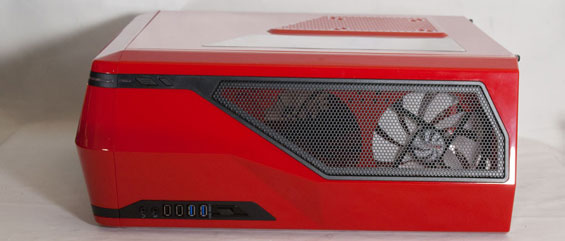
NZXT smartly keeps all the indicator lights, switches, and ports on the top of the enclosure, a modern design cue I wholeheartedly approve of. When the system is powered, a large stripe around the top left corner of the enclosure glows blue as a tertiary color. Thankfully NZXT also includes a pair of USB 3.0 ports that use an internal header; their Tempest 410 Elite made the poor decision of using three USB 2.0 ports and a single USB 3.0 port off an internal header, effectively wasting one USB 2.0 and one USB 3.0 port.
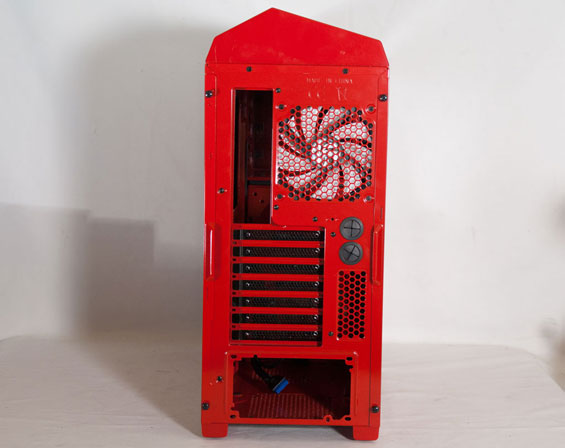
When we move to the back of the Phantom 410, we get our first clue that the inside may be a little more cramped than we're used to seeing: pay attention to the amount of space the I/O cluster, seven expansion slots, and power supply take up. You can tell there's a healthy amount of clearance behind the motherboard tray, but above it things are a little bit cramped.
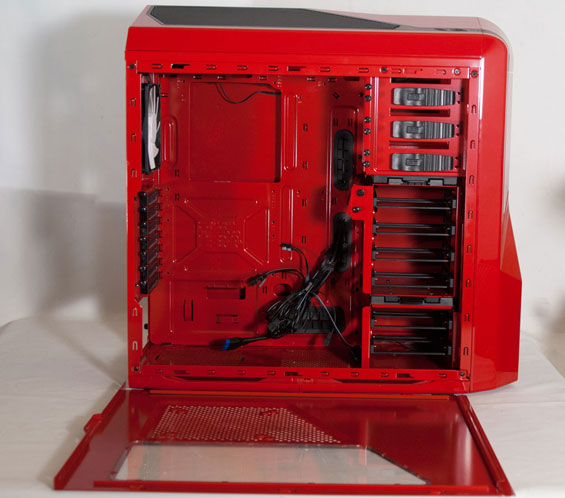
The side panel sports a window over where the CPU heatsink/fan unit typically rests, and then beneath it a grate with a 120mm/140mm fan mount that can blow cool air directly on the video card or video cards, which will be particularly useful for multi-GPU configurations. Both side panels are secured with two thumbscrews that were a little fussy in my review unit, but not much trouble with a proper screwdriver. When you do pop them off, though, you'll see that the inside of the Phantom 410 really is a bit on the cramped side.
You can buy yourself some real estate by removing the drive cage, but in the process you're reduced to just two internal 3.5"/2.5" drive bays. That said, the drive cage also includes an internal fan mount that you can pivot to aim air directly at the processor, but in the process you'll take up space your video card might have otherwise occupied. It's a nice idea, but in practice the Phantom 410 just feels a bit too small to really get any mileage out of it. Also pay attention to clearance above the motherboard tray: the exhaust fan still clears the tray itself, but it's a pretty tight squeeze.


Ultimately, aesthetically the NZXT Phantom 410 is going to be a matter of taste. I have friends that love garish designs, sometimes ironically and other times earnestly. Personally I like the style, and again I fall somewhere in the middle of that continuum. As you'll see when we get to assembly, though, this is definitely going to be style over practicality, so plan accordingly.
Originally published at https://www.anandtech.com/show/5157/nzxt-phantom-410-the-boutique-favorite-goes-on-a-diet (Wayback Machine).