
Toshiba DX735 All-in-One: Notebooks Without Batteries
User Experience
So where does Toshiba really fall short compared to the competition? The software side. I hesitate to ding the DX735 for not performing as well compared to the higher-specced machines from Dell and HP, but the software is where Dell's touchscreen implementation really was best while Toshiba has barely shown up at all.
The fact remains that Windows 7 just isn't very touch friendly. Dell's simple set of widgets and increased font scale dramatically improved the touch computing experience on the Inspiron One, while HP's TouchSmart software felt strangely bloated and gimmicky. Toshiba falls somewhere in the middle as a result of their lackluster showing: they've included a single touch-based application, the "bulletin board," which is cute to play with but ultimately has no real practical use.
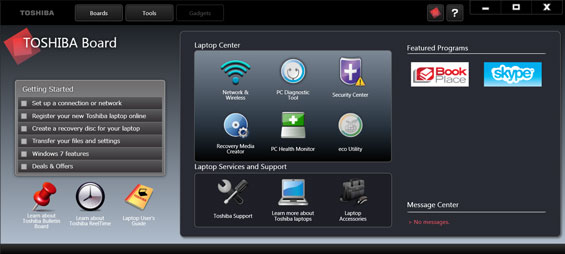
What may be the most damning is that the main "board" of the application talks about the all-in-one like it's a laptop; Toshiba didn't even bother to change the software. This is like opening unpatched Crysis 2 and seeing "Press Start" on the main screen; it's just lazy. While I still ultimately like the user interface better than HP's TouchSmart software, really only Dell seems to actually be trying. What you're left with in the case of the DX735 is the vanilla Windows experience, augmented (if you're so inclined) by touch capability.


Thankfully the rest of the all-in-one is a little better. While the keyboard is poor, it's easy enough and cheap enough to replace. Everything else is nice, clean, and simple, and Toshiba crushes the competition in two ways.
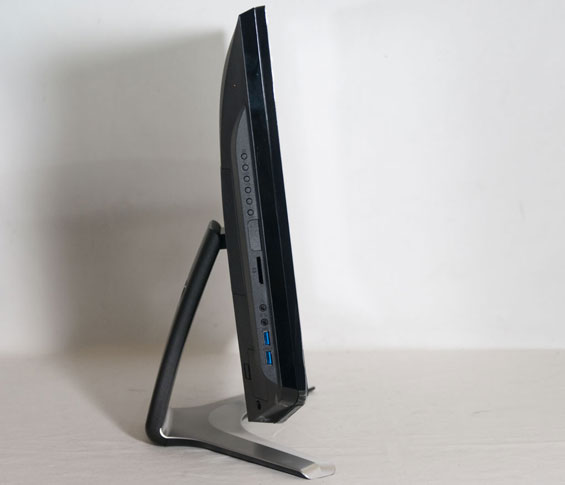
First, they include USB 3.0 connectivity where neither HP nor Dell could be bothered. It's a small improvement but nonetheless an important one because it at least allows for high speed external data transfer. The other major point is that the Toshiba is, quite frankly, a bit easier to get into. While the hard drive is still very difficult to access, the RAM slots are covered by a single panel on the back, and the mount is easy enough to remove. HP's TouchSmart was confusing to even try to figure out, as was the Inspiron One. These things don't have to be this difficult and at least you can upgrade the RAM without pulling your hair out.
Heat and Power Consumption
The Toshiba DX735's ace in the hole is really how it manages heat and power. By using a notebook CPU and electing not to include a discrete graphics part, Toshiba has produced an all-in-one that's incredibly light on power, in the process making it vastly more suitable as an appliance.
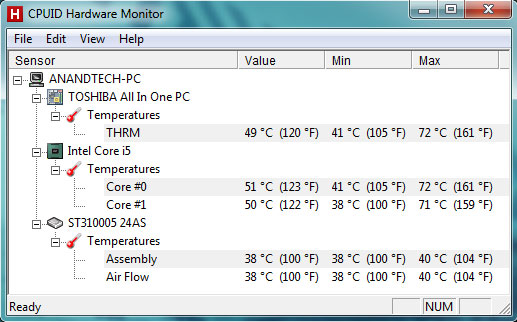
Toshiba does a good job of keeping the CPU fairly cool without producing a lot of noise in the process. And while 40C on the hard drive isn't exactly cool, it's not roasting either, and nowhere near as poor as Dell's system. Ultimately the DX735 is roughly on par with the HP TouchSmart 610, but remember that it's also lighter, smaller, and cheaper than that competing machine.
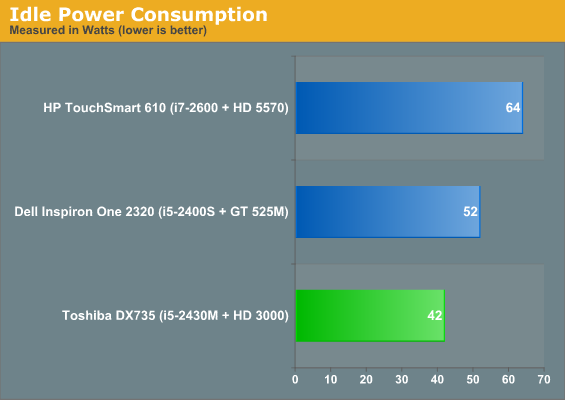
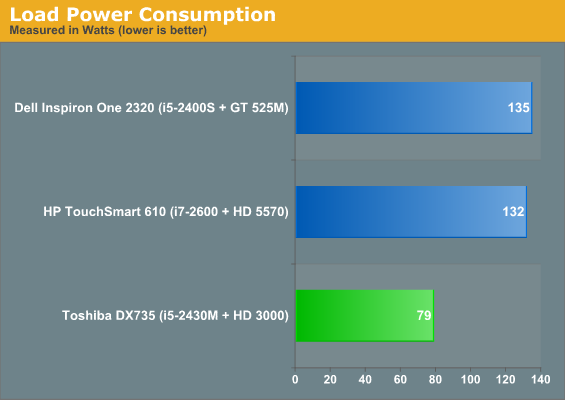
Idle power is admirably low, while load power is downright impressive. Remember Toshiba is powering a decently sized screen along with the computer inside it, so 79 watts under load makes the DX735 a nicely efficient piece of kit.
Originally published at https://www.anandtech.com/show/5135/toshiba-dx735-allinone-notebooks-without-batteries (Wayback Machine).