
Dell Vostro V131: A Budget Business Laptop
Battery Life
Overall performance is pretty much what you’d expect given the components, but one area where the Vostro V131 does acquit itself quite well is in battery life. The 65Wh battery is slightly larger than average, and for a 13.3” chassis it means you can last a long time between charges. How long? If “all day computing” is anything over eight hours (in light use), the V131 certainly reaches that mark, at least in certain workloads.
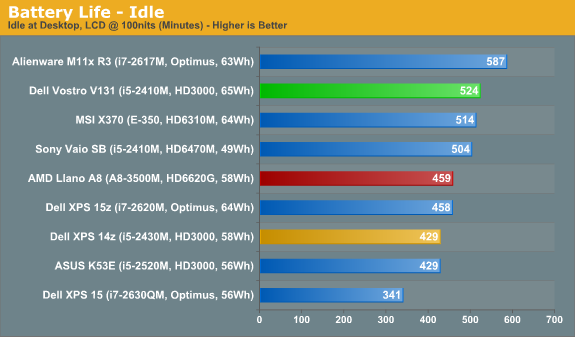
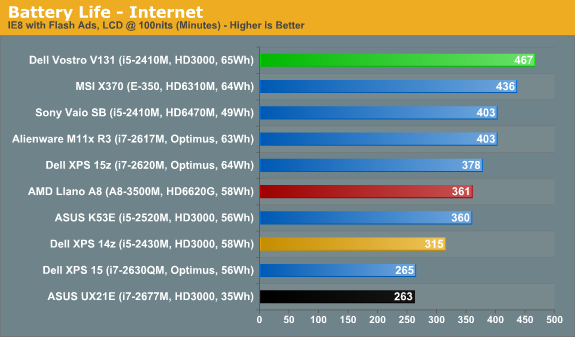
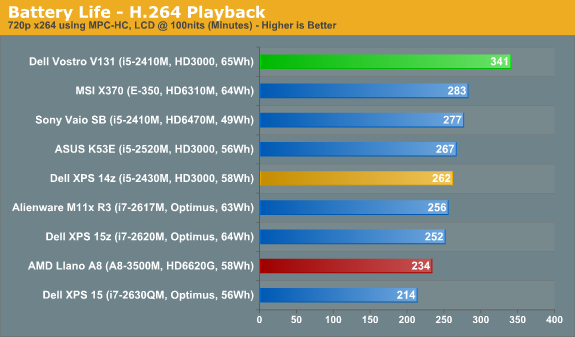
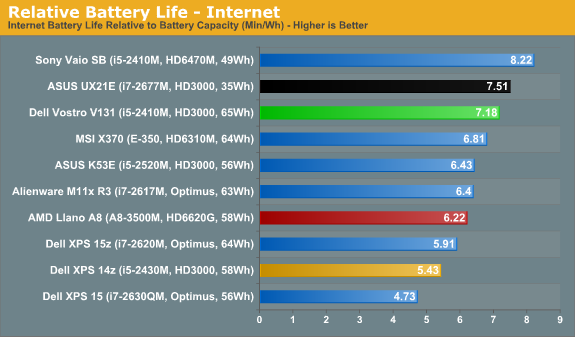
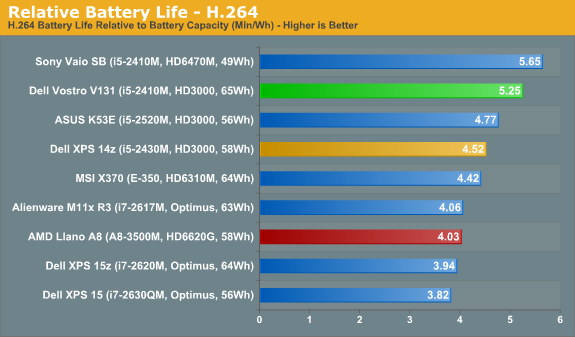
We measured just under nine hours of idle battery life at our 100 nits brightness setting (48% in Windows’ control panel). Internet battery life comes very close to eight hours, while H.264 playback will get you over 5.5 hours of movies. The above charts are only a small selection of the laptops we’ve tested, but Mobile Bench has more results, so let’s look at the bigger picture.
Out of all the laptops we’ve tested in the past couple of years, the Internet battery life ranks near the top—only Atom (with a similar size battery) or some of the ASUS U-series laptops last longer. Idle battery life isn’t quite as impressive, with some ULV/CULV options along with more Atom netbooks surpassing the Vostro, but then idle battery life also isn’t particularly useful if you’re using a laptop. As far as H.264 battery life goes, the V131 again places near the top.
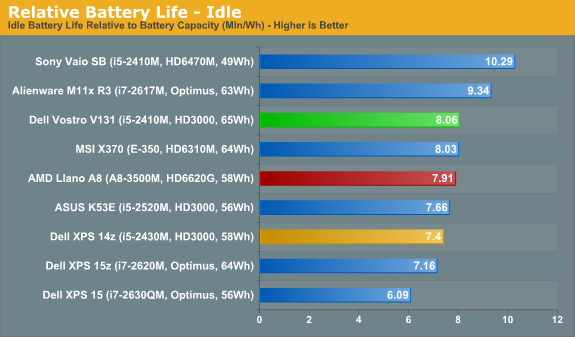
If you prefer a level playing field where we factor in battery capacities, you can also find those charts in Mobile Bench. Relative Idle Battery Life has many Atom and CULV/ULV laptops ahead, but the V131 still performance admirably. Relative Internet Battery Life has the V131 just out of the top 10—number 11 of 112 or so tested laptops. Relative H.264 Battery Life is even better, with the Vostro sitting in the #7 spot overall (for now). In terms of relative battery life, the V131 is right in the mix with the Brazos and Atom laptops we’ve tested, and it’s the second place result out of Sandy Bridge laptops (surpassed only by the Sony VAIO SB).
Power Use
If you prefer looking at power numbers rather than battery life, the Vostro V131 consumes around 7.3W idle, 8.2W for general Internet use, and 11.2W for H.264 playback. Those are all low load numbers, of course; if you put a full load on the system doing CPU video transcoding or gaming, you’ll use a lot more power. Under load, using a Kill-A-Watt meter, we measured a peak draw of 45W in the x264 encoding second pass test, and 49W max looping 3DMark06. (If you factor in power adapter efficiency of around 80-85%, that represents actual power use of 36W-38W for CPU intensive workloads or 39W-42W for gaming.)
Temperatures
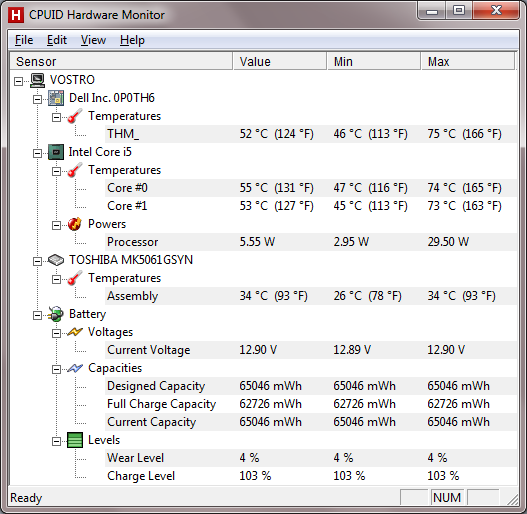
With a moderate dual-core CPU and no discrete graphics, temperatures are nothing to worry about. Even at maximum load, the CPU sits at a warm but hardly alarming 74C. And if you’re just running office tasks, the CPU will rarely get to that level.
Noise Levels
Considering there’s no discrete graphics chip, it shouldn’t be too surprising that noise levels are quite good. Idle noise is slightly higher than some laptops, but 32.3dB (in a ~30dB noise floor) isn’t bad. Put a heavy load on the CPU and/or GPU and fan noise will hit 36.5dB after a minute or so, and under heavier/prolonged loads the maximum noise we measured is 39.0dB. All of the noise measurements are taken at around 15” in front of the laptop.
Originally published at https://www.anandtech.com/show/5025/dell-vostro-v131-a-lesser-business-laptop-for-less (Wayback Machine).