
ASUS ML248H: Thin for the Win?
Brightness and Contrast
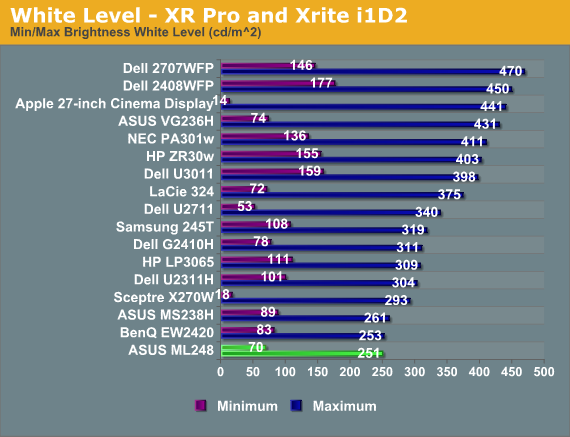
Even with contrast and brightness increased to their maximum values, the ASUS is not a light canon at all. The most I could get out of it was 251 nits, though that is brighter than I would ever use it. When at the minimum brightness level, the ASUS produces 70 nits of light output, which is a bit dim.
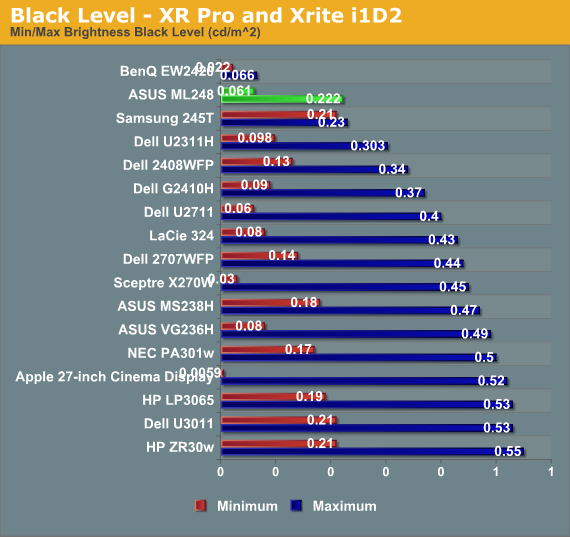
With the brightness back to maximum, the black level only registers at 0.222 nits, whereas with the backlight at minimum we got a black level reading of 0.061 nits.
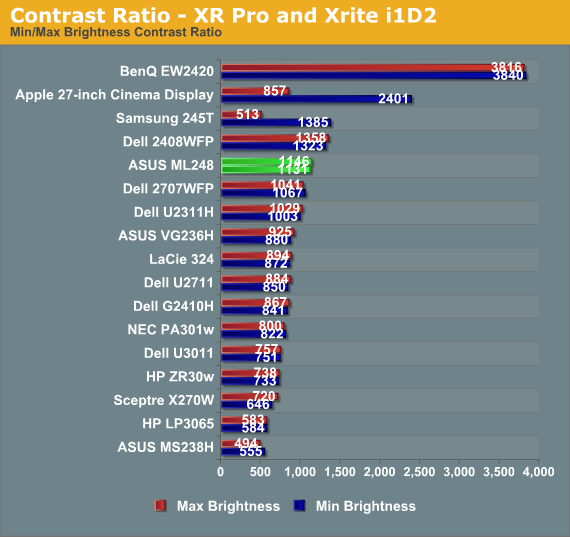
Looking at these in combination, the ASUS is producing contrast ratios of 1131:1 and 1146:1. It looks like whatever brightness level you want to set should work for you with the ASUS, and you can likely expect a contrast ratio of just over 1000:1 as well.
Brightness Uniformity
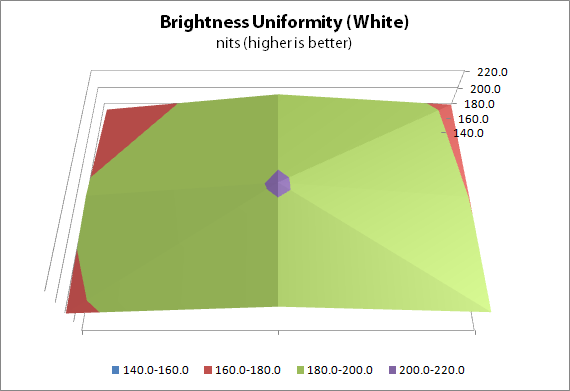
We saw earlier that the color uniformity of the ASUS was not up to par, so I wasn’t sure how the brightness and contrast would be in similar testing. With the center of the screen calibrated to 200 nits on a white screen, the ASUS is around 190 nits at the top and bottom of the center of the screen, but closer to 180 nits at the edges.
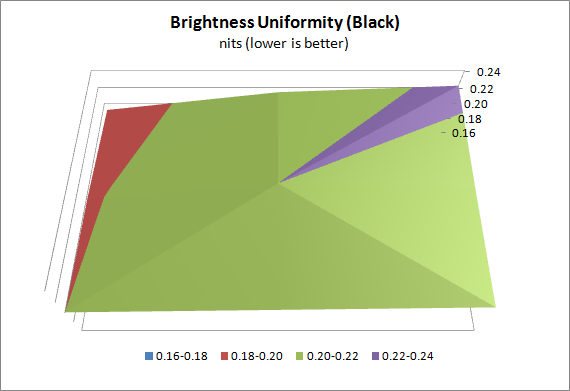
With an all black screen, the ML248H measures 0.22 nits in the center and drops slightly to 0.19 or 0.20 on the edge. These are very small differences, though, and are well within the margin of error for a dark reading from the light meter we use for testing.
I’m not certain what the LED alignment is for the ASUS ML248H, and they haven’t responded to my questions, but I’d guess that however the diffuser is set up for the lights is causing them to have an uneven light distribution across the whole screen, perhaps by having the LEDs themselves centered at the top and bottom of the screen. In any case, this non-uniformity could also be causing the color shifts in our dE uniformity testing. The panel is probably being driven exactly the same at the edges, but the spectrum of light passing through it is different, causing these issues.
I’m not sure if ASUS can fix this by using a different diffuser, or LEDs around the whole edge of the screen, or they might have to go to an LED backlit model to fix it. As I also review home theater displays, LG has recently introduced their Nano LED backlit sets for the home, which keep the slim form factor but provide all the backlit LED benefits like better contrast ratios and more even lighting, so perhaps we will see those in a desktop LCD soon.
Originally published at https://www.anandtech.com/show/5018/asus-ml248h-thin-for-the-win (Wayback Machine).