
Dell XPS 14z: Thoroughly Reviewed
Decent Battery Life
Here’s one area where the ultrabook argument is really going to have a hard time gaining traction with me: battery life. It’s great that you can get an ultra thin laptop, but if getting something to 0.8” thick or less requires the sacrifice of battery capacity, a slightly larger laptop will win out. Even with a ULV processor, the ASUS UX21E can’t hope to match what other Core i5 laptops can provide. Here are the results, though bear in mind we’re comparing the 14z against a limited selection of laptops. Check out Mobile Bench if you’d like to see the full set of results.
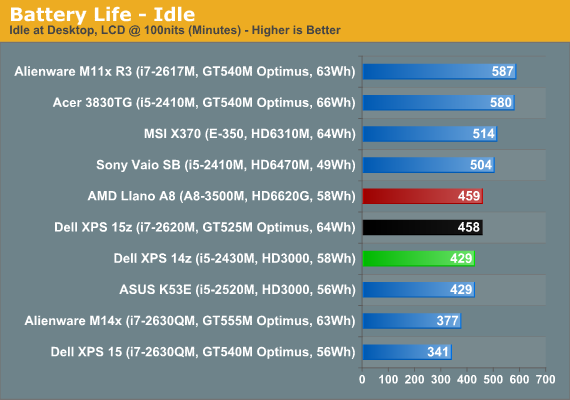
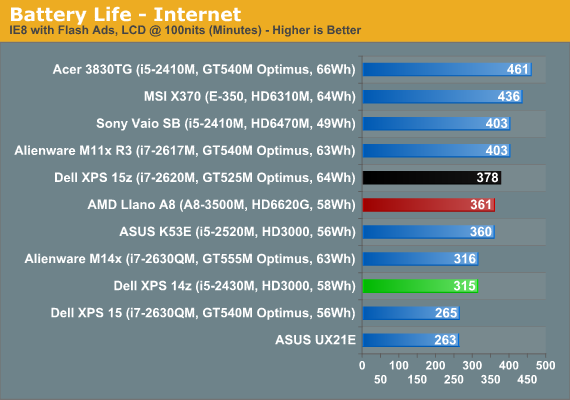
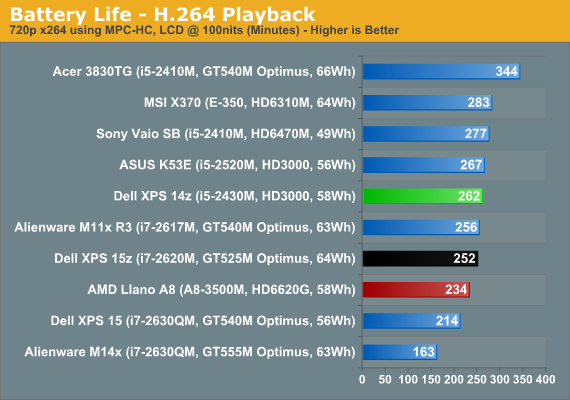
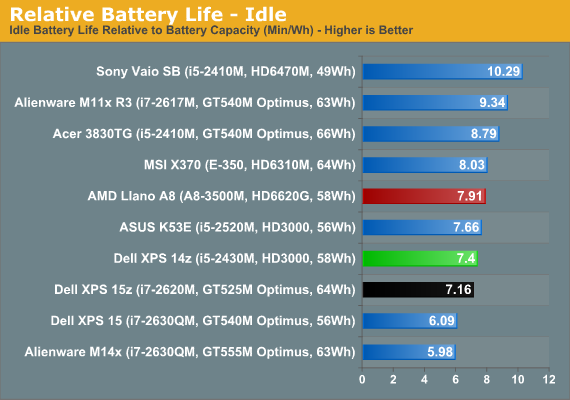
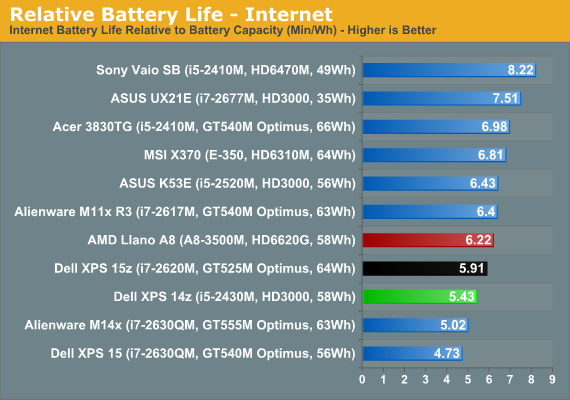
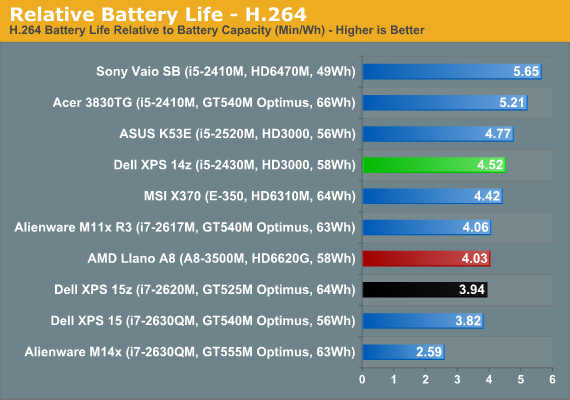
The 14z places in the middle of the pack for battery life, and only the H.264 relative battery life is slightly higher. However, if we look at a larger set of laptops we find that the 14z actually ranks roughly in the top third of battery life among laptops. In terms of raw mobility, five hours of Internet surfing and up to seven hours of idle battery life should be sufficient for most users, and four hours of H.264 playback is enough to get you through a couple of full-length movies.
Noise and Heat
The review sample we received doesn’t have the upgraded CPU or discrete graphics, which really helps to keep temperatures and noise in check. The XPS 14z appears to have three fan speeds that you’re likely to encounter: slow, medium, and high. Idle and light loads will usually run with the fan at a barely audible 31.2dB (from ~15”). Put a sustained load on the laptop for a minute or two and you’ll hear the fan spin up to a much more noticeable 38dB. After several minutes (and likely in hotter environments), the fan appears to have one more speed available that puts out 41dB.
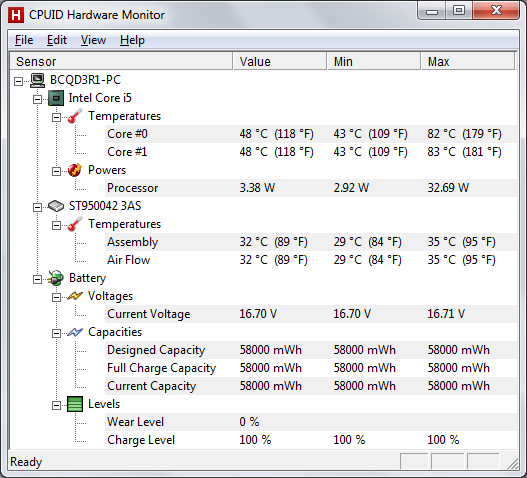
We looped 3DMark06 for several hours and were able to hit maximum fan speed, and temperatures start to get into the higher than typical range. Of note is that a similar sustained load doing H.264 encoding also hit 82C—Intel basically shares the thermal design power budget of the CPU with the IGP, so adding a 100% CPU load test while looping 3DMark didn’t increase the temperatures. With a GT 520M or the i7-2640M CPU upgrade, you’ll more likely encounter increased fan noise, and we’re a little concerned that the cooling setup may prove insufficient in some cases. Most likely the 14z will work fine even with the upgraded CPU/GPU, but there’s probably a reason Dell isn’t offering more than the entry-level GT 520M, and with the dual-core i5-2430M already hitting 83C it’s pretty clear that a 45W quad-core chip would need more cooling than the current chassis provides.
Originally published at https://www.anandtech.com/show/5007/dell-xps-14z-lots-of-features-in-a-small-package (Wayback Machine).