
Lian Li PC-TU200: On the Road With Lian Li
- Posted in
- Cases/Cooling/PSUs
- Mini ITX
- Lian Li
In and Around the Lian Li PC-TU200
If you've been keeping up with my case reviews since I started hammering them out a few months ago, you'll know I'm a proponent of enclosure designs that find newer, sometimes smarter ways to work. At the very least, I can respect any company that's willing to tinker with conventions and experiment with their designs: that's why I have such a soft spot for SilverStone, and it's why I'm developing one for Lian Li. But there's a major difference between the two: SilverStone experiments a bit with their designs, but Lian Li oftentimes seems like their engineers have started entirely off the grid to begin with.


Externally, the TU200 seems pretty self-explanatory. The front features a single 5.25" drive bay with a bay cover so as not to mar Lian Li's trademark all-aluminum design. Below it are the power button and reset buttons, followed by the massive front vent for the 140mm intake fan. Making sure to keep with the times, the bottom of the enclosure sports an eSATA port and a pair of USB 3.0 ports, along with the standard headphone and mic jacks. The corners of the enclosure are covered in molded aluminum bumpers while the top has a handle built into it, not so quietly suggesting that the TU200 is meant to spend its time on the road instead of buried under your desk.
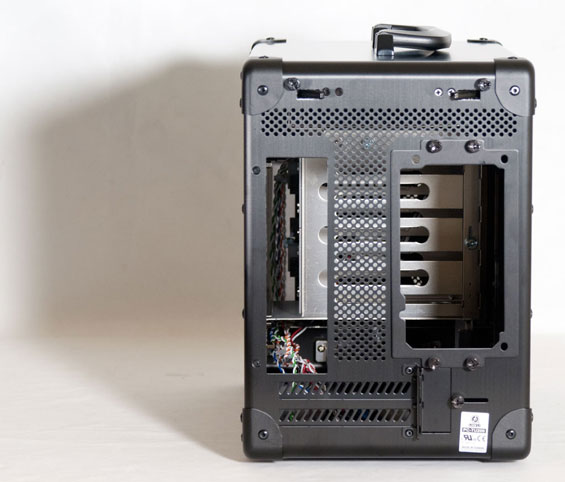
Pop over to the back, and you'll notice two major clues that all is not normal in Lian Li's world: two levers at the top, locked into place with thumbscrews, that are designed to pop out the side panels. Below them is a healthy amount of ventilation, the power supply mounting plate, and the openings for the motherboard I/O cluster along with two ventilated expansion bay covers.
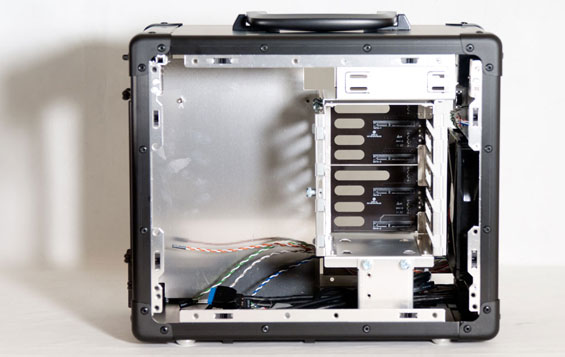
When you do open up the TU200, everything is where you'd expect it to be...sort of. There's a fairly healthy sized drive cage to the right able to support four 3.5" drives (or three 3.5" drives and a single 2.5" drive that mounts to the bottom); that cage is held in place by the top cage for the 5.25" drive and a small plate that secures into both the cage and the bottom of the enclosure with thumbscrews. If it wasn't clear from the outside that quarters in the TU200 were going to be cramped, it should be abundantly clear now. Thankfully the standoffs for the motherboard are built into the tray.
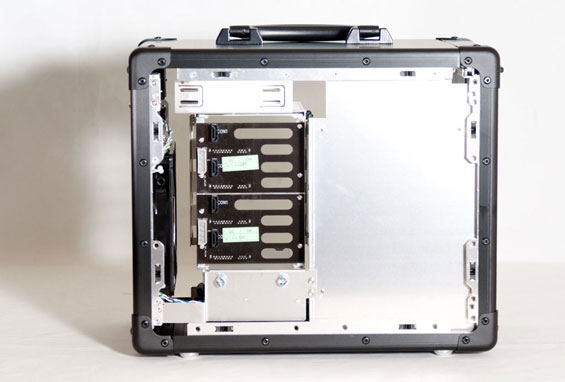
Speaking of the motherboard tray, you'll notice that behind it there's virtually no gap between it and the side panel; any cable organization has to be done behind the drive cage backplane. And while that backplane is very much appreciated, it has a couple of minor flaws. The first is that Lian Li inexplicably includes molex power connectors instead of SATA power. I've mentioned this before: molex needs to go the way of the dinosaur, period. The second has to do with the mount at the bottom of the cage used for the 2.5" drive: it just doesn't line up with the bottom connectors. Given that Lian Li has to use custom grommets and screws to mount a 2.5" drive to the bottom of the cage anyhow, I feel like some allowance could or should've been made for this.
Quarters in the TU200 are pretty freaking cramped. That's to be expected from an enclosure this small and designed with these parts in mind. While the front intake fan theoretically provides airflow for the entire system, it also can potentially run into trouble from the drive cage blocking the air, and it's too high to bring in cool air for the video card; for that there's ventilation in the bottom of the case, but as you can see in the photos the TU200's feet don't lift it off the ground very much. On carpet this gap will be completely closed.
Originally published at https://www.anandtech.com/show/5006/lian-li-pctu200-on-the-road-with-lian-li (Wayback Machine).