
ASUS E35M1-M Pro Review - Anyone For Fusion?
- Posted in
- Asus
- Motherboards
- Fusion
- E-350
BIOS
When you first enter BIOS, you will notice that ASUS have used a graphical BIOS with this motherboard. The BIOS itself is very easy to navigate through and when you get into it for the first time, you are faced with the ‘EZ Mode’ which shows you the basic things which a user may use or need to change such as the boot order of the system. When you enter the ‘Advanced Mode’, it opens up the entire BIOS so that you can turn things on or off which you would not find in the basic setup.

It is nice to see that overclocking features have been included in this BIOS but I do not think that many users will be buying this motherboard with overclocking in mind, as that will only raise power consumption and temperatures.

The fan controls in the BIOS allow you control both fan headers on the motherboard. You have a few options available which allow for either optimized cooling based on temperature, or if a quiet computing experience is preferred, that option is at your disposal too.
There are no noticeable changes between the release BIOS and the latest BIOS which is available on the ASUS website. ASUS claim improved system stability is achieved with the latest release although I have not experienced any issues on the shipped BIOS.


Overclocking
While overclocking may not be a strong point of this motherboard, it is still possible to squeeze a bit of extra performance out of the APU. I started with the ASUS Suite II software to see how good the automated overclocking was. The auto-overclocking feature added 3 MHz to the bus speed which increased the overall CPU speed by 48 MHz to give a final clock speed of 1648 MHz. The same overclock is applied if you select the AutoTune feature within the BIOS. It was stable but the increase in performance was not that noticeable.
Going through the BIOS, I was able to achieve a better result. The APU has a stock clock speed of 1.6 GHz and I was able to push it up to 1.792 GHz by using a 112 MHz base clock. All voltages were left on auto. When I went any higher than 112 MHz on the base clock, the motherboard would occasionally have an issue getting into Windows. However, from a stability standpoint, everything worked flawlessly at 112 MHz.
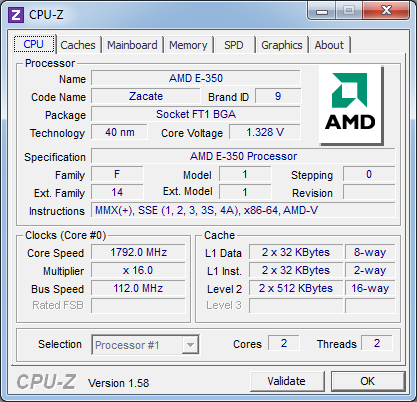
Along with standard stability tests, for completeness, the system was put under a 100 per cent loading for ten minutes and then the PC was put into a sleep state for the night. It switched on in the morning without any issues and full usability. When a 112 MHz base clock was used, there were no issues and the system was fully usable.
Originally published at https://www.anandtech.com/show/4996/asus-e35m1m-pro-review-anyone-for-fusion (Wayback Machine).