
iCloud on the Desktop: A Look at OS X 10.7.2 and iCloud for Windows

iCloud.com is another major piece of the iCloud puzzle. iCloud’s web interface and its associated web apps are a hodgepodge of iOS and OS X design elements - the webmail app is more or less OS X Lion’s Mail.app with iOS Mail’s icons. Pop ups are displayed in iOS-style white-text-on-blue-background boxes. The Contacts web app is likewise a pretty straight port of the Lion version, and the Calendar app is likewise similar. The web interfaces for Contacts and Calendars are, in fact, identical to those that come with Lion Server, though for whatever reason the iCloud web client is much nicer than the bare bones implementation found in Apple’s server OS (I suspect the iCloud webmail client was developed in-house, while Lion Server relies on the open-source Roundcube for webmail and a wide array of other open-source pieces for its backend).
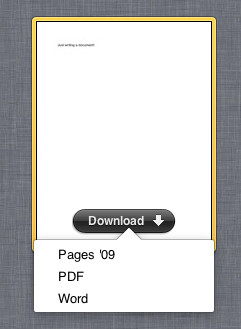
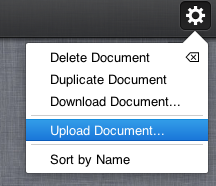
To use the web versions of the iWork apps, you must first install and launch an iCloud-enabled version of either Pages and/or Numbers and/or Keynote - current users of these programs can grab iCloud-enabled updates from the App Store now. Once you've set these programs up to use iCloud, any documents you create in them are automatically stored in iCloud, and can be downloaded from iCloud.com as Pages, Word, or PDF files. You can also upload Pages, Word, and text files for editing on your iCloud-enabled devices (Numbers will let you upload Numbers, Excel, and CSV files, while Keynote lets you upload Keynote, and Powerpoint files).
iCloud for Windows

To get iCloud set up via Outlook, you’ll need to have an Outlook profile created - you just have to launch Outlook once to do this, and you don’t need to have any accounts configured in the client already. If this has been done, clicking the checkboxes in the control panel will set everything up for you automatically.
You can also sync bookmarks, both with Internet Explorer and Safari for Windows 5.1.1 - clicking Options will allow you to choose between the browsers, provided you have both installed.
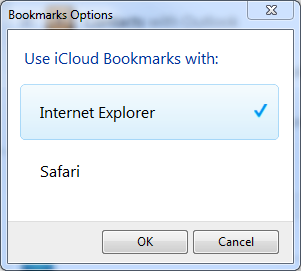
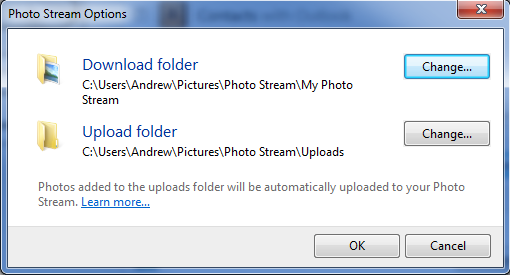
Photo Stream is available in Windows, which is a nice touch, even if it isn’t as seamless as in its OS X/iOS implementation. By default, it creates a Photo Stream folder in your My Pictures folder. In that folder, there are two additional folders - one for downloading of pictures that are already in your Photo Stream, and one for uploading new pictures into Photo Stream from your PC.

Conclusions
The second thing iCloud is trying to do - visible particularly through Documents in the Cloud, iTunes in the Cloud, and Photo Stream - is to serve as the connective tissue between all of your many devices (as long as your devices aren't running, say, Android, or some flavor of Linux). It's generally more useful on this account (Photo Stream is very easy to get used to if you're in the habit of taking a lot of pictures or screenshots), but it won't be as useful as it could be unless developers begin updating their apps to take advantage of iCloud's APIs. The trouble here is that some of those developers (Microsoft chief among them) have their own cloud services to push. Only time will tell how popular iCloud will become among third parties.
None of this is to say that iCloud won’t be a success, or at least more of a success than MobileMe ever was. The services lost in the transition from MobileMe to iCloud (iDisk and iWeb publishing among them) are mostly replaceable, it’s now free of charge and, critically, it brings reasonably sophisticated services to people who previously might not have bothered to set them up: synchronizing mail, calendars, contacts, photos, documents and the rest between several different devices is now something a casual user can do without too much effort.
Whether iCloud succeeds in the long run depends largely on whether those novice users (and developers) take advantage of its features, and on the service’s reliability once it’s handling data syncing and data backup for millions of Macs and iOS devices.
Originally published at https://www.anandtech.com/show/4959/icloud-on-the-desktop-a-look-at-os-x-1072-and-icloud-for-windows (Wayback Machine).