
Sony VAIO S Series: All Day Consumer Computing
Good Computer, Too Much Bloat
Generally when I've handled these notebook reviews, I haven't gone into the software/bloatware that ships on them too much, if at all. Truth be told, bloatware (at least in my experience) isn't the cancer on the industry that it used to be. These days the worst you have to do is uninstall Norton and disable Bing bar and I'd be hard-pressed to find anyone who thinks that isn't a net win. But before we get to the part where Sony drops the ball with the VAIO S, we'll take a look at the good stuff.
As far as build quality and style go, the VAIO S is primo for a consumer laptop, no doubt about that. Sony uses a combination of aluminum, plastic, and magnesium alloy for the chassis that's extremely attractive, classy, and best of all, functional. There's just no gloss anywhere. And a weight of under four pounds for a powerful 13.3" notebook is really quite good; as far as heft and portability go, it's comparable to a netbook.
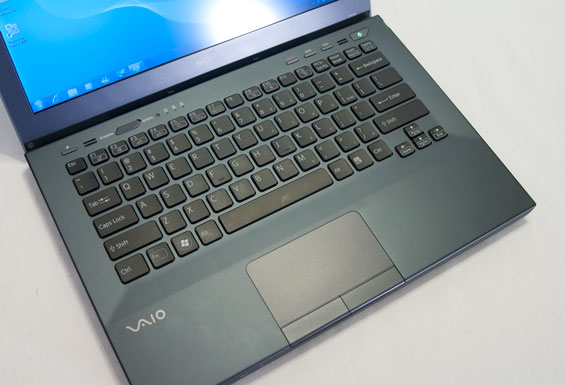
The lid appears to be made out of magnesium alloy, as it displays remarkably little flex when you try to twist the screen. From there, the inside surface is brushed aluminum with a recessed, backlit plastic keyboard. My only real complaint as far as the keyboard is concerned is the lack of dedicated document navigation keys, but given the overall thickness (or lack thereof) I'm inclined to let that slide.
Unfortunately the same can't be said for the touchpad. The tracking surface is something that I think is going to divide a lot of end users; some people will really like it, while some people (like me) are just going to find it doesn't feel particularly comfortable to use. Likewise, the mouse buttons feel stiff and require a bit more pressure than I'm used to. The touchpad and buttons probably shouldn't be a dealbreaker for anyone and most users will be able to get used to them, but this is one area where Sony can improve the design of the VAIO S.


Everything else (physically at least) is pretty stellar, though. Above the keyboard is the eject button for the optical drive, next to the "Stamina / Speed" switch. The "Stamina" mode switches off the AMD Radeon HD 6470M and relies on Intel's IGP, while automatically changing the power profile over to "power saver." On the other hand, the "Speed" mode enables the 6470M and switches the power profile over to "high performance." As I mentioned before, Sony appears to be using muxes to handle graphics switching instead of AMD's dynamic switching software solution, and the screen blinks a couple of times (takes about ten seconds) when switching between modes. Thankfully it doesn't require a reboot.
The VAIO S' battery is housed internally, but a single plate on the bottom of the notebook can be removed to swap it out along with changing the hard drive or adding memory to the single DIMM slot. Clearly the battery isn't designed to be hot-swappable, but it doesn't need to be either; there are grooves on the bottom of the notebook the extended sheet style battery latches into.
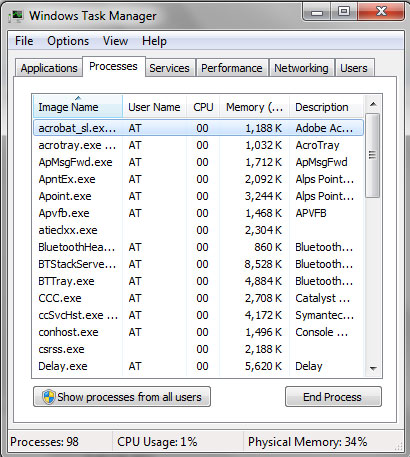
And then there's this (and then there's Maude?) I actually had my work cut out for me getting the VAIO S into stomping shape for testing, because the factory restored image has a punishing 100 processes running at the outset, which eventually shrinks down to a more reasonable...97? It's really bad. The bloat on the VAIO isn't just the usual bloatware, a tremendous amount of it is Sony's own pack-in crap. Between all of the junk software and the agonizingly slow 5400RPM hard drive, what should be a fairly agile little computer can actually be rendered nigh unusable. I actually had to do the factory restore after I'd started copying over my test suite; Windows Update running in the background was exactly enough to bring the whole system to a crawl, to the point where the mouse pointer lags hopelessly.
Just to put things in perspective: while I'm writing this review on my desktop, I have Photoshop CS5, Windows Live Mail (quiet you), WinAMP, Steam, Trillian, and Firefox open, along with antiviral software, Dropbox, and my UPS system software in the system tray. That brings me up to about 3.6GB of used memory...and 62 processes.
Originally published at https://www.anandtech.com/show/4748/sony-vaio-sb-all-day-consumer-computing (Wayback Machine).