
Dell XPS 15z: Sincerely Flattering
Dell XPS 15z Battery Life: Up to 7.5 Hours
It’s interesting to look at battery life for what should otherwise be similar laptops, as the results aren’t always what you’d expect. Consider NVIDIA’s Optimus Technology, which allows the discrete GPU to complete shut off when it’s not in use. Given that the dGPU isn’t using any power in such laptops, in theory we should see consistent relative battery life across all Sandy Bridge (or Second-Generation Core i-series if you prefer the official name) laptops—with dual-core offerings doing somewhat better than quad-core laptops. A look at the results in Mobile Bench however proves that this doesn’t always happen.
ASUS’ K53E uses an i5-2520M and manages 6.43 min/Wh in the Internet test, but the Toshiba M645 only gets 5.23 min/Wh. On the quad-core side of things, the initial Sandy Bridge test laptop got 5.86 min/Wh—a mark yet to be equaled by any shipping SNB quad-core laptops! Alienware’s M14x gets 5.02 min/Wh in the same test while the Dell XPS 15 L502x only scores 4.73 min/Wh (or 4.8 min/Wh with a larger 90Wh battery). There’s certainly variance among the laptops, more than we’d attribute to LCD size or other factors. The question then is where the XPS 15z places, and thankfully it does much better than the XPS 15.
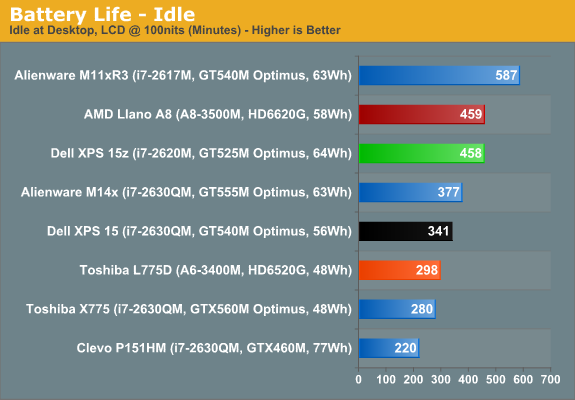
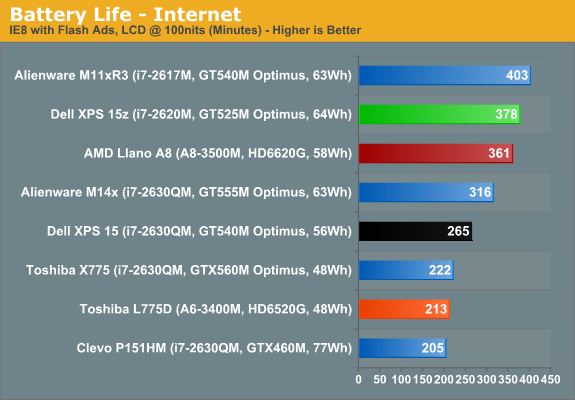
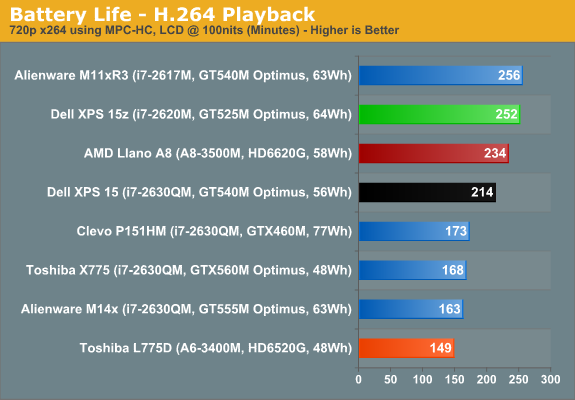
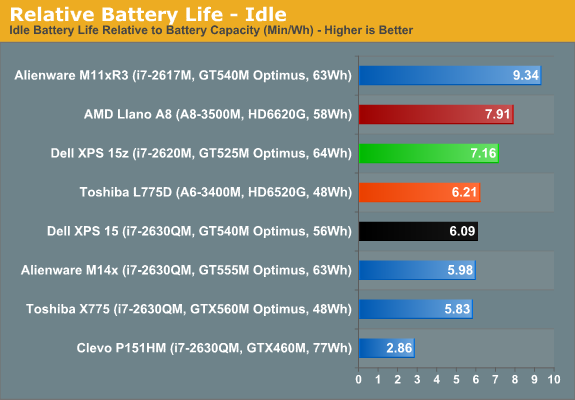
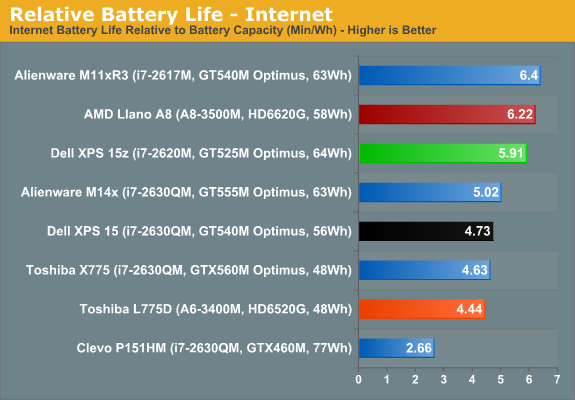
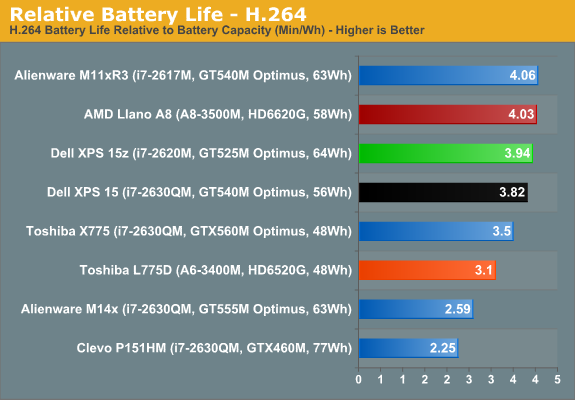
Dell’s XPS 15z not only beats the XPS 15, but it also leads most other Optimus enabled SNB laptops that we’ve tested. The ASUS K53E still wins out for dual-core SNB laptops (it’s not shown in the above charts, but you can see the comparison in Bench), but the only other SNB system to match/exceed the 15z is the Alienware M11x R3—a smaller laptop with a ULV processor. Idle battery life is over 7.5 hours, and if you want to drop the LCD below 100 nits (we tested at 33% brightness), you could probably hit eight hours. For more reasonable use cases, Internet browsing battery life is still an impressive 6+ hours, and H.264 playback from the HDD lasts over four hours.
In terms of modern laptops (e.g. excluding Atom netbooks and older CULV offerings), the only laptops that get better relative battery life than the XPS 15z are equipped with Brazos or Llano, or the already mentioned ASUS K53E and Alienware M11x R3. That puts the 15z in good company as far as operating off the mains is concerned. Of course, if we want to bring OS X into the picture, you’ll still have a hard time matching the 9+ hours the MBP13/15 can reach, but run Windows 7 on a MacBook and you’ll get substantially worse battery life. Unless you want/need more than six hours unplugged time, the XPS 15z should have you covered—at least until your battery starts wearing out and you have to pry open the chassis.
Originally published at https://www.anandtech.com/show/4711/dell-xps-15z-sincerely-flattering (Wayback Machine).