
HP Z210 SFF Workstation: Serious Power in Cramped Quarters
Build, Noise, Heat, and Power Consumption
The build and build quality of the HP Z210 SFF are probably the most striking aspects of it right off the bat. I personally love smaller computers, but there's a real benefit to going with a workstation from HP or Dell as well: they're vastly easier to service than a garden variety desktop build. Despite the small case, HP has designed the Z210's chassis to be incredibly easy to work inside.
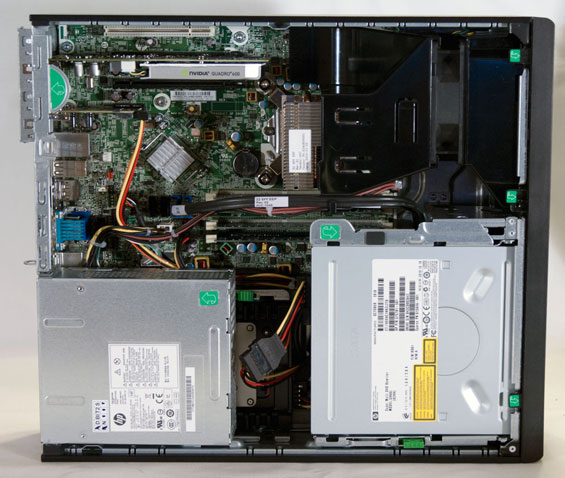
While initially appearing very compact and difficult, there are a couple of extremely smart decisions on HP's part. First, the cooling design minimizes the amount of work the intake fan has to do and as a result, the Z210 gets by with just one 80mm fan. The only thing between the processor and cool air from the front of the case is the fan and heatsink assembly, and this allows the chip to run very cool and keeps the fan at a low speed, making it virtually silent. Second, the power supply easily tilts up to allow access to the single 3.5" internal drive bay, and the optical drive tilts up allowing easy upgrading and servicing of whatever parts the end user has elected to use for the 5.25" and 3.5" external bays. Third, the Z210 is just plain easy to get into; you can lock the side panel to the case with a conventional padlock, but otherwise the panel simply lifts off with the use of a lever. The Dell Precision T1600 was just about as easy to use, and frankly I wouldn't mind seeing more of these design cues materialize in consumer enclosures.


When you look inside the Z210, though, you can pretty easily see where sacrifices had to be made to reach this form factor, and the one that hurts the most is the single internal 3.5" bay. You can increase the number of storage drives inside the system through a variety of means (probably the easiest is to mount one in the external 3.5" bay), but our review unit had a 160GB SSD...and that's it.
Finally, when talking about the build we would be remiss in not at least mentioning some of the secret sauce HP includes with their workstations, specifically the HP Performance Advisor. The Performance Advisor is software they're very proud of and I can see why: it can give you exceptionally detailed information about the particular system configuration, but its major claim to fame is the ability to change BIOS settings and suggest new drivers depending on the software you want to run. Unfortunately the only software we were able to test this with was Adobe Premiere Pro CS5.5, and it struck out there as I mentioned before. Conceptually it's fantastic, but it looks like it may need a little more work and optimization.
It won't surprise you to know that power consumption in the Z210 SFF was fantastic, and it's here where HP delivers a major advantage over Dell. While Dell will charge you for the privilege of a more efficient power supply, HP promises 90% efficiency and 80 Plus Bronze certification across all of the power supplies in their enterprise desktops.
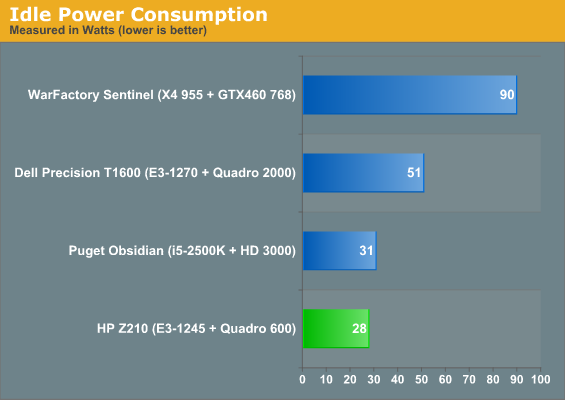
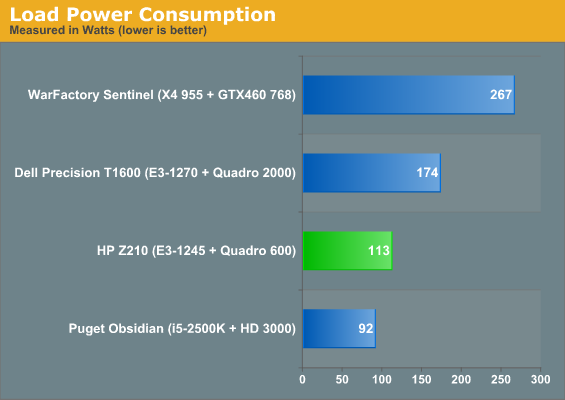
That efficient power supply winds up paying dividends. The Puget Systems Obsidian is no slouch (and is indeed a desktop designed specifically for small business), including an Antec TruePower 650 80 Plus Bronze-certified power supply, and idle power consumption is roughly in the margin of error. At idle, though, the Z210 sports a brutal 20-watt lead on the Dell T1600, which makes do with a low-efficiency power supply coupled with a pair of mechanical hard drives in RAID 0. The Z210 and T1600 have processors that perform fairly comparably, while the workstation cards have roughly a 20-watt TDP gap separating them, yet between the storage, cards, and power supplies, the Z210 stakes out a 60-watt lead under load.
With low power consumption comes low heat generation. Unfortunately HWMonitor didn't run properly on the Z210; AIDA64, on the other hand, was able to read temperatures fairly well. Cores idled in the high 40s, but load temperatures were good, never breaking 70C under stress. For the most part the Z210 retains a cool head, and even under load barely generates any noise. You can hear a very soft hum at best, but the efficient cooling design keeps the whole system running quietly. Most of the desktop cases I test could stand to run this softly.
Originally published at https://www.anandtech.com/show/4668/hp-z210-sff-workstation-serious-power-in-cramped-quarters (Wayback Machine).