
SilverStone Fortress FT02: True Classics Never Go Out of Style
Assembling the SilverStone Fortress FT02
While installing the testbed into the FT02 was much easier than the RV03, it's still not a walk in the park compared to more "normal" cases. This is still very much in line with the sort of "special needs" I've come to expect from assembling SilverStone hardware. The nonstandard internal layout results in some odd clearance issues, but part of the problem is that SilverStone in general seems to be allergic to tool-less designs. There are conveniences that could be added, though the FT02 was unleashed upon the world when Corsair's designs were in their infancy.
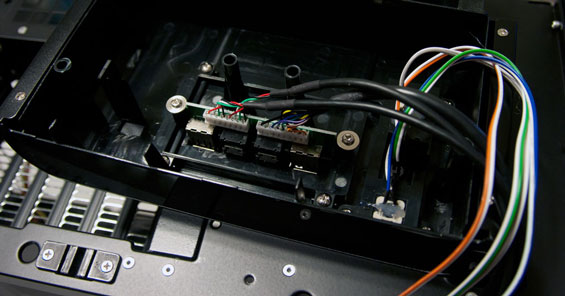
The first thing I did was change out the USB 2.0 ports for a pair of USB 3.0 ports, and this was actually fairly simple. The top piece that houses the port cluster is attached using just two screws, and then the power cluster itself is another two. Remove those, slide the card with the ports on it out, slide in the replacement, reassemble, and you're done. It works perfectly.
Mounting the motherboard and I/O shield was a breeze, too; that isn't where the complication comes in. Routing the case headers down to the motherboard was just as easy, and the more of these reviews I do the more inclined I am to connect those little two-pin headaches as early as possible. SilverStone also includes brackets for attaching a 240mm radiator to the bottom intake fans, but I can't believe this is a remotely good idea: by the time air blows through that radiator, it's going to be mighty toasty and headed right into your video cards.
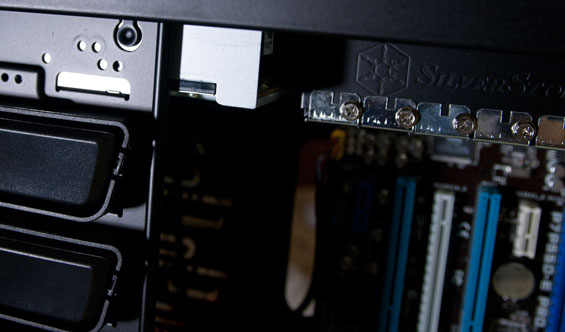
My next step is installing the hard drive, SSD, and optical drive. While the hard drive is easy enough to install into the removable drive cage, the SSD and optical drive are a little more fraught. First, while there are tool-less snaps for the optical drives, they're only on one side: the FT02 uses screws on the other side, and all of the bay shields are mounted this way. Second, there's a clearance issue with the topmost drive bay: our optical drive is a blu-ray reader that's about 180mm deep, and it butts squarely against the expansion slots. As a result, it has to be installed into the second bay down, which isn't the most attractive solution.
If you have a fairly deep optical drive, odds are good it'll either smack against the expansion slots or butt up against whatever you might've wanted to install in the bottommost PCI/PCIe slot on the motherboard, and I ran into this when I installed my personal machine into the FT02 after finishing testing (a glowing endorsement if ever there were one.) I have a combination blu-ray/HD-DVD drive that's fairly deep, and as a result it wound up having to get mounted into the third 5.25" bay. I'd planned to put my ASUS GeForce GT 430 into the bottom PCIe slot to space it from my main graphics card, but the cooler on the card is about a slot and a half wide and as a result wouldn't fit against the blu-ray drive. Between requiring tools and the iffy clearance, this is one place where the FT02 could definitely use some improvement.
Mounting the SSD also feels a bit tacked on. SilverStone ships the FT02 with a separate tray that you can install your SSD into, and then that tray gets screwed onto the back of the 5.25" drive cage, behind the motherboard tray. Four screws to mount the drive, four more to mount it to the cage, and heaven help you if you need to remove the 5.25" drive under it for any reason, because the screws holding that in are also covered by the SSD tray. Cold comfort is that when you go to route the power cables, at least the SSD's close enough to use the same set of leads as the optical drives.
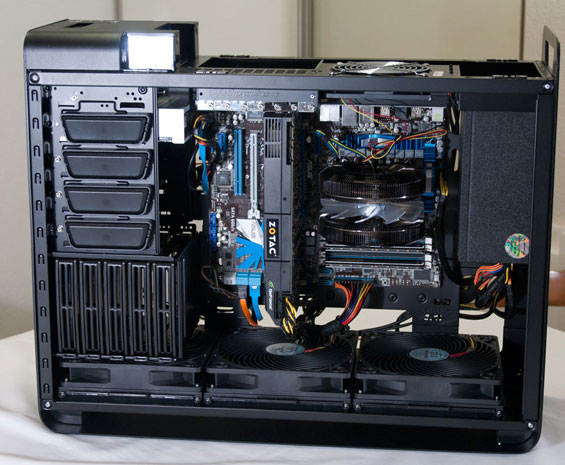
My concerns about mounting expansion cards were largely aired when discussing the clearance issues with optical drives. The FT02 will support anything as long as the Radeon HD 5970, but keep in mind that the coolers used on the Radeon HD 6990 and GeForce GTX 590 are unlikely to take advantage of the FT02's cooling design: your video card should be employing a blower-style cooler to get the most out of it.
Installing the power supply is a bit unusual. SilverStone includes two additional ways to secure it beyond just the four usual screws. Since it's mounted in such a way that it basically hangs off the top of the case, there's a "step" that can be screwed in beneath the power supply to support it from the bottom, and SilverStone also includes a strap to wrap around and secure it. The strap needs to be on the PSU before it goes in, though, and can't be installed after the PSU has been mounted. Likewise, the step is a nice touch, but I had a hard time getting it to feel particularly secure or well-aligned with our test power supply.
Finally, let's discuss cabling. This was actually a fairly pleasant surprise; routing cables through the holes in the motherboard tray was easy enough, and the expansion drives all line up pretty well. There's also a healthy amount of space around the power supply, making the normally nightmarish AUX 12V line a little easier to cope with. My advice is again to use a modular power supply, but also to connect the leads to the motherboard and peripheral firsts and wire up the power supply last.


Getting the side panels on is actually fairly easy, although with the cables routed behind the motherboard tray, the back panel is going to require a bit of force and will be easier to replace if you have the case oriented on its side. Thankfully the panel flexes just enough that it's not a major struggle. When you do plug in monitor cables and peripherals to the video card and I/O cluster on the motherboard, keep in mind that there's a set amount of clearance: just like the FT03 and RV03, fixed video adapters (like DVI-to-VGA) instead of flexible ones are liable to prevent you from being able to snap the top panel back on.
Originally published at https://www.anandtech.com/show/4620/silverstone-fortress-ft02-true-classics-never-go-out-of-style (Wayback Machine).