
The HP TouchPad Review: webOS on the Big Screen
Display
With the exception of Samsung's forthcoming Galaxy Tab 8.9, most tablets these days seem to either fall in the 7-inch or 10-inch camp. The former offers portability while the latter is better suited for more productive environments. Given everything I've said about webOS thus far, it makes sense that HP would choose a 9.7-inch form factor for the TouchPad.
For a device whose primary method of interaction is its screen, having a good display is very important. Thankfully HP did a good job with the TouchPad's IPS panel. The TouchPad's 9.7-inch display is near identical to what Apple used in the iPad 2.
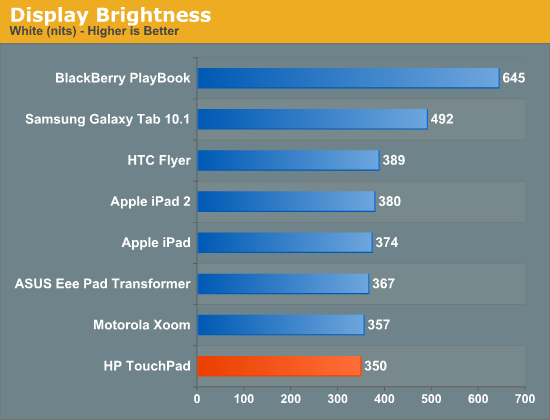
At its highest setting the TouchPad delivers 92% of the brightness of the iPad 2. The loss is noticeable but not the end of the world.
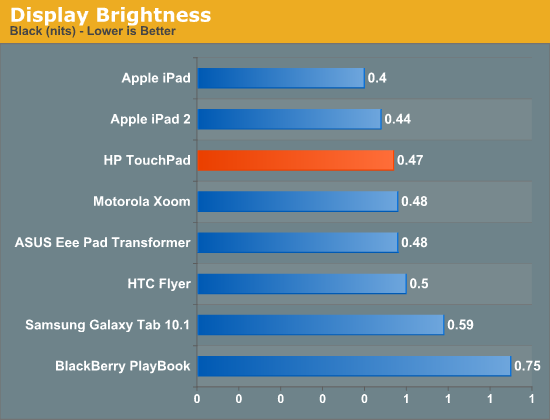
Black levels are also competitive with the iPad 2.
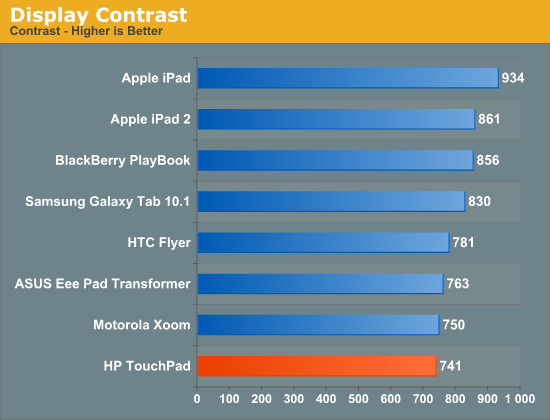
Color calibration of the panel is very good. My review sample had its white point set at 6600K. There are definitely multiple panel vendors used in TouchPads, which is to be expected. I had another TouchPad for a short while and it was even dimmer and had a different white point (~6000K). I would prefer it if tablet makers had tighter tolerances for variance in display panels, but I guess there are bigger problems to solve first.
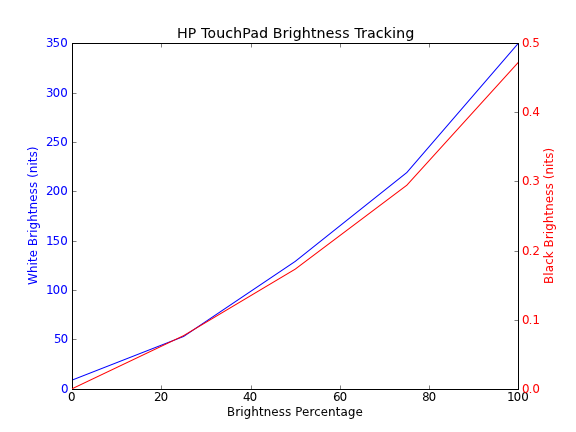
Ignore the black brightness value at 0%, the colorimeter wouldn't read values that low
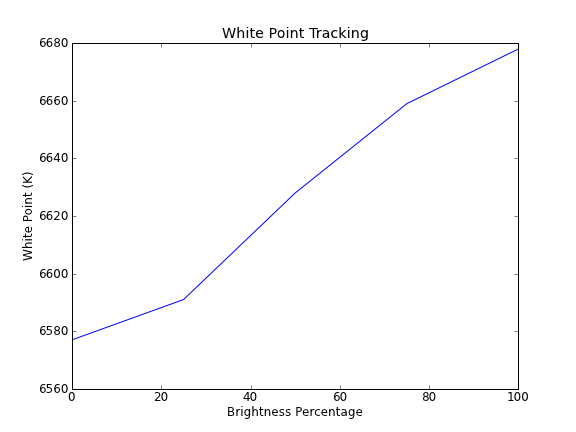
Brightness is pretty linear and the white level remains constant regardless of brightness setting. There is a toggle for auto dimming, which I assumed meant dimming based on ambient light but the toggle didn't seem to do much in my testing. I shined an LED flash light all over the TouchPad but couldn't get the display brightness to change at all. Looking around the bezel I don't see any evidence of an ambient light sensor so I'm not entirely sure the purpose of the toggle. Just to be safe I tested in a bright room and disabled the auto dimming toggle for both display and battery life tests.
The webOS UI is generally pretty light so outdoor use is a bit better than Honeycomb, but at max brightness the TouchPad is still not quite bright enough to comfortably deal with direct sunlight. The other problem is how easily the glass picks up grease from your hands. Once you've got a lot of finger prints on the surface it becomes even more difficult to read outside. These aren't TouchPad specific issues, nearly every tablet other than the PlayBook is tough to use in very bright conditions. Seeking shelter or being a hermit with your new tablet are the only present day solutions.
Originally published at https://www.anandtech.com/show/4508/hp-touchpad-review (Wayback Machine).