
Sandy Bridge Memory Scaling: Choosing the Best DDR3
7-Zip
Many people are moving over to 7-Zip for their compression/decompression needs. 7-Zip is not only free and open-source, but it also has a built in benchmark for measuring system performance using the LZMA compression/decompression method. Keep in mind that these tests are ran in memory and bypass any potential disk bottlenecks. The compression routines in particular can put a heavy load on the memory subsystem, as many MB worth of data is scanned for patterns that allow the compression to take place. In a sense, data compression is one of the best real-world tests for memory performance.
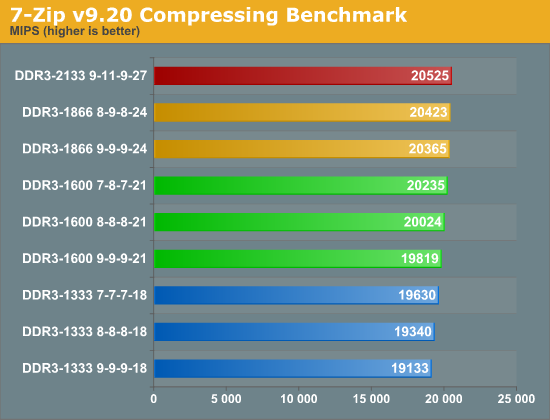
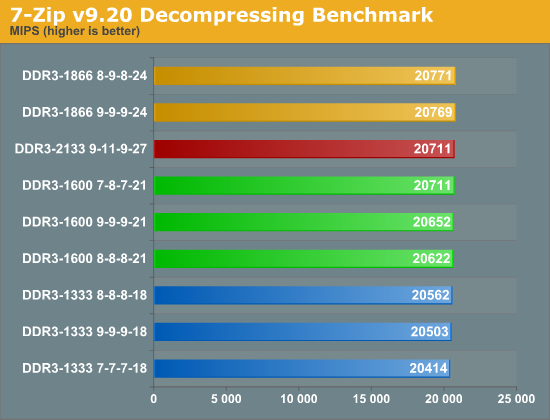
The compression test shows a linear performance increase with a ~7% variance between the fastest and slowest. If you do a fair amount of compressing, you could potentially save some time in the long run by using faster memory. This, of course, is assuming you're not bottlenecked elsewhere such as in your I/O or CPU performance. The decompression test isn’t affected by faster memory in the same way, as there’s no pattern recognition going on; it’s simply expanding the already found patterns into the original files. With less than 2% separating the range, it's unlikely to make much of a difference if you’re primarily decompressing files.
x264 HD Benchmark
The x264 HD Benchmark measures how fast your system can encode a short HD-quality video clip into a high quality H.264 video file. There are two separate passes performed and compared. Multiple passes are generally used to ensure the highest quality video output, and the first pass tends to be more I/O bound while the second pass is typically constrained by CPU performance.
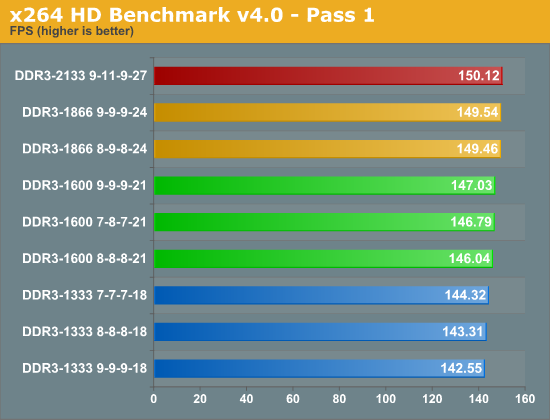
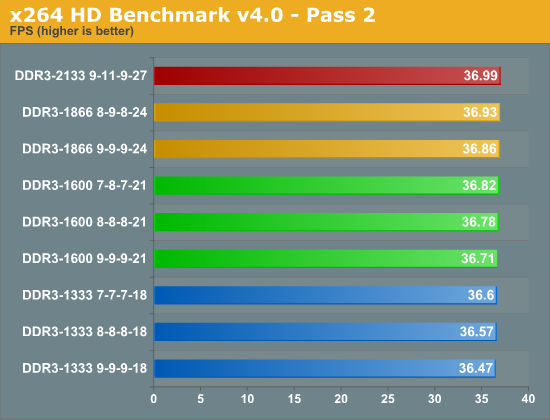
While not a huge spread, we do see a difference of 5% from the fastest to the slowest in the first pass. The second pass, however, shows a less than 2% gain. If encoding is one of your systems primary tasks, it's possible that having faster memory could pay off over time, but a faster CPU will be far more beneficial.
Cinebench 11.5
The Cinebench CPU test scenario uses all of your system's processing power to render a photorealistic 3D scene containing approximately 2,000 objects and nearly 300,000 polygons. This scene makes use of various algorithms to stress all available processor cores, but how does memory speed come into play?
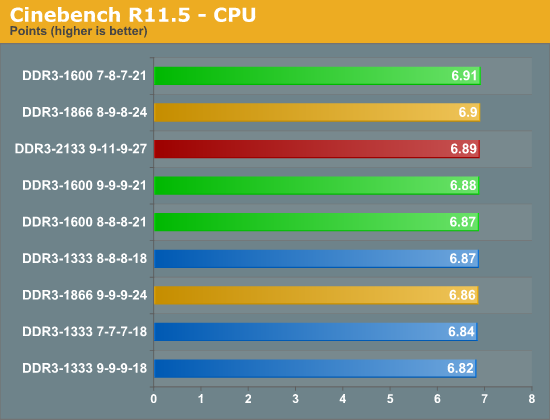
Apparently not much in this benchmark. We're looking at a less than 2% difference from the fastest to the slowest. It's possible that CAS latency is more important for this type of load, but due to the extremely small variance, I don't believe that statement is conclusive. Overall, even a single CPU bin would be enough to close the gap between the fastest and slowest memory we tested.
Originally published at https://www.anandtech.com/show/4503/sandy-bridge-memory-scaling-choosing-the-best-ddr3 (Wayback Machine).