
Fusion E-350 Review: ASUS E35M1-I Deluxe, ECS HDC-I and Zotac FUSION350-A-E
I decided to dedicate an extra page to looking at two features on these Fusion boards that are, in my eyes, quite interesting to discuss.
On the one hand, we are dealing with low power CPUs which can't process that much very fast, so if you want to overclock them, that overclock also has a significant impression on any integrated GPU gaming being used.
On the other, we have access to a PCIe x16 slot, capable of running a full length, high-end GPU (should you want to). This PCIe slot actually runs at 4x, which in certain circumstances would cripple the discrete GPU. Pair this crippling with a not-so-great CPU, and we're not expecting the gaming capability to take off, so I've examined this as well.
Overclocking, and Gaming Performance
By default, we have a 1600 MHz, dual core Fusion CPU, combined with an 80 SP iGPU at 500 MHz, designated the HD 6310. In terms of pure CPU throughput, we saw on all boards that a percentage increase in clock speed gave a direct increase in benchmark result for the 3D Particle Movement benchmark.
In terms of gaming, we need to analyze what this overclock does. Apart from the default CPU speed increase, we're getting a direct GPU clock speed increase as well. The DDR3 memory is also getting an increase, thus the memory bandwidth to the iGPU is increased as well. So any overclock will increase its own effectiveness in two major areas.
I'll take the ASUS E35M1-I Deluxe for this explanation, which allowed a 10% overclock from 1600 MHz to 1760 MHz. From the gaming perspective on the iGPU, we have a large increase in scores:
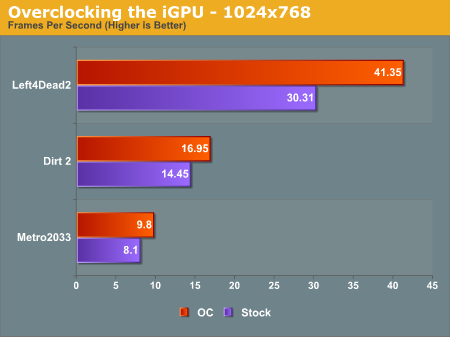
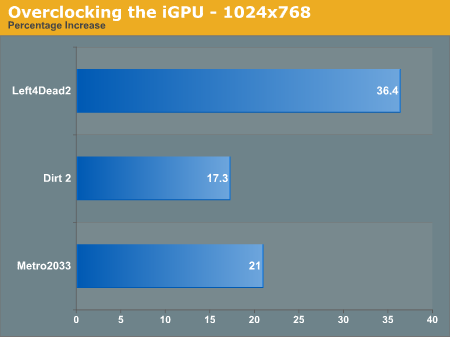
Out largest increase was in the DirectX 9 game, Left4Dead2 - a staggering 36.4 % increase in frame rate from 30.3 fps to 41.4 fps, making the game more playable at the 1024x768 resolution. Even Metro2033 had a 21.0 % increase, and Dirt2 a 17.3% increase. Is the iGPU itself capable of playing the major games? Probably not, but at least those older ones can feel smoother.
The PCIe slot running at 4x - Is it worth using a beefy GPU, like a GTX 580?
The short answer is no, probably not. Normally we see a full length PCIe slot run at 4x only when it's the second or third PCIe slot on the board, and usually at the detriment to SATA or USB ports that have to be switched off as a result. Here, we have two main issues - will the CPU be fast enough to be able to navigate data across the PCIe bus to and from the discrete graphics, or will the 4x speed of the bus be the crippling factor?
(Note: I understand getting a GTX580 isn't realistic with a Fusion, but it's the most powerful GPU I have to hand and most apt for this test as GPU power should not be an issue.)
For this test, I ran the GTX 580 at the same settings as the iGPU tests, and then at the 1920x1080 resolutions and settings that we normally do for the high end motherboards (8xMSAA, 16xAF). First, at the iGPU resolutions on the ASUS E35M1-I Deluxe:
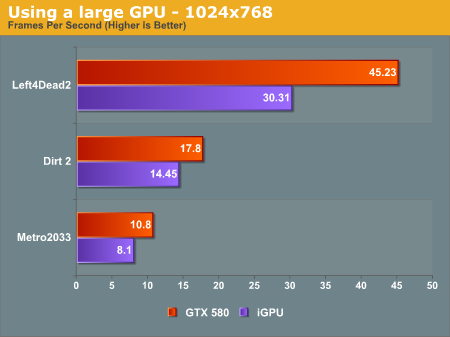
Despite using a $500 GPU, our biggest increase in frame rate, at 1024x768 resolution, is only 50%. In Left4Dead2 on Sandy Bridge, at 1680x1050, we see over 200 fps - we know L4D2 can be fairly CPU limited, so the fact that we only see 45 fps is definitely testament to the Fusion CPU.
Now, at the full 1920x1080 resolution:
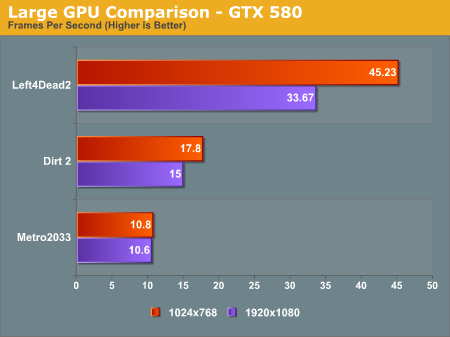
In Metro 2033, we didn't see any real decline from 1024x768 to 1920x1080, but there was a significant drop in Left4Dead2. These results are also due to the CPU holding the GPU back, meaning that even with a GTX 580 on Fusion, only the old games will be playable, but this time at a higher resolution.
Originally published at https://www.anandtech.com/show/4499/fusion-e350-review-asus-e35m1i-deluxe-ecs-hdci-and-zotac-fusion350ae (Wayback Machine).