
Samsung Central Station: The Future of Laptop Docking?
Features and specifications
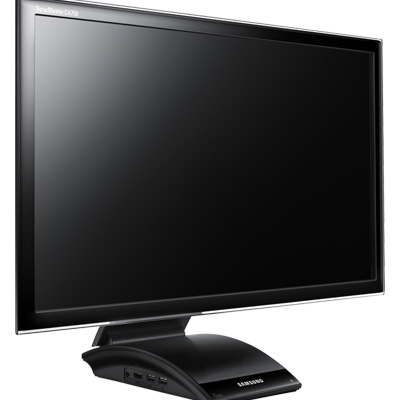
Central Station is not available yet but Samsung has updated their product page to include specifications for two soon-to-be released monitors utilizing Central Station:
| Central Station Product Comparison | ||
| C23A750X | C27A750X | |
| Screen size | 23" | 27" |
| Resolution | 1920x1080 | 1920x1080 |
| Brightness | 250 cd/m2 | 250 cd/m2 |
| Response time | 2ms | 2ms |
| Viewing angles | 170°/160° | 170°/160° |
| Color support | 16.7 million | 16.7 million |
| Video inputs | HDMI, VGA | HDMI, VGA |
| Other inputs | 2x USB 3.0, 2x USB 2.0, Megabit Ethernet | 2x USB 3.0, 2x USB 2.0, Megabit Ethernet |
| Outputs | Audio out (3.5mm), USB 3.0 | Audio out (3.5mm), USB 3.0 |
| Dimensions (WxHxD) | 21.7" x 17.1" x 9.2" | 25.1" x 19.1" x 9.2" |
| Weight | 9.7 lbs | 11.5 lbs |
| Price | $449 | $599 |
As the table shows, the only differences between these two are the screen size, dimensions, and price. Both offer the same resolution, brightness, viewing angles, and other features.
Update: Best Buy is selling the 23" model for $449 and Micro Center is selling the 27" model for $599 so it appears that the rumored prices were correct.
The Screen
Screen wise these new monitors remind me of Samsung’s Class 550 Series monitors which offer the same screen sizes, resolution, brightness etc. It could be that these monitors are actually using the same panels with just the Central Station hardware bundled with them. The viewing angles suggest that the panel type is TN, which might be bad news for people who need more accurate colors, or just an overall better quality display.
Ports
Each monitor has a total of four USB ports. Two of them are USB 3.0 but here comes the downside of using a wireless connection: your bandwidth will be limited to USB 2.0 speeds when connecting wirelessly. Samsung acknowledges that USB 2.0 speeds may not always be enough, and thus a USB 3.0 output is also present so if you want to enjoy USB 3.0 speeds; you just plug in a single USB 3.0 cable to your laptop and you can use the USB 3.0 devices connected to your monitor at full speed. However, this kind of kills the idea of paying extra for Central Station technology as there are plenty of other monitors and USB 3.0 hubs that can basically do the same thing for less money.
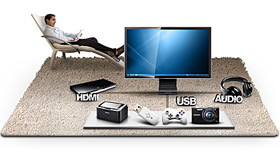
Samsung says that the wireless range is 5 feet, which means that you have to be on the same desk to use this feature without lag, so don’t imagine sitting across the room and using the screen as it won’t work. While wireless connection is the selling point of Central Station, these monitors also come with VGA and HDMI connections, so for instance you can plug in a Blu-Ray player and use the monitor “normally”. There is also a 100Mb Ethernet port (yeah, you heard it right, Megabit) which can be useful for businesses if there is no WiFi due to possible security concerns.
Ergonomics
The stand offers height adjustment so using the monitor should be comfortable no matter how tall you or your desk are. For a dual display setup, it’s even handier because you can adjust the display to be on the level of your laptop’s display (or very close to it). There is also something that Samsung calls MagicAngle which lets you to adjust the angle of the monitor.
System Requirements
Windows XP and Windows 7 will be supported at launch, but users of Windows Vista and Mac OS X will have to wait for a driver, which is set to be released later in 2011 (NY Times quotes October). On the hardware side, Samsung states that a 2.2GHz Core 2 Duo or better is required along with 2GB of RAM. Intel, ATI/AMD, and NVIDIA graphics are supported but it’s unclear whether this includes all GPUs made by these companies or only certain models. A 2.2GHz Core 2 Duo actually sounds pretty high as a requirement; personally I would expect Central Station to run fine on a 2010 MacBook Air, which has a slower CPU.
Originally published at https://www.anandtech.com/show/4446/samsung-central-station-future-of-laptop-docking (Wayback Machine).