
Samsung Galaxy Tab 10.1 Review: The Sleekest Honeycomb Tablet
The Hardware
The 10.1 is light enough to wield single handedly without fatigue, assuming you're holding it in portrait mode. In landscape there's some basic physics that comes into play, the long side of the 16:9 display pulls down and wears on your wrist after a while. In portrait mode the Galaxy Tab is remarkably comfortable. After prolonged usage I either orientation can be a problem, but I honestly believe Samsung's 8.9-inch variant may be the answer to all of our problems when it ships later this year. Unfortunately by that point you may as well wait for a Kal-El version rather than jump on what will most definitely be an aging Tegra 2.

Around the 10.1's perimeter are the usual suspects, just rearranged. The upper left edge is home to a subtle power/lock switch and a volume rocker. Neither are terribly pronounced nor are they impossible to find. With the Galaxy Tab's symmetrical industrial design it's very easy to lose your bearings and hold the tablet upside down. The subtle buttons do little to help avoid any confusion. Luckily Honeycomb, like iOS, can be oriented in any direction.

A curved 1/8" headphone jack also graces the top edge. Because of how thin the Galaxy Tab 10.1 is part of any stereo plug is going to be exposed when fully inserted into the jack, however I didn't notice any issues with the connection in my testing. Samsung ships the 10.1 with a pair of in-ear headphones with integrated mic. The mic has a single button that can be used to pause/skip songs (click once to pause, twice to skip). The headphones look expensive but the audio quality isn't anything to be impressed by.


The left and right edges are home to two individual speaker grills. The speakers are high enough on the sides that they typically aren't covered by your hands when holding the tablet.

Finally along the bottom edge of the 10.1 there's Samsung's proprietary dock connector, oddly reminiscent of Apple's iPad dock connector but just slightly narrower. If you wanted to, you could definitely get the iPad's dock cable stuck in your brand new Galaxy Tab (ahem, don't do this).

Three different, far too similar dock connectors
The Galaxy Tab 10.1 draws too much power to be charged while running off a standard USB port that doesn't implement the USB charging spec. To quickly charge the tablet you'll need to use Samsung's supplied USB to AC adapter which is a bit larger than what you get with the iPad:

Unlike the Eee Pad there are no microSD card, HDMI or USB ports available on the Galaxy Tab 10.1. This is a Honeycomb tablet in the strictest sense, it's a device for consumption not something that's going to transform into a netbook alternative. Samsung does advertise a "full size" keyboard dock, however it's only available from Samsung's website ($69.99) and it is currently out of stock.
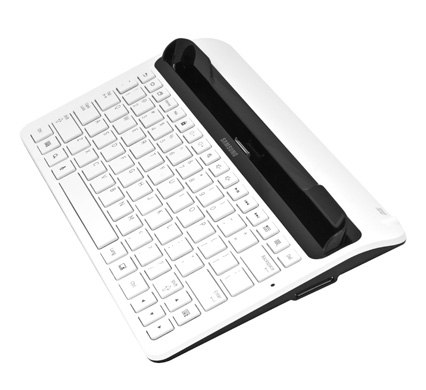
The missing HDMI support is a bit unusual for a Tegra 2 based Honeycomb tablet, but presumably Samsung could coax a digital output out of its custom dock connector via an adapter if it wanted to.

Samsung offers the Galaxy Tab 10.1 in white and dark grey versions at the same price points. Also pretty standard are the Galaxy Tab 10.1's two cameras: a rear-facing 3.2MP (2048 x 1536) sensor and a 2MP (1600 x 1200) front facing sensor complete the package.
Originally published at https://www.anandtech.com/show/4445/samsung-galaxy-tab-101-review (Wayback Machine).