
HP Veer 4G Review - Getting Us Excited for Pre 3
The next part of the Veer’s compact size is its smallish display. The only issue with the entire thing is that because of the Veer’s decidedly square display aspect ratio (320x400, 4:5) and overall squarish shape, it seems much more prone to errant rotation than any other smartphone I’ve ever used. There just seems to be a higher than average propensity to either wind up with the display rotated completely upside down (since WebOS honors rotation a full 180 degrees from portrait), or have application launches start out rotated to landscape. It happens with surprising frequency, and since the home screen doesn’t have a landscape orientation, often it catches one entirely by surprise when new cards are launched. This wouldn’t be so bad except there’s also no option to disable auto rotation from the screen and lock settings page.
The Veer’s display is the same LCD TFT we’ve grown accustomed to seeing in WebOS devices, not something fancy like AMOLED, Super AMOLED, or “Super LCD”. I still generally prefer LCD over AMOLED due to color accuracy issues that still aren’t sorted out, and in that department the Veer is actually pretty decent. Out of the box at max brightness, the Veer had a white point of 7057K as measured by an i1 Pro.
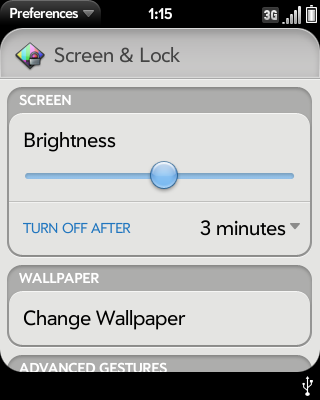
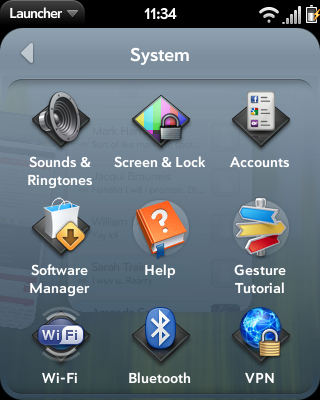
The brightness controls on the Veer are a bit deceptive. The Screen & Lock settings application has a brightness slider with analog control (the slider doesn’t snap to quantized levels), however there’s no auto brightness toggle. What’s confusing is that the Veer actually does have auto brightness, and a decently aggressive auto brightness algorithm at that - but you can’t turn it off. I’m a fan of simplifying things whenever possible, but not totally removing control at the same time. I doubt most users will complain, but for measuring brightness this initially posed a problem for a few seconds.
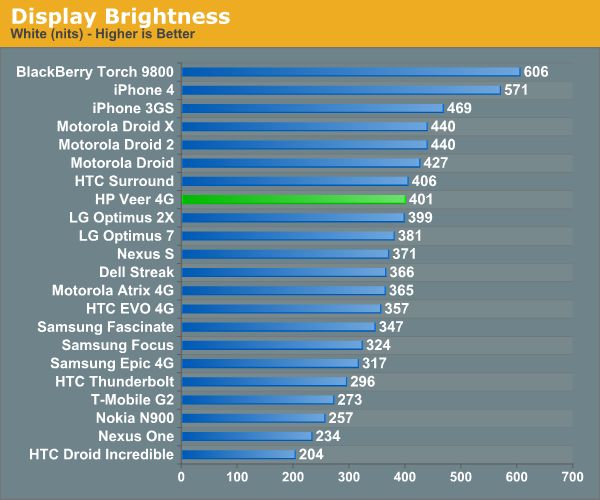
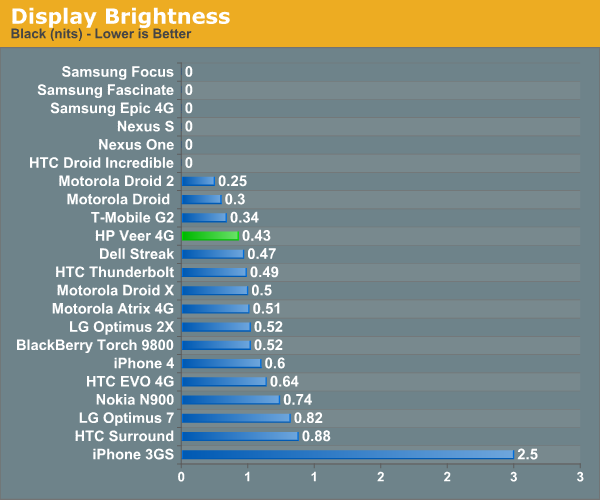
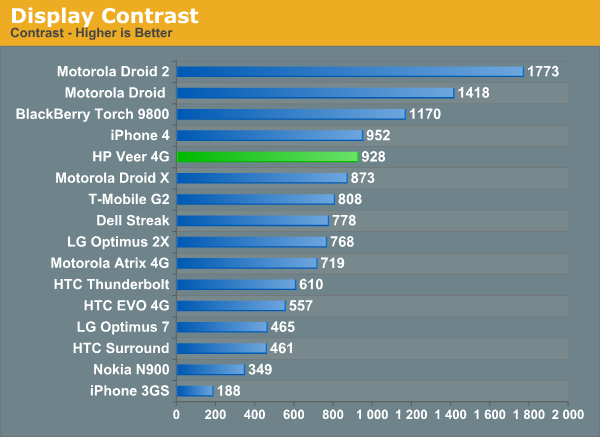
Measuring brightness and contrast on the Veer required me to carefully shine a white LED into the sensor while masking the rest of the display and i1 Pro off when taking measurements. In that manner, I could measure the Veer’s true maximum brightness, which came to almost exactly 400 nits. With the LED still enabled and shining into the sensor (so auto brightness adjusts to maximum brightness), I measured black point and contrast as well, and the Veer actually does very well.
I still think that the WebOS family of devices could benefit from some AMOLED, if nothing else because the edge of the UI is rounded and black. Remember that with AMOLED displays, black regions are truly black. There’s no backlight, so inside black regions pixels literally aren’t turned on. This would work perfectly for WebOS whose status iconography at the top is white on black with rounded corners, and at the bottom the notifications area is likewise black. These regions that are just painted black on an LCD display always look slightly off when next to the black bezel.
I didn’t get a chance to measure the brightness and contrast levels on the Pixi for comparison with the Veer, but I fully expect that had I done so the values would be almost exactly the same. The Veer’s display resolution and size are identical to the Pixi’s.

Outdoor viewing on the phone is what we’re used to seeing for LCD displays, and is quite good thanks to the Veer’s very bright backlight. The Veer also uses a capacitive panel that has small reflective regions that become evident in strong sunlight – another thing I’m used to seeing on some displays.
Originally published at https://www.anandtech.com/show/4424/hp-veer-4g-review-getting-us-excited-for-pre-3 (Wayback Machine).