
CyberPower's X6-9300 and MSI's GT680R: Fighting for Your Mobile Gaming Dollar
Application Performance, Now with PCMark 7
We’ll start with our usual look at application performance, but we’re making a new addition to the benchmarks. Out goes PCMark05 results (we might still put them in Mobile Bench, but they won’t be in the articles) and in comes PCMark 7 (the seven is for Windows 7, incidentally; though the test runs on Vista as well, results may not be optimal and I’m not sure if you can run the full PCMark suite). Officially launched on May 12, PCMark 7 updates the benchmark suite with a revised set of applications and tests. This goes along nicely with the newly christened 3DMark 11, which we will get to in a minute.
We’re going to break with our mobile testing tradition and run the full suite of PCMark 7 benchmarks. They consist of the following areas: PCMark, Lightweight, Productivity, Creativity, Entertainment, Computation, and Storage. Each individual score represents a composite score for several other tests, and we’ll discuss some of the results in those tests where appropriate. Many have asked for additional application tests, and the various PCMark 7 benchmarks do a good job of running a variety of workloads. If you want to know the specifics of each test, you can consult the PCMark 7 Whitepaper.
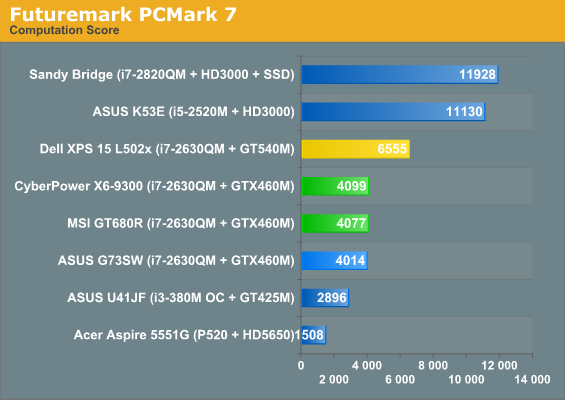
With that introduction out of the way, here’s how the P151HM and GT680R stack up to the competition. We’ve used green for the two notebooks we’re focusing on in this review, gold for the Dell XPS 15 L502x, and black for the Clevo P150HM (sporting an i7-2720QM and an HD 6970M). The ASUS G73SW is also highlighted in a lighter blue, though most of the tests will have it running neck and neck with these two notebooks. As with any new benchmark, we don’t have a full set of results for all the older laptops and notebooks in PCMark 7, but we did run it on several other notebooks to provide some reference points. We’ll start there before moving to the rest of our application tests.
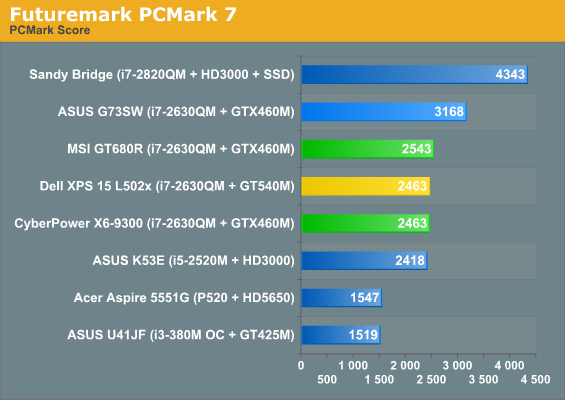
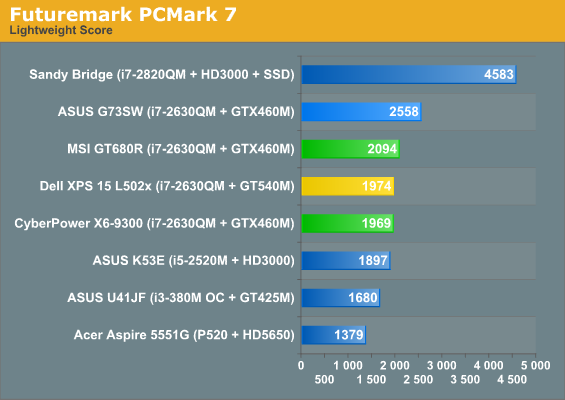
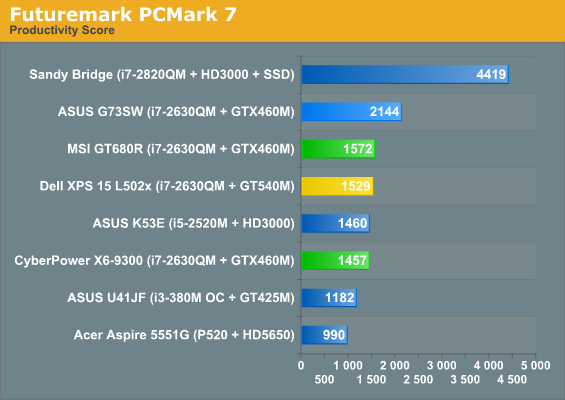
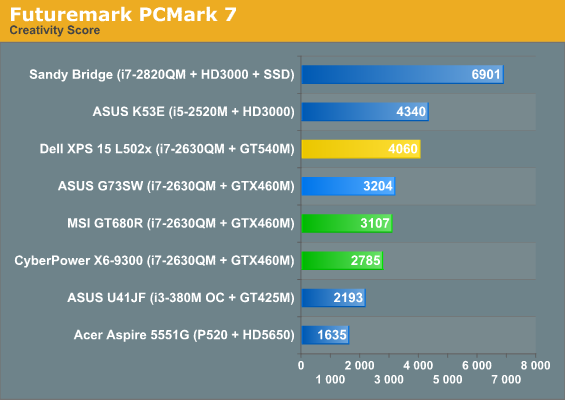
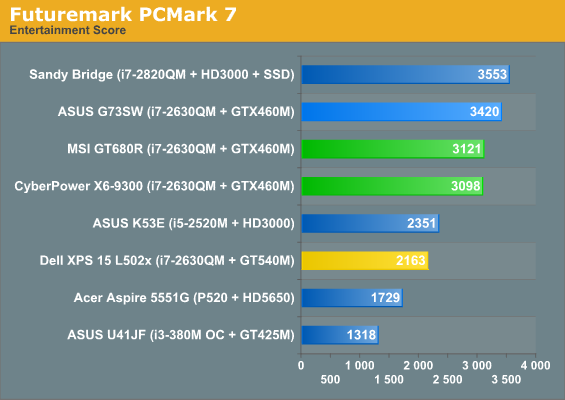
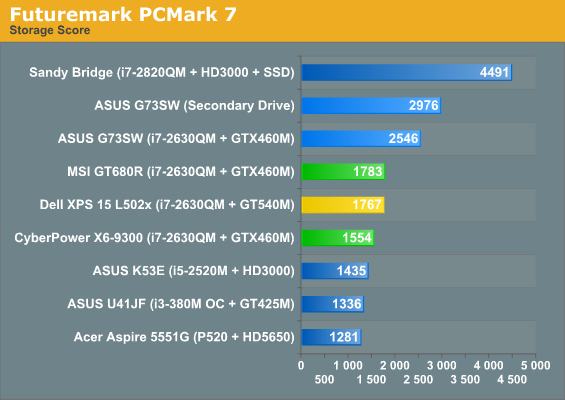
When we first ran PCMark 7, we noticed some oddities: the ASUS G73SW ended up beating the similarly equipped Clevo P151HM, Dell XPS 15 L502x, and MSI GT680R systems by 25%, which is well outside the margin of error we would expect. Looking at the individual test results, we quickly discovered the culprit: the storage subsystem results were around twice as fast on the ASUS compared to the other three laptops. The Dell has a 750GB 7200RPM Western Digital Scorpio Black, whereas the ASUS, Clevo, and MSI notebooks all use the venerable 500GB Seagate Momentus 7200.4; if those three all have the same HDD—heck, the MSI has two of them in RAID 0!—then why are the scores so different?
I decided to pull out the heavy guns on this one and make sure we were playing on a level field; that’s right: I defragged. Actually, I always do that before running benchmarks, but since I had just installed PCMark 7 I thought it was worth a shot. I reran PCMark 7 a couple times to see if some sort of optimization on subsequent runs was coming into play (e.g. SuperFetch). Nope; in fact, the first run on each laptop was usually the highest result out of five runs. After all the testing, I’m still not exactly sure what’s going on. I thought at first that since ASUS has two hard drives, so that might be part of it; however, PCMark 7 let’s you run the storage test on the secondary drive, and I did that as well (and generated an even higher result on the Storage test). A quick look at the ASUS K53E scores shows the same approximate doubling of HDD bandwidth in the various storage subtests, so I have to conclude that ASUS has a BIOS, firmware, or driver optimization that’s giving them a sizeable lead in the PCMark 7 results. Of course, that lead only holds up as long as you’re not looking at the performance of the Sandy Bridge i7-2820QM with an SSD.
In both PCMark 7 and PCMark Vantage (see below), the presence of an SSD definitely makes its presence known. Part of that is because SSDs really do make a system snappier in a lot of ways; the other part of the story is that storage related subtests are in every one of the PCMark 7 suites, with the exception of the Computation benchmark. There’s an interesting element to that test as well, though, in that it has two video transcoding tests, and both appear to use Intel’s Quick Sync when it’s available. The result is that the dual-core and quad-core Sandy Bridge laptops with no discrete graphics come out looking like a champ in that discipline—and they really are fast on video transcoding with the right application. We could force the Dell laptop to run only on the IGP, but interestingly it appears that Quick Sync is only partially used with Optimus. Anyway, don’t get too caught up in the charts, because the large differences in the storage related tests really skew the results.
Originally published at https://www.anandtech.com/show/4339/cyberpower-x6-9300-msi-gt680r-mobile-gaming (Wayback Machine).