
P67 $190 Part 2: MSI P67A-GD65, ASRock P67 Extreme6 and ECS P67H2-A2
System Benchmarks
LAN Speed Test
LAN Speed Test is a freeware program designed for testing the network connection between two PCs on a home network. The speed of the transfer is limited by the lowest common denominator on the network, so if you have gigabit Ethernet capable computers but a 100 Mbit capable router, you are limited to 100 Mbit transfer. Note that this is really a formality—if a network port is rated at 1 Gbps, then chances are that it will hit at least 90+% of this value. The main test here is CPU usage, and how much is offloaded by the controller. For this test, we use LAN Speed Test to transfer a 1000 MB file across a home network with a 100 Mbps lowest common speed to the same machine each time, in a read/write scenario. CPU usage is taken as a visual max/average from task manager.
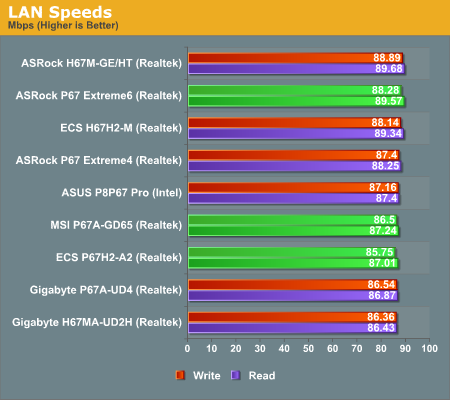
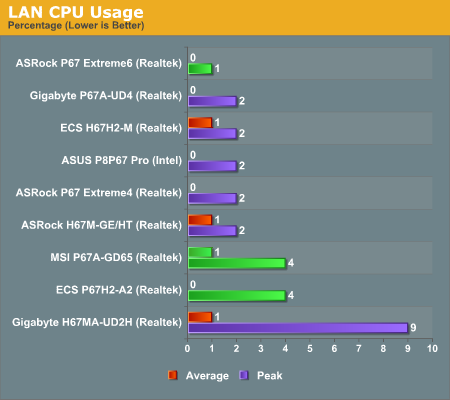
There's almost nothing between any of the boards we've tested in terms of 100 Mbps LAN speed and CPU usage—all three have an average CPU usage of 1% or less.
USB Speed
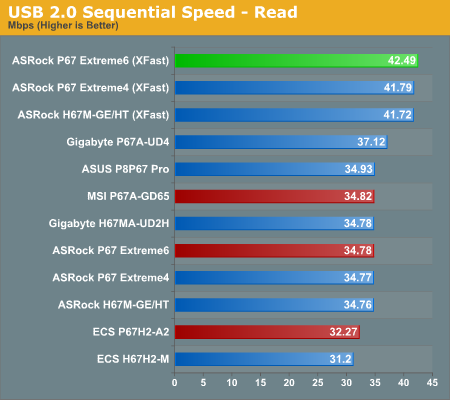
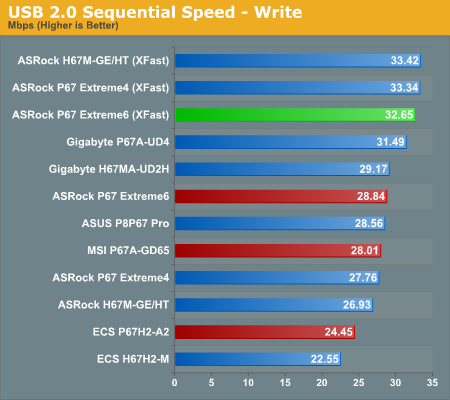
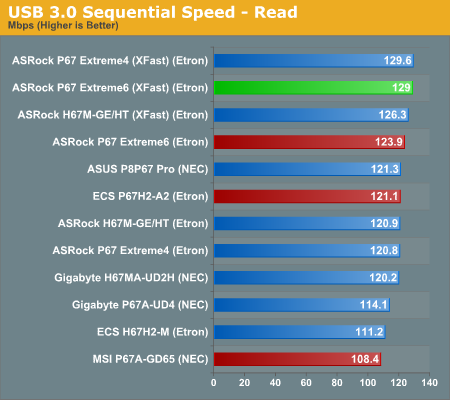
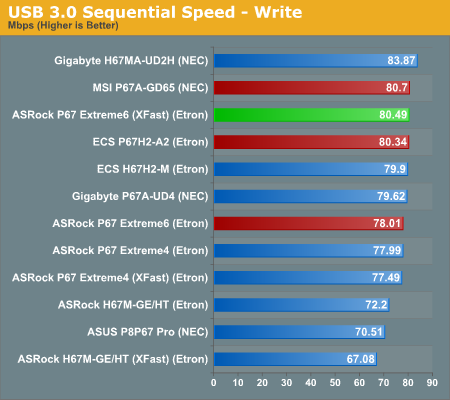
For this benchmark, we run CrystalDiskMark to determine the ideal sequential read and write speeds for the USB port using our 64GB Patriot SuperSpeed USB 3.0 drive. Then we transfer a set size of files from the SSD to the USB drive, and monitor the time taken to transfer. The files transferred are a 1.52 GB set of 2867 files across 320 folders—95% of these files are small typical website files, and the rest (90% of the size) are the videos used in the Sorenson Squeeze test.
USB 2.0:
USB 3.0:
Copy Speeds:
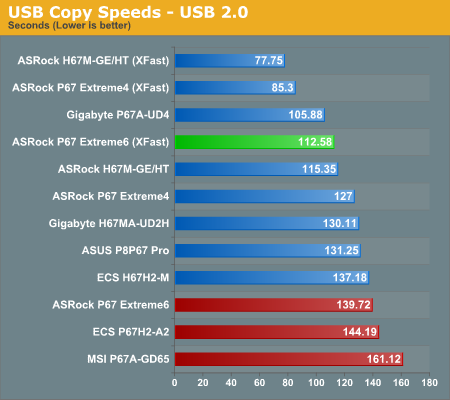
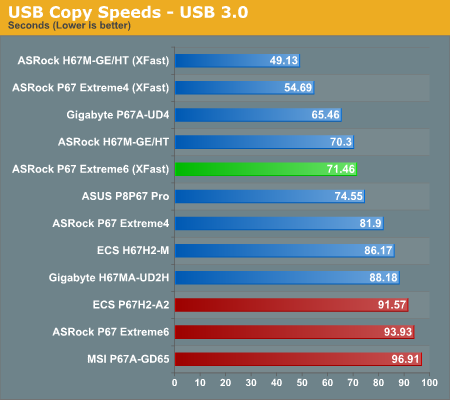
Despite having reasonably good sequential scores, when it comes down to a series of small files for the copy results, all three motherboards perform relatively poorly compared to all the other boards we've tested. The ASRock has the get out clause of XFast, which is blowing the competitors away.
SATA Testing
We also use CrystalDiskMark for SATA port testing. The operating system is installed on the Micron RealSSD C300, which is rated at 355 MB/s read and 215 MB/s write, and the sequential test is run at the 5 x 1000 MB level. This test probes the efficiency of the data delivery system between the chipset and the drive, or in the case of additional SATA ports provided by a third party controller, the efficiency between the controller, the chipset and the drive.
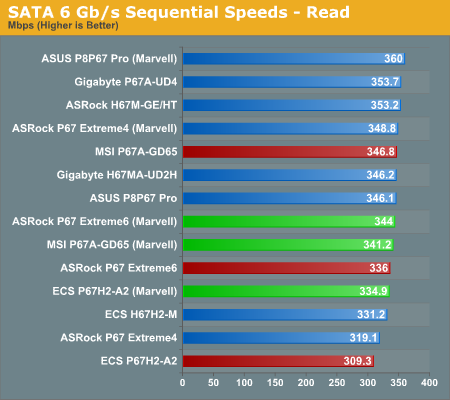
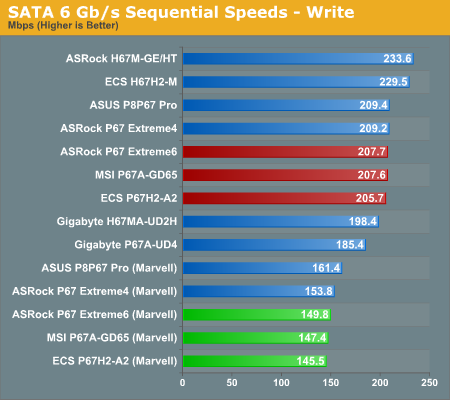
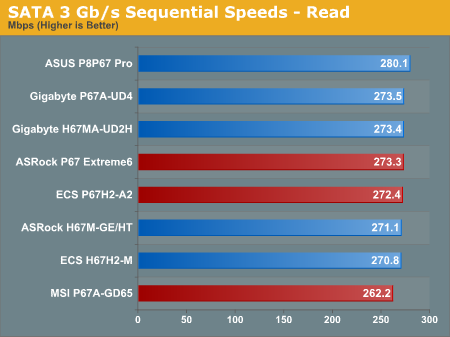
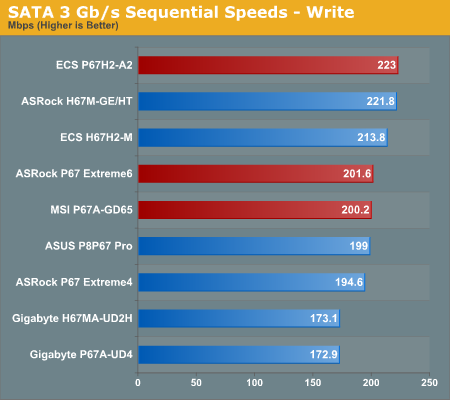
The Marvell controller has a large negative effect on the write speed of any drive in the 6 Gbps tests. The MSI performs the worst out of the three boards on the SATA 3 Gbps sequential speeds.
DPC Latency
Deferred Procedure Call latency is a way in which Windows handles interrupt servicing. In order to wait for a processor to acknowledge the request, the system will queue all interrupt requests by priority. Critical interrupts will be handled as soon as possible, whereas lesser priority requests, such as audio, will be further down the line. So if the audio device requires data, it will have to wait until the request is processed before the buffer is filled. If the device drivers of higher priority components in a system are poorly implemented, this can cause delays in request scheduling and process time, resulting in an empty audio buffer—this leads to characteristic audible pauses, pops and clicks. Having a bigger buffer and correctly implemented system drivers obviously helps in this regard. The DPC latency checker measures how much time is processing DPCs from driver invocation—the lower the value will result in better audio transfer at smaller buffer sizes. Results are measured in microseconds and taken as the peak latency while cycling through a series of short HD videos—under 500 ms usually gets the green light, but the lower the better.
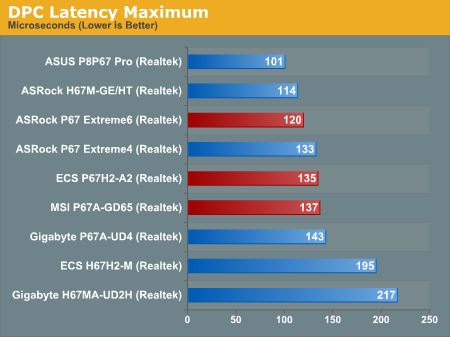
All three boards perform well in the DPC test.
Originally published at https://www.anandtech.com/show/4323/p67-190-part-2-msi-asrock-and-ecs (Wayback Machine).