
CyberPower Xplorer X6-9100: Gamers Need Not Apply
The Inevitable Return of Too Much Gloss
Sometimes I feel like we're on crazy pills here. Glossy plastic has proven to be the bane of my existence as a laptop reviewer (let alone mediocre laptop photographer), and we gripe about it every time, yet nothing seems to change. The nicest thing I can say with the Xplorer X6-9100 is that at least they used the gloss in a very uniform fashion: it's the exact same glossy black finish on the lid, the screen bezel, the palm rest, and surrounding the keyboard. In that sense it leaves us very little to talk about: there's just glossy plastic everywhere. But we'll press on.


The Xplorer X6-9100 kicks it old school with its glossy black plastic and keeps it real with blue LEDs for the indicator lights. Just to make sure you get no illusions about progress, there's a touch-sensitive media control bar just above the keyboard that's also backlit with blue LEDs. While the X6-9100 ships with Bluetooth, there's no dedicated switch for it: you have to manually enable and disable the adapter in software.
The model number on the bottom of the Xplorer X6-9100 simply cites "A15A" and that's all CyberPower's website offers us, though once we contacted CyberPower we were able to confirm the ODM as Pegatron. Of course, actually using the notebook suggests its origin isn't the industry stalwart Clevo, as we've grown accustomed to from boutique builders.
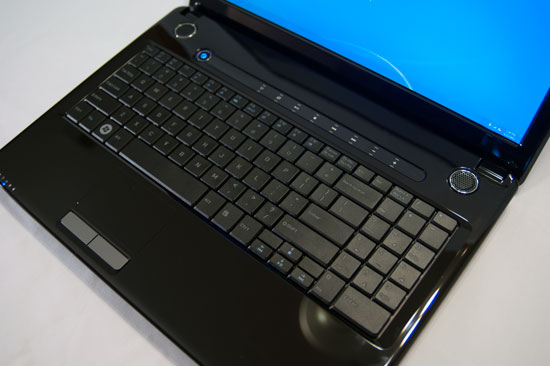
The first indication this isn't standard Clevo fare is the keyboard, which doesn't completely suck and uses a slightly different layout. The soft edges and boundless gloss used for the shell notwithstanding, the keyboard uses traditional matte plastic keys as opposed to an island-style (chiclet) keyboard, and the arrow keys don't intrude on the 10-key. The layout still isn't ideal: arithmetic operator keys are above the 10-key instead of to the side, and the 0-key is instead intruded upon by a double-wide enter key. Whenever a manufacturer messes with the 10-key layout it just seems ridiculous and self-defeating, at least to me. The whole point of a 10-key is being able to use it by touch because it has a standard layout; changing that layout severely curtails the pad's usefulness, and this is only made worse when you look at the top of the notebook shell and see what seems like plenty of space on either side of the keyboard to add that fourth column.
Our other sticking point is the touchpad, which ranks among the worst I've ever used. It has the same glossy finish as the rest of the shell, so if you have the slightest bit of moisture on your fingertip it's going to be extremely jerky and difficult to use. Fortunately that's not liable to be a major issue to the users this notebook is targeted towards, who are more likely to just plug in an external mouse and call it a day.
Overall, the build quality of the Xplorer X6-9100 really is pretty good, with sturdy hinges and minimal flex, but the problem is that the glossy plastic makes the whole thing look and feel cheaper than it is. Ignoring my general hatred towards putting glossy plastic on the screen bezel, the use of the material over the entirety of the notebook (save the bottom and the keyboard) makes it appear and feel utterly generic. Frankly even some basic CyberPower branding would go a long way towards sprucing up the shell.
Originally published at https://www.anandtech.com/show/4297/cyberpower-xplorer-x6-9100-gamers-need-not-apply (Wayback Machine).