
ASUS Eee Pad Transformer Review
Dock Issues
As impressed as I was with the fact that ASUS took a tablet OS and made it work in both the tablet and notebook worlds, the Eee Pad Transformer dock isn't without its issues. As I alluded to before, there are times when the dock simply doesn't work. I'll be using the dock, scrolling around or typing and then all of the sudden the keyboard and trackpad stop working altogether. Sometimes the solution is as simple as undocking and redocking the Eee Pad, but other times it requires a full reboot. It's frustrating.

I've also encountered a hard lock and an unexpected reboot, both while docked although I'm not sure if ASUS is to blame or if these are Honeycomb specific issues. ASUS tells me that the Transformer docks that were sent out to reviewers are one firmware revision too old, and what will go out to customers next week should have a number of bugs fixed. I expect to have final hardware/software sometime next week, which I'll be testing to see exactly how much has been fixed.
There's also an issue with power consumption. The dock doesn't exactly have an on/off switch, so even when not in use it'll eat up power as it waits to see if you've docked an Eee Pad to it. ASUS expects to address this with a future firmware update for the dock next month. The update will put the unit into an ultra low power state when docked if the tablet is in standby, and power down completely when not attached to the tablet.
ASUS' Virtual Keyboard: By Nuance
If you read our Xoom review you'll know that I was pretty impressed with the stock Honeycomb keyboard. Not only does it boast a clean layout but Google also provides adjustable autocorrect settings, allowing you to configure how aggressive the autocorrect system behaves. Thus I was surprised to find out that the Eee Pad ships with a custom ASUS virtual keyboard:

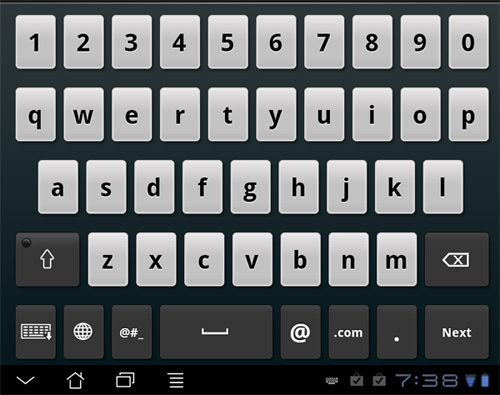
A little digging reveals that Nuance (the company that makes Dragon NaturallySpeaking) is the ISV that developed the keyboard and its underlying autocorrect engine. Similar to what Apple offers under iOS, Nuance corrects what you type by looking at word length, letters used and proximity of those letters to others on the keyboard. The ASUS keyboard is just as configurable as the stock Android keyboard, even letting you set how aggressive the auto correction engine behaves.


The ASUS virtual keyboard also supports "trace input" which is basically a non-trademarked word for Swype. Trace input on the Eee Pad works but the tracing animation is pretty laggy and I feel like accuracy isn't quite as good as Swype on smartphones.
The look and layout of ASUS' virtual keyboard also differs from the stock Honeycomb keyboard. ASUS includes a row of number keys along the top of the keyboard, without increasing the footprint of the keyboard—meaning all of the keys get shorter. Thankfully on a 10.1-inch screen, even shorter keys aren't that hard to hit, and the addition of the number row saves you an awkward trip to a secondary keyboard screen. The backspace and return keys are unfortunately placed in the very bottom right corner, which I never could get used to.
Originally published at https://www.anandtech.com/show/4277/asus-eee-pad-transformer-review (Wayback Machine).