
The BlackBerry PlayBook Review
Keyboard
The PlayBook's virtual keyboard is pretty standard fare. By default you have a QWERTY keyboard with all of the alphabet present, although RIM gives you the option of switching to QWERTZ and AZERTY layouts. You can tap and hold on vowels to bring up accented letters.

Numbers and symbols are available through a modifier key:
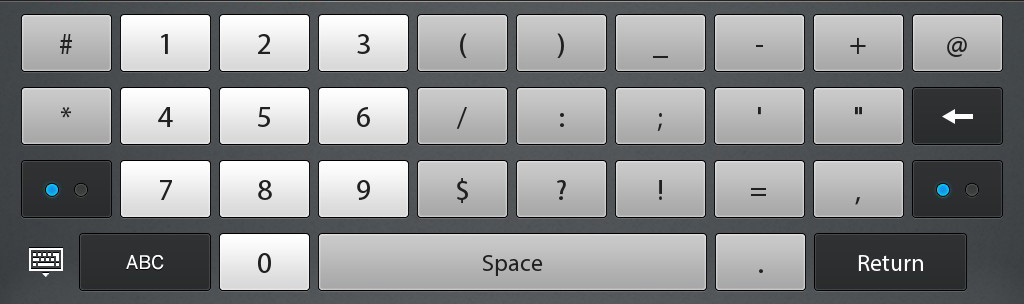

The number and symbol layout is a bit odd compared to iOS and Honeycomb but other than that I don't really have any complaints about the layout of the virtual keyboard.
While it's possible to type on the PlayBook, it's not quite as easy as on a larger tablet for obvious reasons. And thanks to the combination of overall size and gesture bezel, I found myself hitting the bottom bezel instead of space quite frequently.
One thing you can do on the PlayBook that isn't too comfortable/possible on larger tablets is two-thumb-type in portrait mode like you would on a smartphone.
RIM doesn't support any real time autocorrection. I complained about Apple dialing back autocorrection in iOS for the iPad, I gave Google props for letting you customize autocorrection aggressiveness in Honeycomb, but RIM seems to avoid the issue entirely by just not doing it. I understand the reasoning behind dialing it back - the sort of typing you do on a tablet is a bit different than on a smartphone, but I still believe that with a dictionary that is well customized to your vocabulary autocorrect can be a boon to typing speed on virtual tablet keyboards.

Although there's no autocorrect, system-wide spell check is supported by the PlayBook OS. Misspell a word and you'll get a familiar red underline. As long as you're running a non-BlackBerry Bridge app, tapping on the word will pop up a list of possible replacements. There's no way to control the dictionary and I haven't found a way to make it learn words either. Whereas Apple and Google really focused on the virtual keyboard experience, it feels like it's a work in progress for RIM.
I managed to get a Bluetooth keyboard working with the PlayBook, so if you need to do a lot of typing there's always the physical keyboard option. RIM doesn't specifically offer a Bluetooth keyboard however anything that supports the standard should work.
With a Bluetooth keyboard you can type without having the virtual keyboard on-screen but you still need to use the touch screen to interact with apps and switch between them.
Originally published at https://www.anandtech.com/show/4266/blackberry-playbook-review (Wayback Machine).