
The BlackBerry PlayBook Review
The Screen
The PlayBook's 7-inch panel has a 1024 x 600 resolution, which for the most part works well for content consumption. Web pages fit nicely, although as I mentioned earlier, in portrait mode you'll need to do a lot of zooming to easily read content. Where the PlayBook's resolution falls flat is when you've got a lot on the screen. Here's what happens when you have a keyboard open in landscape mode on a web page:

In Google docs that leaves you with a single line of text above your keyboard. The same happens elsewhere, although it's less of a problem in Documents To Go.
I've complained in the past about the input problem on tablets, and I do believe it's actually worse on the PlayBook thanks to its cramped screen size. If anything, the PlayBook is even more optimized for content consumption than production of any sort.
Touch sensitivity could also use some work on the PlayBook. While the capacitive touchscreen is normally fine, I've definitely had to double or triple tap to activate controls (particularly small ones) moreso on the PlayBook than on either the iPad or Xoom.
Like Apple, RIM put its focus on the PlayBook's display, which is very bright:
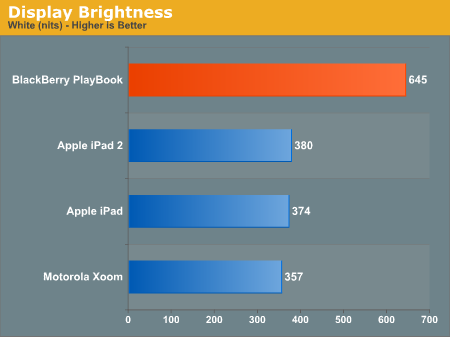
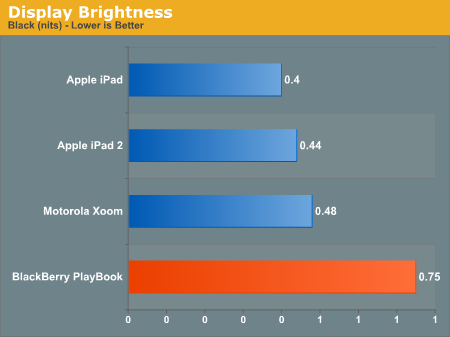
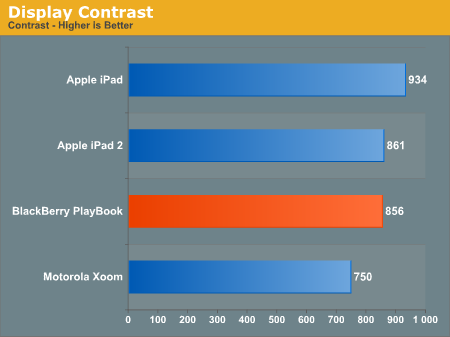
The PlayBook's brightness is high enough that we finally have a tablet that's usable outdoors in direct sunlight:


Viewing angles are also reasonable:


Originally published at https://www.anandtech.com/show/4266/blackberry-playbook-review (Wayback Machine).