
The BlackBerry PlayBook Review
BlackBerry Bridge
The first era of the mobile revolution was about apps. Quantity, quality, method of delivery, everything that related to the apps on these devices is what really helped accelerate adoption of platforms like Android and iOS. While we're not quite done with the first era, the next era will be one of synergy between devices. Today there's simply no good way to seamlessly share all of your data (both static and active) among all of your computing devices (PC, tablet and smartphone). Cloud services help bridge the gap but what about some of the basic use cases? Let's say I've got a few tabs open in Chrome on my PC and I decide to take a break and read those websites on my tablet. There's no way to quickly take my current operating environment with the apps/tasks I've got open and transition them to another device.
Everyone who is anyone in the mobile space is working on device synergy, although very few attempts have been demonstrated publicly. HP's touch-to-share is an early example of synergy between devices, although it's presently limited to sharing URLs between webOS phones and the TouchPad. You can see how HP is in a good position however to extend that sort of synergy to its desktops as well. The same goes for Apple. Google wouldn't have too hard of a time doing it, assuming you're running mostly web apps on your PC and store state in the cloud.
RIM's first attempt at device synergy targets its loyal (whether forced or by choice) customer base: BlackBerry users. In the enterprise, the BlackBerry does a handful of things extremely well. The features are apparently attractive enough to actually force some users to carry two smartphones: an iPhone/Android phone for personal use and a BlackBerry for work.
The PlayBook solution is called BlackBerry Bridge. At a high level it's a 256-bit AES encrypted link over Bluetooth between the tablet and any BlackBerry running OS 5.0 or later. This encrypted link is then used to manage data stored on the BlackBerry using the PlayBook. In essence, the PlayBook becomes a larger window into your BlackBerry.

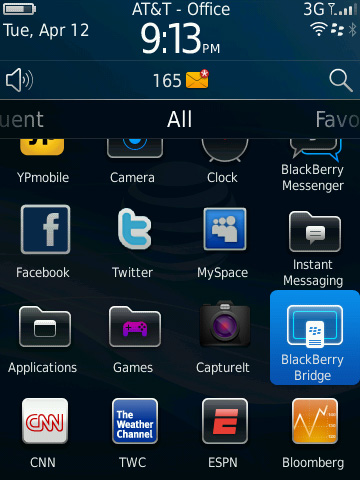
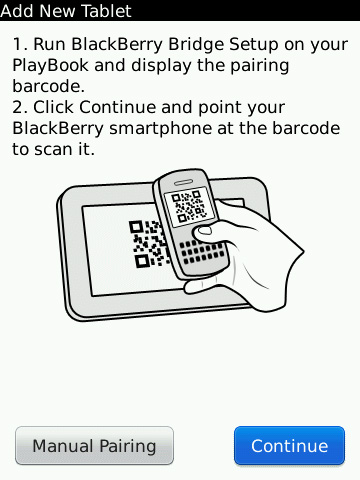
To enable BlackBerry/PlayBook interoperability you have to do two things. First, on the PlayBook, go to the BlackBerry Bridge settings page and enable the option. You'll be taken through steps to get the Bridge app onto your BlackBerry and finally pair the two devices. RIM just enabled Bridge support within the past 24 hours so the process is a bit more complicated for reviewers than it will be for customers. While an end user should be able to just scan the QR code displayed on the PlayBook with a BlackBerry, I had to login to RIM's beta site and manually download the app as well as jump through a few additional hoops.
The pairing process is pretty simple, pretty typical for a Bluetooth pair. You'll get a pin on both devices, make sure they match, hit go and you're all synced up.
Once paired, you can lock your BlackBerry and set it aside. The PlayBook now gives you full access to messages, calendar, contacts, memos, tasks and even your BIS/BES connection for browsing the web. Again, the link between the BlackBerry and PlayBook is 256-bit AES encrypted so you don't sacrifice any security in doing this.
The default PlayBook home screen has four categories for apps: All, Favorites, Media and Games. Enabling Bridge adds a fifth category: BlackBerry Bridge. All apps in this category pull their data from your BlackBerry and don't store anything on the PlayBook itself. Once you end the Bridge session, all data goes away. Even when you're using the PlayBook anything that comes from your BlackBerry is stored temporarily in memory and encrypted during its stay on the tablet. RIM's goal here is to allow the PlayBook to be introduced into a secured enterprise environment without compromising that security.
All internet/intranet data you access through a BlackBerry Bridge app goes over your BlackBerry internet connection, which means it all goes through BIS/BES and is thus fully encrypted. There's obviously a performance penalty, but if you need the added security, it's there.
BlackBerry Bridge apps are all choppier than regular PlayBook apps, something you notice even when you scroll over them in the task switcher. Scrolling over PlayBook apps is typically pretty smooth but get to the first active Bridge app and the animation frame rate drops a bit.
BlackBerry Bridge Messages
By default the PlayBook has no thick email client, something RIM will rectify this summer in an update to the PlayBook OS. BlackBerry Bridge however gives you full access to all messages received by your BlackBerry via the Messages app.
The Messages UI is pretty standard for a tablet email client. There are two columns, one for your inbox and one for the currently selected message. In portrait mode only one column is visible at a time.
You can do most of the basics from the Messages app: search, compose, delete, forward, reply, flag and move. Curiously absent is the ability to mark all items as opened like you can on a BlackBerry. You can go into multiple-selection mode just like on Android/iOS and mark items as opened that way, but there's no mark all option unfortunately.

You can send attachments via Bridge from either the PlayBook or BlackBerry, but you can't open them currently
Selecting multiple items in the Messages app is considerably slower than other aspects of the PlayBook UI. Given how fast and smooth everything else is, any sluggishness is that much more pronounced.
Calendar, Contacts, MemoPad and Tasks
The Bridge Calendar app isn't particularly beautiful, but it's functional. You can create and view appointments, which are again stored only on your BlackBerry. Unfortunately any reminders set in your calendar don't currently propagate to the PlayBook, they'll appear on your BlackBerry but not on the tablet. RIM clearly has work to do here.
The Contacts, MemoPad and Tasks apps are all self explanatory. Any data you create/access here lives solely on the BlackBerry, the PlayBook is simply a more user friendly viewport into your work world.
The notification problem exists for the Tasks app as well. You can have a reminder set for a task but you'll only be notified on your BlackBerry.
BlackBerry Bridge Browser
Remember that all Bridge apps use your BlackBerry's encrypted internet connection to get to the outside world. If you need that added layer of security for web browsing, just fire up the Bridge Browser.

The Bridge Browser app itself is just as functional as the standard PlayBook browser. You can even run the PlayBook's browser and the BlackBerry Bridge browser in parallel, using one for unencrypted web traffic and the other when you need additional security. The only difference between the two browsers is what path your packets take: WiFi or Bluetooth-to-BlackBerry-radio.
Originally published at https://www.anandtech.com/show/4266/blackberry-playbook-review (Wayback Machine).