
The Apple iPad 2 Review
The Web Browser
The iOS UI isn't the only area that doesn't get an update with the iPad 2, the core apps also remain untouched. Mobile Safari on the iPad 2 is effectively the same browser used on the iPhone 4, just on a larger screen.
Web page compatibility is generally pretty good on mobile Safari, with the obvious exception of any website that requires Flash. Apple continues its firm stance on not supporting Flash and hoping the rest of the world will convert to HTML5 or iOS apps. I'm personally not a huge fan of Flash, however I do believe the lack of Flash support is frustrating on the iPad. For most usage it's not a problem, but missing Flash is yet another reason why the iPad can't be an exclusive travel companion for me. There are still far too many niche sites out there that require the use of Flash. And if I'm in a hotel room with only iOS devices and no notebook, not having anything that can run Flash is a problem.
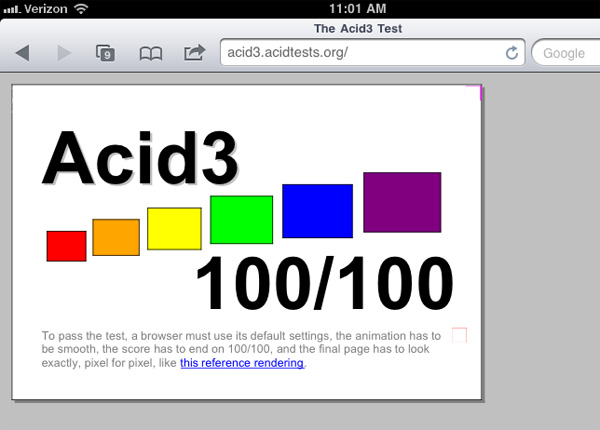
I ran two compliance tests on mobile Safari: Acid3 and the HTML5 Test. Acid3 is near perfect with the exception of an errant box in the lower right hand corner of the final test image:
 |
 |
 |
 |
 |
 |
In practice I have noticed more rendering errors and browser issues in Honeycomb than I have under iOS 4.3. There's one particularly nasty Honeycomb bug that I've encountered several times that prevents web pages from loading entirely until you kill the Browser process and restart it.
In iOS 4.3 Apple increased the performance of its JavaScript execution engine significantly. The result is pretty astounding. According to SunSpider the iPad 2 is now slightly faster than the Motorola Xoom, however BrowserMark puts the Xoom well ahead of the iPad 2. Google is extremely adept (and aggressive) at optimizing browser performance, this is one area where I'm not entirely sure how well Apple will be able to keep up in the long run.
JavaScript execution is only one aspect of the total performance equation however. Scrolling smoothness has been a staple of iOS and the iPad 2 does not disappoint here at all. Google made huge improvements in going to Honeycomb, but browsing in iOS is still smoother on the iPad 2.
Web page loading performance also proves to be quicker on the iPad 2, although given Google's advantages in BrowserMark it's clear that this won't be the case for all web pages.
Performance isn't everything when it comes to web browsing, and one area where Google maintains a significant advantage is in its support for tabbed browsing. Mobile Safari still requires that you tap once to bring up an array of browser windows and then once more to select the window you want to view. Apple limits you to a total of 9 browser windows.
The web browser in Honeycomb on the other hand implements tabs just like a desktop browser. Tabbed browsing has a profuse impact on usability, not unlike what we saw on the desktop (when was the last time you used a browser without support for tabs?). The fact that Apple still hasn't implemented tabbed browsing on the iPad is unacceptable.
Apple handles all memory management within mobile Safari for you, so if you happen to leave too many windows open and the iPad runs out of memory iOS will simply evict some of those web pages out of main memory. On the iPad 1 this was more of a pain as it only had 256MB of memory and a 1GHz Cortex A8 CPU, web pages were evicted more frequently and took longer to load when you went back to them. The iPad 2 doubles memory size to 512MB and loads web pages around 50% faster than the original iPad - making the experience much better overall.
Originally published at https://www.anandtech.com/show/4225/the-ipad-2-review (Wayback Machine).