
The MacBook Pro Review (13 & 15-inch): 2011 Brings Sandy Bridge
Thermals and Power Consumption
The new MacBook Pros have the potential to draw more power than the previous generation. Despite being built on a 32nm process, the new 15 has twice the cores of last year's model—there's no question that it can draw more power under a full load.
I measured maximum power consumption at the wall using the same power brick and a fully charged battery. I chose two high-load scenarios: Cinebench 11.5 and Half Life 2. The former will fully load all CPU cores while the latter ramps up CPU and GPU usage.
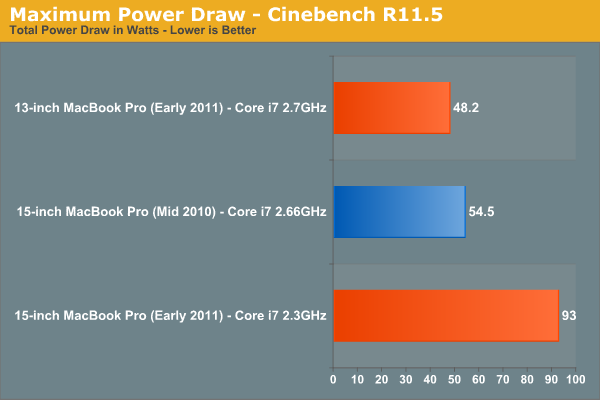
Under Cinebench the new quad-core 15-inch MacBook Pro draws 70% more power at the wall than last year's dual-core model. This shouldn't be surprising as Cinebench scales nearly perfectly with core count—twice the cores should result in nearly twice the power draw. The scaling isn't perfect since we are dealing with different architectures and a number of factors such as display remain static. The new 13-inch MacBook Pro isn't as worrisome, it has 88% of the power usage of the high end 2010 15-inch MBP and 81% of the battery capacity.
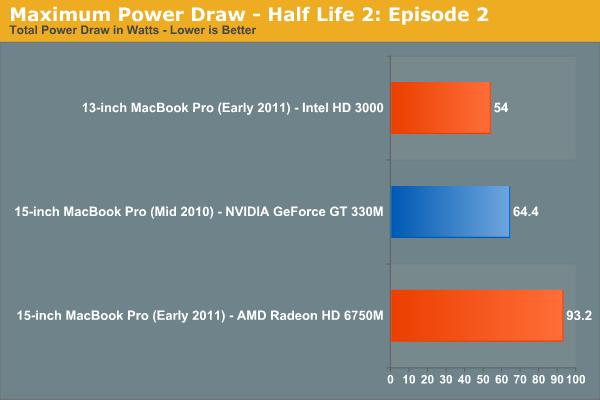
The Half Life 2 comparison is not quite as bad, although the new 15-inch MBP still uses 45% more power under full load compared to the previous generation. These numbers tell you one thing: although the new MBP is significantly faster than its predecessor, it can also draw significantly more power. Running the same workload the new MBP shouldn't have any problems lasting as long as the old MBP on battery, but running a more aggressive workload will result in shorter battery life as a result of the higher max power consumption. In other words if you use the higher performance to do more, you can expect your battery to last proportionally less than the 2010 MBP.
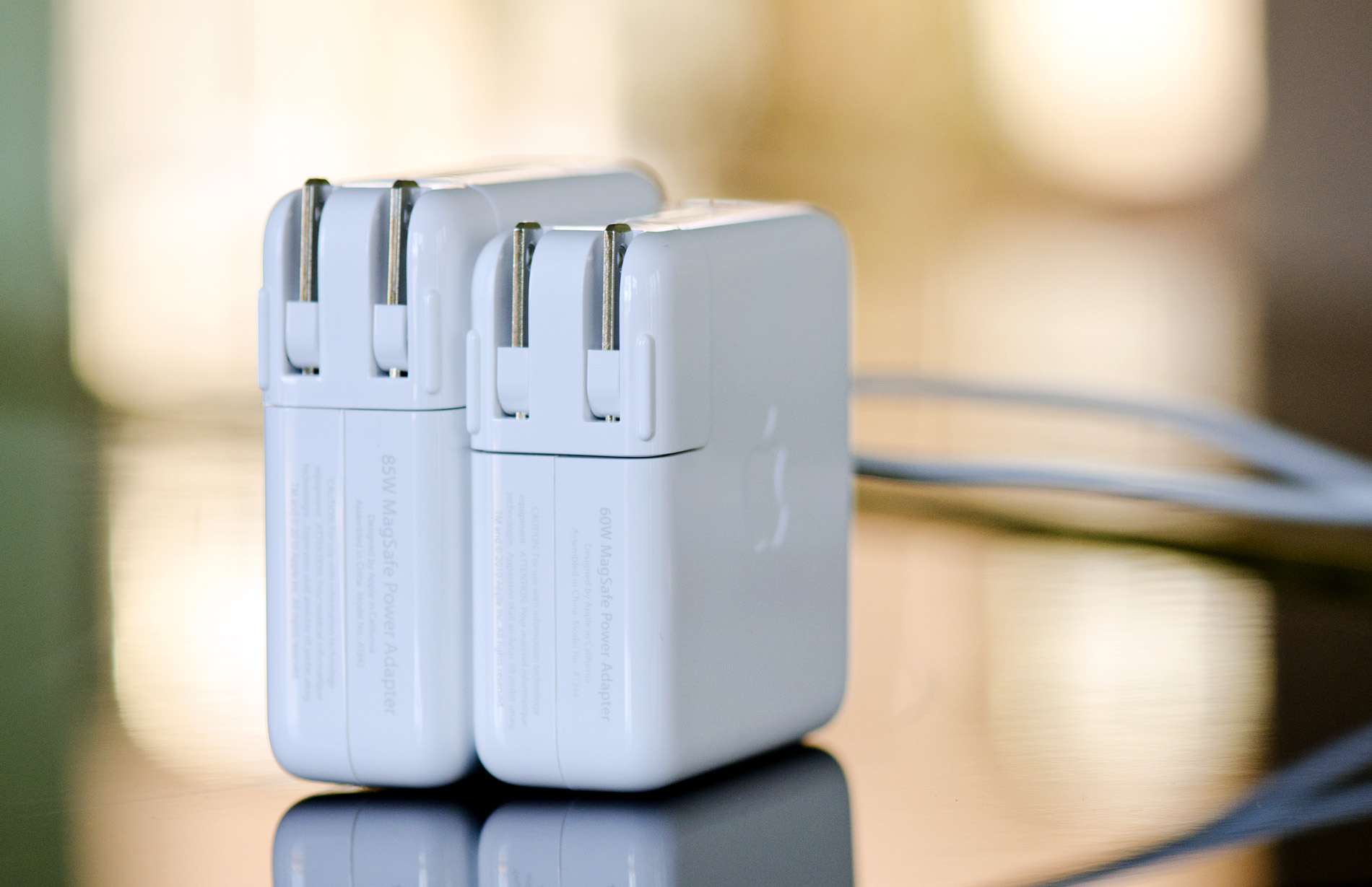
The 15-inch MBP uses an 85W power adapter (left) and the 13-inch MBP uses a 60W adapter (right)
Drawing more power also has another unfortunate side effect: the bottom of the chassis gets even hotter than before. I took some crude temperature measurements when I did the 2010 MacBook Pro reviews last year. I pointed an IR thermometer at the center of the bottom of the notebook, right where you'd have your lap, and measured surface temperature in a couple of scenarios.
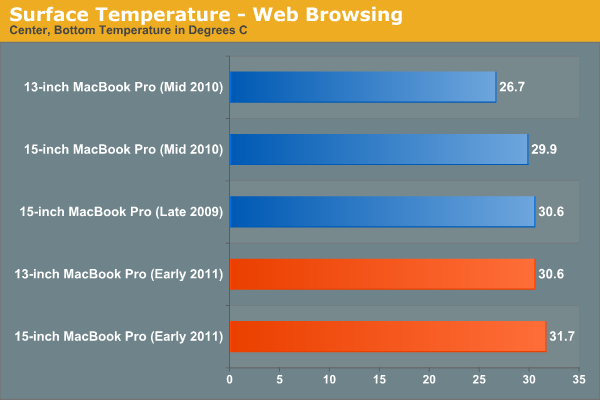
While browsing the web with tons of windows/tabs open I noticed a small but tangible increase in surface temperature of the 2011 15-inch MBP compared to the 2010 model. Even the new 13 is warmer than last year's 15. Under light workloads none of these temperatures are high enough to really be a problem.
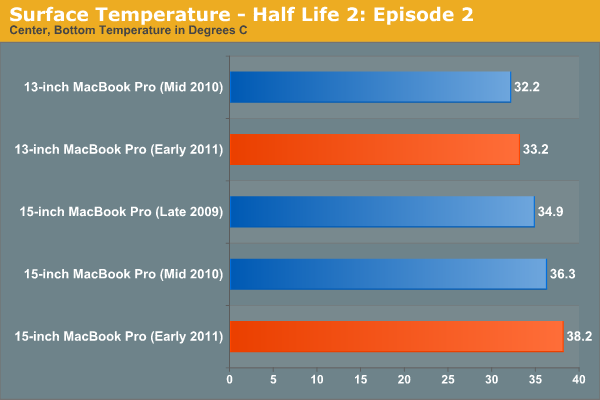
Load up the system however and you start getting into the uncomfortable zone. The new 15 breaks 38C, while the new 13 is actually only marginally warmer than the old 13 thanks to the use of Intel's HD Graphics 3000.
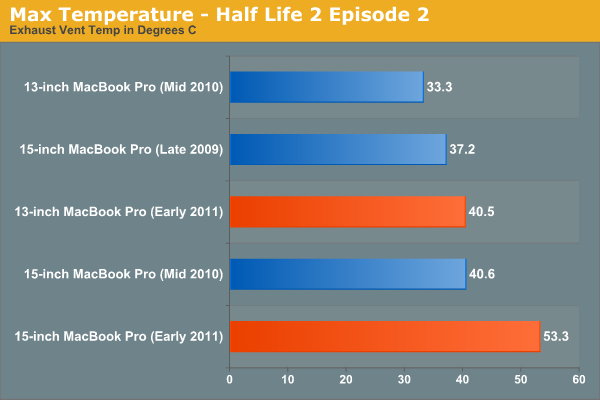
The biggest difference I noticed was the max temperature near the exhaust fan(s) on the notebooks. The new 15 is a whole 13C warmer than last year's model.
There's no way to get around it—if you're going to be using these systems to anywhere near their potential, they are going to get significantly warmer than last year's. Also, as a result, the new systems are noisier. Fans are more likely to spin up and given how small they are, they are quite audible. If this is a deal breaker for you, the best advice I can give you is to wait for Ivy Bridge.
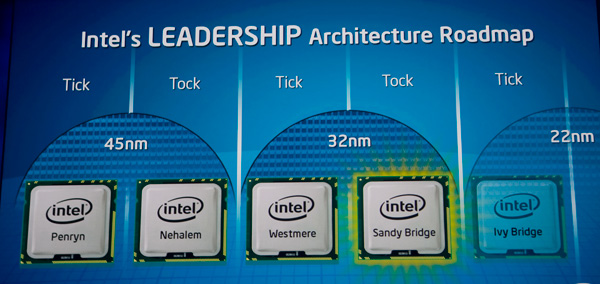
Ivy Bridge will bring mild updates to the Sandy Bridge architecture, an increase in performance but more importantly it'll bring Intel's 22nm process. At 22nm I'd expect somewhat lower power usage than what we're seeing here today. Ivy Bridge is expected to ship in the first half of 2012, with updated MacBook Pros arriving ~2 months post introduction.
Originally published at https://www.anandtech.com/show/4205/the-macbook-pro-review-13-and-15-inch-2011-brings-sandy-bridge (Wayback Machine).