
NEC PA301w: The Baddest 30-inch Display Around
Brightness and Contrast
For brightness, black level, and contrast points, we use the same colorimeter setup described earlier. Specifically, we use an Xrite i1D2 with ColorEyes Display Pro, and take measurements at maximum and minimum brightness of white and black targets. Dynamic contrast is turned off. We also let the panels settle in for a half hour at the respective settings before taking any measurements.
The PA301w uses a CCFL backlight, which makes that warm up time even more critical. The PA301w has an interesting quick warmup feature that reduces the visible brightness increase period dramatically. At power on, I measured brightness go from 160 nits (with the OSD showing 200 nits, blinking) to 210 nits in under one minute, then gradually settle to the desired 200 nits. There's a bit of overshoot, but the visual difference is hard if not impossible to actually pick out. For the sake of these tests, I waited for things to settle, but it's actually impressive how fast the PA301w can warm up to totally useable brightness levels.
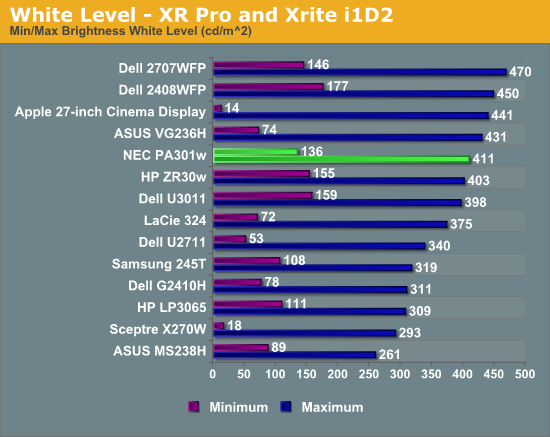
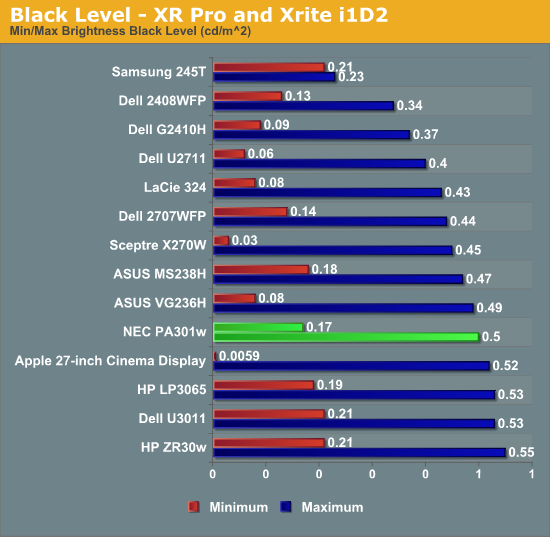
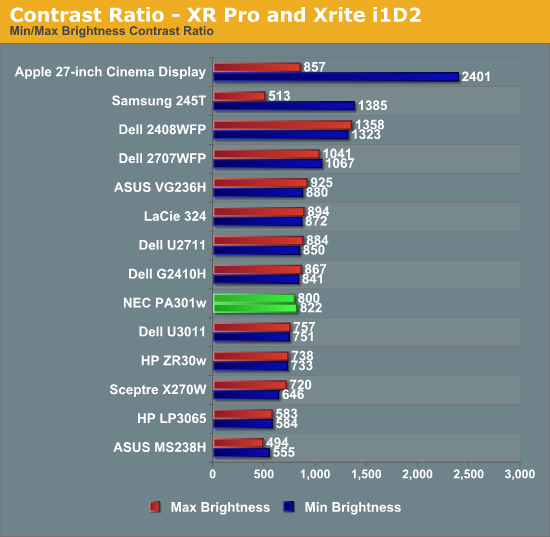
Brightness settings in the OSD follow the same rules as color ones - if you select something impossible, the last changed value will show up pink, meaning it's outside of the monitor's capabilities. The same thing applies for brightness. I had no problem reaching 411 nits of brightness after getting that worked out - it's a similar thing I've seen on all other displays, sometimes you need to change contrast or color adjustment settings appropriately. Regardless, the PA301w went above the specified 350 nits of brightness, reaching 411. Contrast isn't quite the 1000:1 advertised typical, instead hovering around 800:1 pretty consistently.
Originally published at https://www.anandtech.com/show/4196/nec-pa301w-review-the-baddest-30-inch-display (Wayback Machine).