
HP dm1z: Taking Fusion on the Road
Battery Life
The big news with Brazos, and by extension the HP dm1z, is the substantially improved battery life over Nile. While performance is nowhere near a strict win over that platform (Atom on the other hand...), power efficiency absolutely is. Take a look at this.
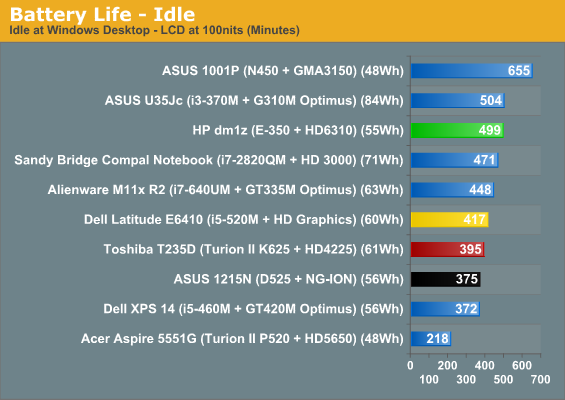
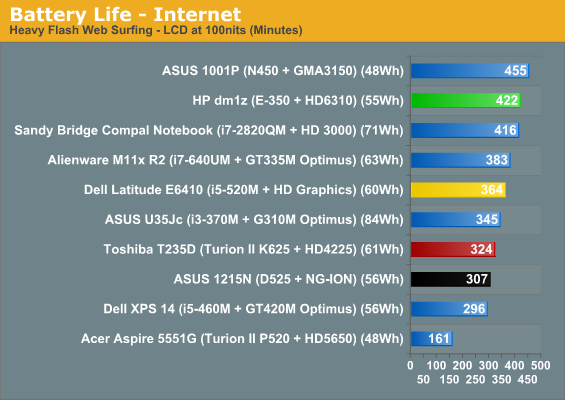
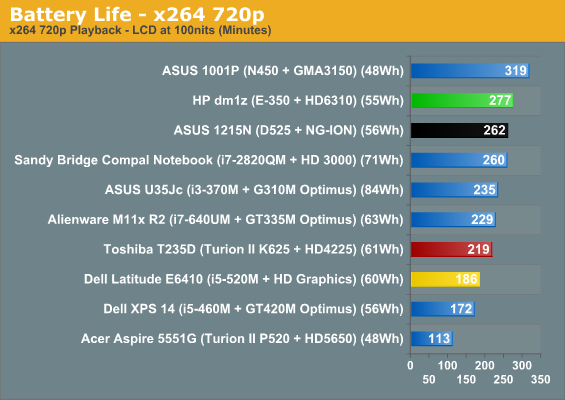
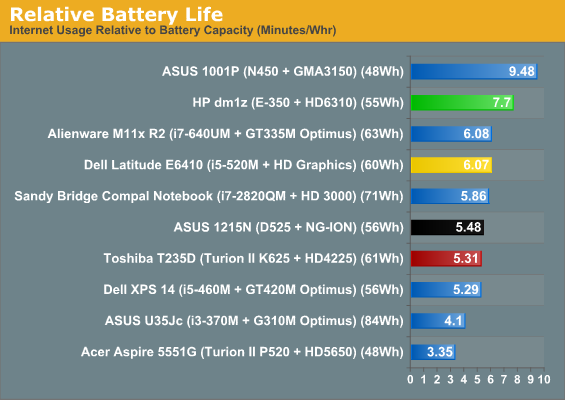
While portable gamers are probably still going to want to hang with Alienware's M11x, Brazos basically tells Intel's dual-core Atom to pound sand. The dm1z doesn't hit the battery life HP advertises (9.5 hours is pretty optimistic, probably only possible with wireless and Bluetooth disabled and the screen at the lowest brightness), but it still pulls more than seven hours of useful running time with a reasonable screen brightness and runs roughshod over Nile.
Heat and Noise
Unfortunately, where things get a little dicey (at least with the HP dm1z) is noise. First, the good news: heat output.
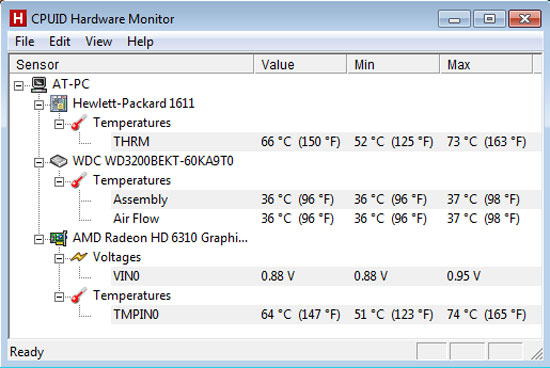
The internal components run at fairly reasonable temperatures, if a little on the high side, but fortunately those temperatures don't translate into an uncomfortable user experience. Quite the opposite in fact: the dm1z can happily be used on your lap without scalding you.
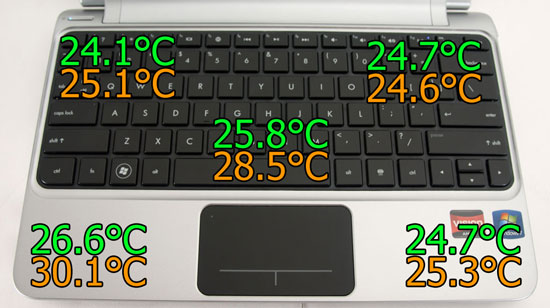
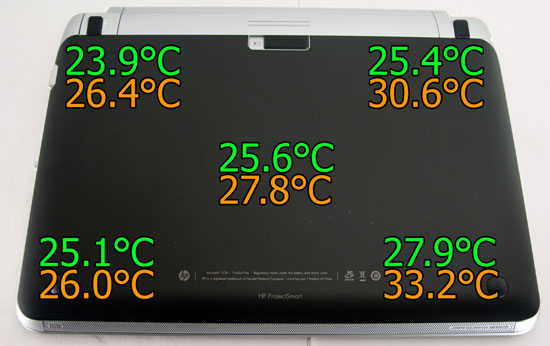
At idle the HP dm1z remains nice and frosty, and under sustained load the outside temperatures don't increase enough to make using the dm1z uncomfortable. But remember what I said about noise?
Part of the reason the dm1z is able to stay so comfortable is because the fan is almost constantly running. It's fairly low and not too obtrusive, but I have an AMD-based 15.6" Sony notebook on hand for review that runs quieter than the dm1z does at both idle and load. That may not be entirely fair because the 15.6" machine has more breathing room in the larger chassis, but it's nonetheless an issue. The fan in the dm1z doesn't spin up that much under heavy load, which would be more appreciated if HP was able to tune it to run just a little quieter at idle. This isn't make-or-break noise, but it's worth bringing up.
Update: Several of our readers pointed out that the HP dm1z has a utility called CoolSense as part of the HP Support Tools. It's supposed to allow some customization fan speeds to allow users to configure their laptop to prefer lower temperatures/higher noise, or lower noise/higher temperatures. As a matter of course we disable most of the manufacturer utilities to allow for optimal battery life results, so the above remarks reflect using the laptop without CoolSense enabled. Unfortunately, the dm1z has already been returned, so we are unable to run updated results. Anecdotally, noise is much better with CoolSense enabled.
Originally published at https://www.anandtech.com/show/4187/hp-dm1z-taking-fusion-on-the-road (Wayback Machine).