
HP dm1z: Taking Fusion on the Road
The Swankiest Netbook You Ever Did See
First we should make one thing clear: the HP dm1z is basically small enough and slow enough to be considered a netbook, with most of the good and bad connotations that term brings with it. With that in mind, the dm1z is a remarkably attractive piece of kit and as you'll see, in many ways it feels like the netbook finally arriving at about the form factor and performance level it always needed to be at.
The lid of the dm1z is a textured black plastic that is a healthy stride away from the glossy plastic hell that used to plague HP's older models; it's attractive and doesn't easily pick up fingerprints and smudges, and the HP logo is nice and subdued in the lower corner. There's a silver trim that extends around the lid and into the body.


When you pop open the dm1z, you'll see that trim matched with silver matte plastics on the screen bezel and tastefully framing the keyboard and touchpad. HP has made some really great strides as of late in improving the looks of their notebooks, and the dm1z continues that trend. The silver plastic is used for the interior surface along with the battery and rim of the system and is complemented by sparse usage of white LED indicator lights.
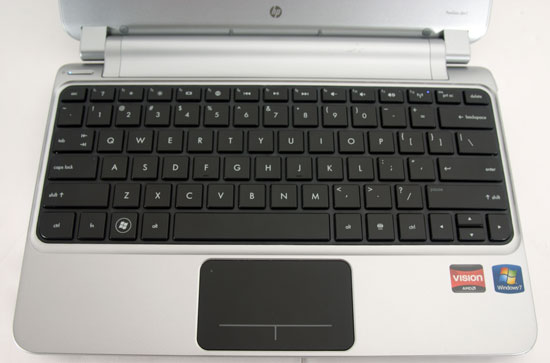
HP has been pushing a standardized chiclet-style keyboard across all of their lines at this point, and it suits the dm1z. The 11.6" form factor allows HP to squeeze a comfortable full-sized keyboard into the unit, too, with the document navigation keys helpfully and logically mapped to Fn+arrow key combinations. The keys aren't marked that way, but it's easy enough to figure out. There's no number lock either, but I've never found the 10-key wrangled onto the main keyboard to be particularly useful. The only complaints about the keyboard are minor ones: HP, like Dell, opts to default the function keys to controls and shortcuts (though this can be toggled in the UEFI), and the left and right arrow keys are basically double-sized compared to the up and down arrows. On the whole, though, this is a solid netbook keyboard that most people should be very comfortable with.
The touchpad is more of a mixed bag, but kudos to HP for actually using a separate piece of plastic for it instead of just building the sensor into the inside panel. Of course, there's a reason for that: HP is using the same clickpad that's dogged their mainstream notebooks over the past year. To be fair the HP implementation is among the better ones used for Windows-based systems, it's multitouch capable, and the tracking surface is comfortable, but we would still rather see dedicated buttons on future refreshes. If you're using an external mouse or keep brushing the touchpad (not a problem I had in testing it), you can actually double-tap the top left corner of the touchpad with your finger to disable it; a pinpoint orange LED will glow when the touchpad is disabled.
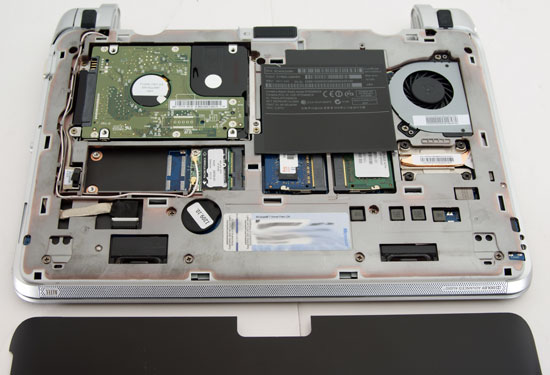
One of my favorite features of the dm1z is actually on the bottom. HP has gone a long way towards simplifying user upgrades by simply putting one large, screwless panel on the bottom of the unit. The panel simply snaps on and off and feels both sturdy and user-friendly while also making the dm1z as a whole more attractive by hiding serial numbers and the Windows key. As you can see, everything you'd want to upgrade is easily accessible.
Taken as a whole I'll admit to being fairly smitten by the dm1z's design. It's remarkably well streamlined and clearly designed to improve the user experience while avoiding looking too chintzy or cheap. This is definitely one of the best-looking netbooks I've ever seen and it feels very solid.
Originally published at https://www.anandtech.com/show/4187/hp-dm1z-taking-fusion-on-the-road (Wayback Machine).