
Puget Systems Serenity SPCR Edition: Blissful Silence
Build, Noise, Heat, and Power Consumption
Given the somewhat exotic nature of Puget Systems's Serenity SPCR Edition tower, it's reasonable to assume that there just aren't any good corners to cut. I'm happy to report that, having examined the system, Puget Systems simply couldn't and didn't.
What makes the build particularly interesting compared to the others is that, as I mentioned in the introduction, this really is a custom build, not just a melange of carefully chosen and assembled parts. Take a look inside and see what I mean.
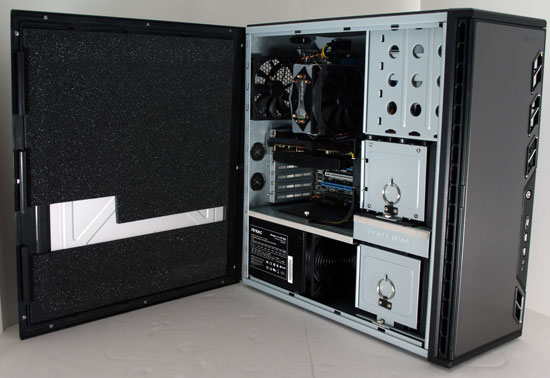
Seeing the additional foam padding on the inside of the side panel when I had to remove the internal packing was a major cue, and the foam has been carefully cut to fit around the internals of the Antec P183 case used for the build. From the photo you can see three major points in Puget Systems's favor: quality case, quality power supply, and additional custom sound dampening. What's harder to see is that Puget Systems removed the Antec Tricool fans from the case and replaced them with silent Scythe 120mm fans. They've also bracketed an additional fan to the top hard drive tray, and they've removed the top exhaust fan and covered the vent with foam.


Another interesting point is the use of an air cooler instead of a watercooling system on the processor. I've reviewed more desktops with watercoolers than not and they're generally considered among the quietest ways to go, but here Puget Systems opts to use an air cooler—the Gelid Tranquilo—with a silent fan. They also carefully tuned the fan speeds in the ASUS board's UEFI to ensure silent running.
Certainly building the entire system for low noise is going to mean running a little hotter than normal, though, right? Interestingly, that's not the case.
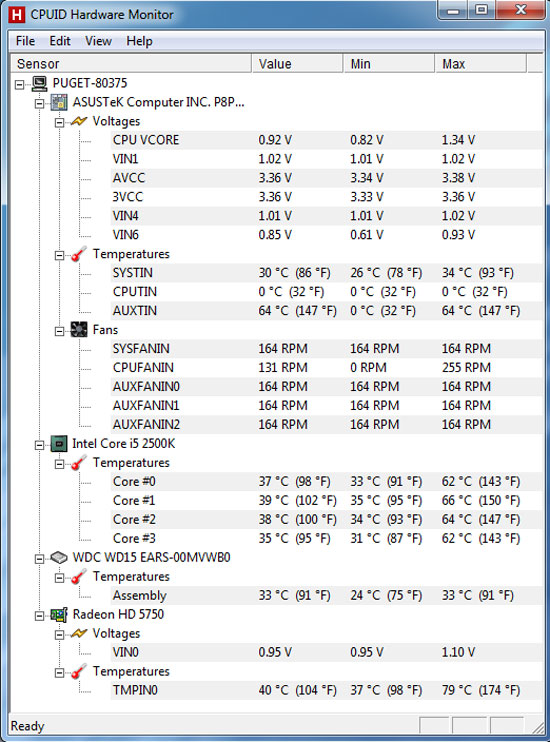
Check out those thermals. The Serenity SPCR Edition keeps everything running remarkably frosty, and that's due in no small part to the attention paid to airflow inside the case. The P183 was already an excellent case with great thermals (we actually have a review unit on hand and we'll be posting a case review in the coming months), but the modified cooling produces airflow moving in effectively a straight line through the tower with minimal turbulence, allowing the fans to run at low speeds without compromising thermal performance. Even the Radeon doesn't crack 80C.
With those temperatures and the system's configuration in mind, these power consumption figures should come as no surprise to you:
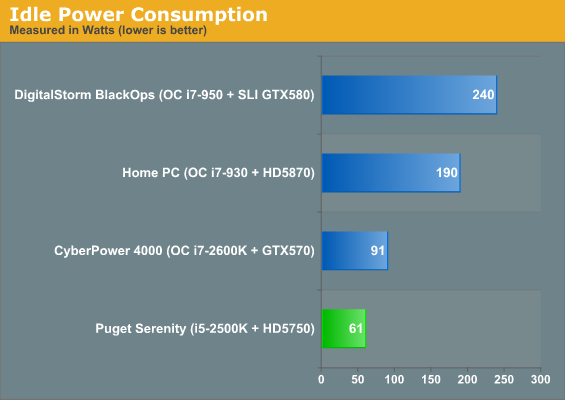
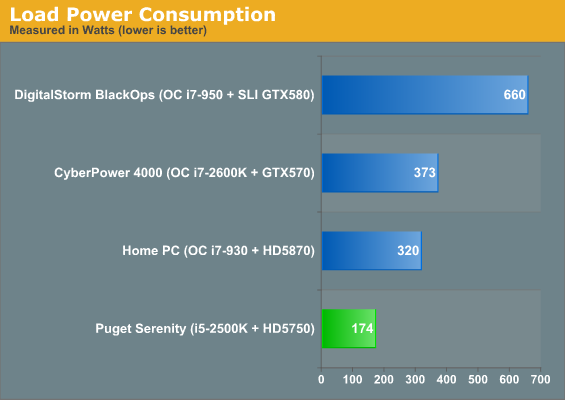
We tested power consumption by idling at the desktop, and then running our Left 4 Dead 2 timedemo. In my experience, very few games are capable of pulling as much power from a system as Left 4 Dead 2 can. Something about the Source engine's relatively frugal usage of graphics hardware lets the processor and video power consumption scale well together.
Under load, Puget Systems's Serenity SPCR Edition draws less power than my fairly frugal desktop does at idle. Sandy Bridge has proven to be stunningly power efficient in the testing we've been able to do (we really can't wait to get our hands on more Sandy Bridge-equipped notebooks), and combining that with the already efficient Radeon HD 5750 keeps power consumption low. The next system up on the list—my home tower—draws nearly twice as much power under load. That increase in power draw may be commensurate with the increase in gaming performance, but keep in mind the i5-2500K is able to handle processor-intensive tasks much more efficiently than the i7-930.
Originally published at https://www.anandtech.com/show/4155/puget-systems-serenity-spcr-edition (Wayback Machine).