
Welcome to Sandy Bridge, with the ASRock P67 Extreme4
- Posted in
- Motherboards
- ASRock
Overclocking
Overclocking on Sandy Bridge is significantly easier than on previous platforms. With only the multiplier to play with, it is a case of finding the correct balance of multiplier and voltage.
Using the AXTU software bundled with the motherboard, I simply pushed the multiplier up to 44x (4.4GHz) without any issues. At this speed, the CPU would declock to 4.0GHz when OCCT was running, indicating that we were hitting the power draw limit automatically determined by the motherboard. On 4.5GHz, the system would BSOD when starting the OCCT stress tool, indicating that not enough voltage was being supplied to the processor.
In the UEFI, due to the auto overclocking settings offered, I set the system to boot at 4.6GHz. In the OS, this set a voltage of 1.378V, and ran an OCCT stress test fine, showing a maximum temperature of 70ºC (Idle 37ºC). At the 4.8GHz setting, we got 1.49V through the processor, but a failed OCCT stress test. On the next boot, I had to reset the UEFI to get it to stay stable while changing settings.
In my wisdom, and by delving into the UEFI settings, I ventured forth to manipulate the multiplier and voltages personally. I booted into Win7 with 4.5GHz, 1.4V on VCore and 1.9V on CPU PLL (for some headroom), and turned off Load Line Calibration. However, the OCCT stress test also resulted in the CPU declocking automatically. In order to get this to stop, I had to turn on Intel SpeedStep, and increase the Long Duration Power Limit from 95W to 110W. With this, I hit 4.6GHz and 4.7GHz (hitting 73 ºC, and reducing to 4.6GHz so I increased the power to 120W). For 4.8GHz, I pushed VCore to 1.45V, and the power limits to 150W (short) and 130W (long)—this gave a stable OCCT at 80ºC but would randomly BSOD. At these settings, 4.9GHz would not boot into the OS, and I was not willing to push them further.
4.6GHz using the UEFI settings seems like the best bet for any user wanting a simple 24/7 overclock. The 3D Movement multithreaded benchmark rose from a stock score of 341.74 to 451.84.
Power Consumption and CPU Temperatures
Power consumption was tested on the system as a whole with a wall meter connected to the power supply, using a dual GPU configuration. This method allows us to compare the power management of the UEFI and the board to supply components with power under load, and includes typical PSU losses due to efficiency. These are the real world values that consumers may expect from a typical system (minus the monitor) using this motherboard.
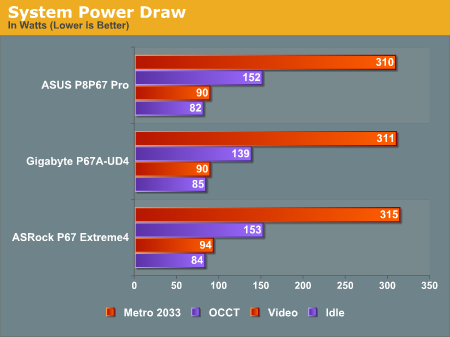
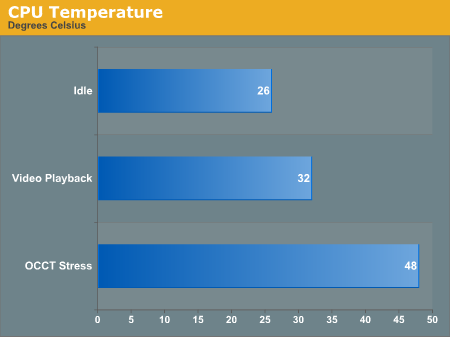
The Extreme4 doesn't do too badly in power consumption readings compared to the other boards. It ends up slighly higher under heavy loads, but the differences are small enough that we can't see power requirements being a selling point one way or another yet.
Originally published at https://www.anandtech.com/show/4080/welcome-to-sandy-bridge-with-the-asrock-p67-extreme4 (Wayback Machine).