
ASUS N53JF: Midrange 15.6” 1080p, Take Four
ASUS N53JF Battery Life: Not Bad for 48Wh, but Please Give Us 63Wh!
We’ve complained about the use of older and smaller 48Wh batteries in midrange notebooks quite a few times, but the N53JF continues that trend. That puts it at a definite disadvantage relative to Dell XPS’ 56Wh battery, as well as Compal’s 58Wh and Clevo’s 62Wh offerings. But higher capacity isn’t the only game in town; making better use of that capacity is still possible with BIOS and hardware optimizations, and ASUS does very well in this regard. Combined with NVIDIA’s Optimus Technology, we end up with roughly four hours of useful battery life, or just under 2.5 hours of H.264 playback.
ASUS also has their “Super Hybrid Engine” available, which underclocks the CPU and locks the maximum multiplier when enabled. We test with modified Power Saver settings normally, which already locks the CPU multiplier to the minimum, but SHE is still able to wring an extra few minutes out of the battery. We left it enabled for the battery life testing, so the results are the best-case scenario. We also disable any unnecessary utilities and software, and set the LCD to 100nits (45% in this case).
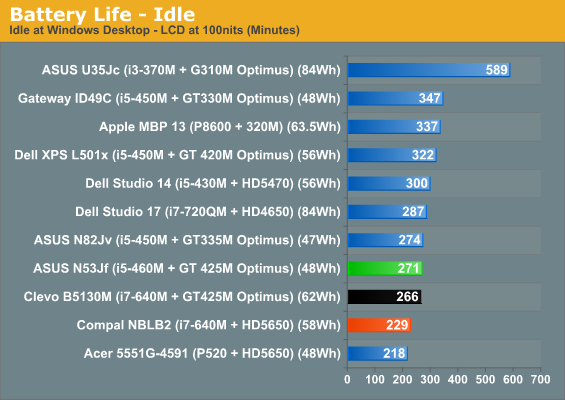
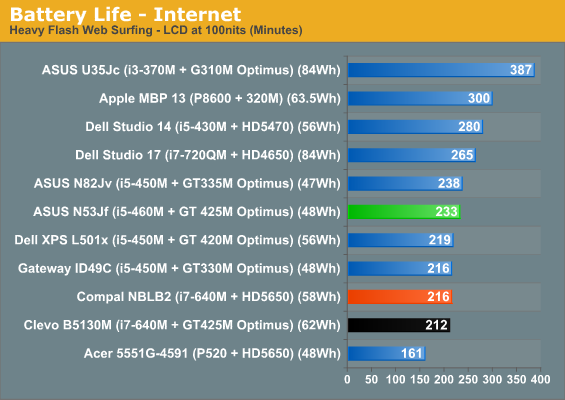
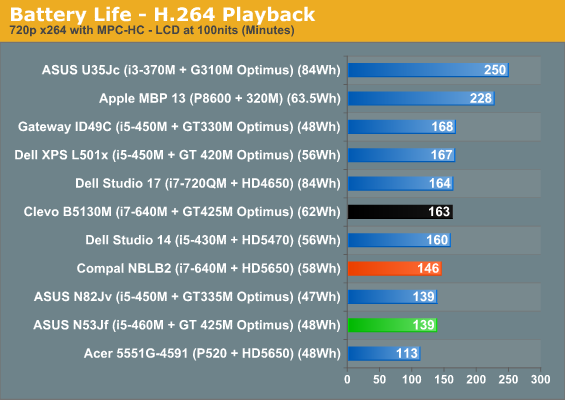
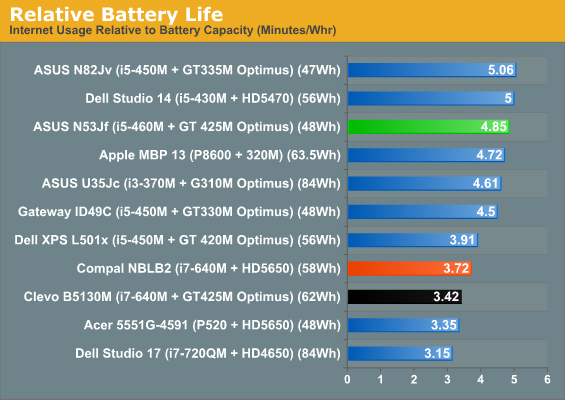
Despite having a smaller battery, ASUS beats the Clevo notebook in two of the three tests. The Compal result on the other hand isn’t so surprising, given the always-on GPU. We commented in the past that the Dell XPS had a substandard Internet result (despite multiple test runs), and that shows up again as the one inexplicable loss to the ASUS. In general, though, battery life is decent and enough for typical users. You’ll still want the power brick handy if you play any games or want to watch a Blu-ray from an actual disc, however—we measured just 90 minutes playing an 35Mbps AVC Blu-ray video (Jumper).
Originally published at https://www.anandtech.com/show/4075/asus-n53jf-midrange-156-1080p-take-four (Wayback Machine).