
SilverStone GD04 HTPC Case: Cool, Not Quiet
In and Around the GD04
A jaunt around the GD04 reveals a case that at least appears to be well-suited to its task. Most of the case is constructed with steel, but the front bezel is an attractive brushed aluminum and again, the case comes in silver or black depending on your taste. Personally, I think black goes with everything.


The front bezel is nice and spare, featuring the two USB ports, microphone and headphone jacks, the power and reset buttons, a power LED, the optical drive bay, and a SilverStone logo. There's a lot of negative space here and it's appreciated; the GD04 is going to look like it belongs in your home theater setup. When you look at the sides, you'll see the three 120mm intake fans: one on the left, two on the right. This is a positive pressure case, designed to bring in air through the sides then push it out through ventilation in the top and the back. There's also a vent on the bottom of the case, beneath where the power supply's intake fan would typically be, that stays unobstructed as a result of the reasonably tall standoffs.
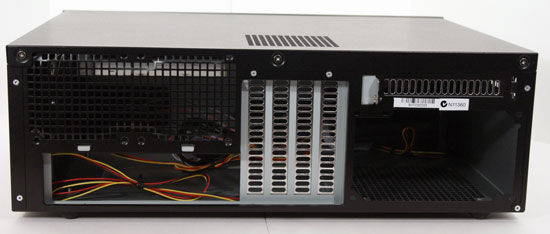
The rear of the case features four expansion slots, the power supply bay, and a fifth expansion slot above it presumably meant for extra USB ports or an eSATA bracket. There's also ventilation above the port cluster that could support additional cooling, if you wanted to add a couple 80mm fans.


Assembly of the GD04 is done by removing the top panel and it's here that you first realize this is not going to be a tool-less affair: the panel is fastened with three Philips head screws, and these are only the first of many you'll need to use when you start putting your HTPC together in this case.
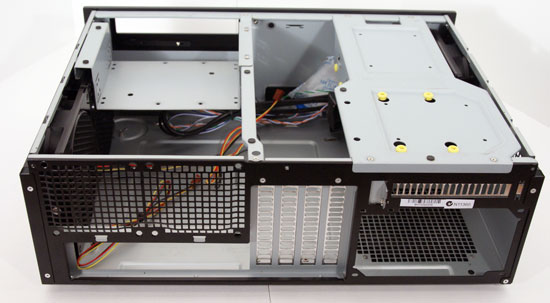
Once you get the top off, there are three additional pieces that can be and in fact need to be removed: the optical drive tray, the hard disk drive mount, and the crossbar. Removing all of these parts requires a grand total of ten screws, and you'll want to keep those in a safe place. That said, the inside of the GD04 is actually remarkably spacious, but people with long power supplies should be forewarned: something as long as the spare Corsair HX750 I had won't fit, as trying to install it results in it butting squarely up against the intake fan on the left side.
What's also worth noting is the low clearance beneath the optical drive tray. While stock coolers for most AMD processors will work fine, the Zalman CNPS7000 cooler I'm using in my build is only a few millimeters from scraping the bottom of the tray. You're going to want to use either the stock or a low profile cooler like a Scythe Shuriken (or, if you don't mind the scant clearance, the Zalman CNPS7000) when assembling a machine in the GD04.
Originally published at https://www.anandtech.com/show/4072/silverstone-gd04-htpc-case-cool-not-quiet (Wayback Machine).